index
RS485 Transparent Transmission allows supported WisNode Bridge devices to forward raw RS485 data over LoRaWAN® without application-layer parsing or conversion.
This is useful when the application server needs to process the original RS485 or Modbus data directly, or when the connected device uses a protocol that should remain unchanged during transmission.
The feature supports two transparent transmission modes:
- Polling Transparent Mode: The Bridge device actively polls RS485 devices according to configured polling tasks and forwards the returned raw Modbus data without parsing.
- Passive Transparent Mode: The Bridge device does not initiate Modbus polling. It forwards received RS485 data directly over LoRaWAN and forwards LoRaWAN downlink data directly to the RS485 interface.
Supported Devices
The following devices support RS485 Transparent Transmission:
| Device | Polling Transparent Mode | Passive Transparent Mode |
|---|---|---|
| RAK2461 WisNode Bridge IO Lite | Supported | Supported |
| RAK2470 WisNode Bridge Serial Prime | Supported | Supported |
Product-specific interface behavior may vary. Refer to the corresponding product documentation for hardware interfaces and other functions available on your device.
Transmission Mode Overview
The RS485 Transmission Mode determines how received RS485 data is processed before it is sent over LoRaWAN.
| Mode | Polling Task | Data Parsing | LoRaWAN Uplink |
|---|---|---|---|
| Parsing Mode | Required | Yes | Parsed structured data |
| Polling Transparent Mode | Required | No | Raw Modbus response data |
| Passive Transparent Mode | Not required | No | Raw RS485 data |
Use:
- Parsing Mode when the Bridge device should parse Modbus responses and convert them into structured LoRaWAN payloads.
- Polling Transparent Mode when the Bridge device should actively query RS485 devices but the application server needs the original response data.
- Passive Transparent Mode when the Bridge device should act as a bidirectional transparent bridge without Modbus polling.
Only one RS485 transmission mode can operate at a time.
Polling Transparent Mode
Configure Polling Transparent Mode
- In IO.Box, go to RS485.
- Configure the RS485 communication parameters to match the connected device.
- Set Transmission Mode to Polling Transparent Mode.
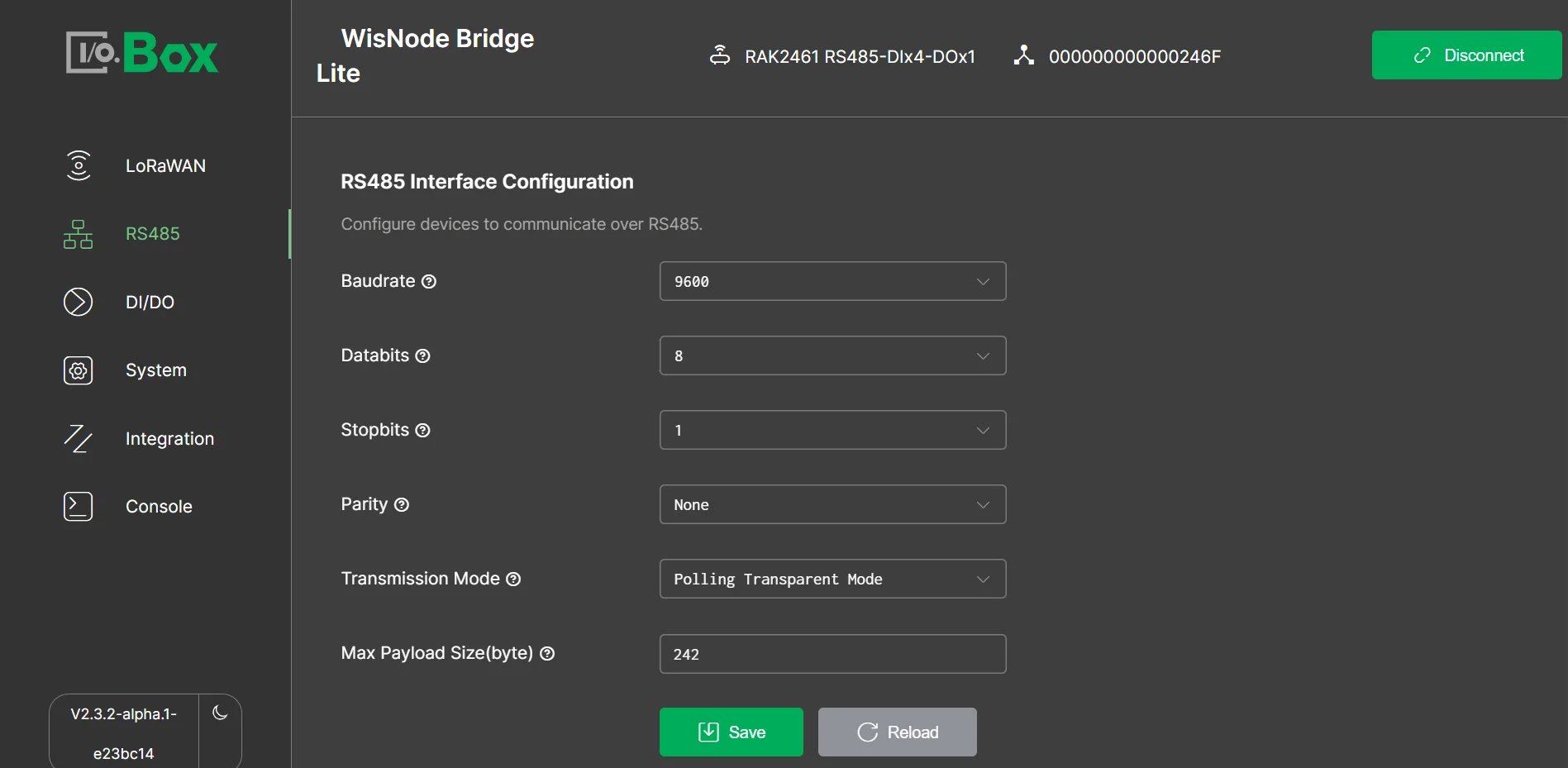 Figure 1: Polling TransparentNOTE
The Max Payload Size is determined automatically according to the configured LoRaWAN region and DataRate.
- Create the required Modbus Polling Tasks according to the RS485 device specification.
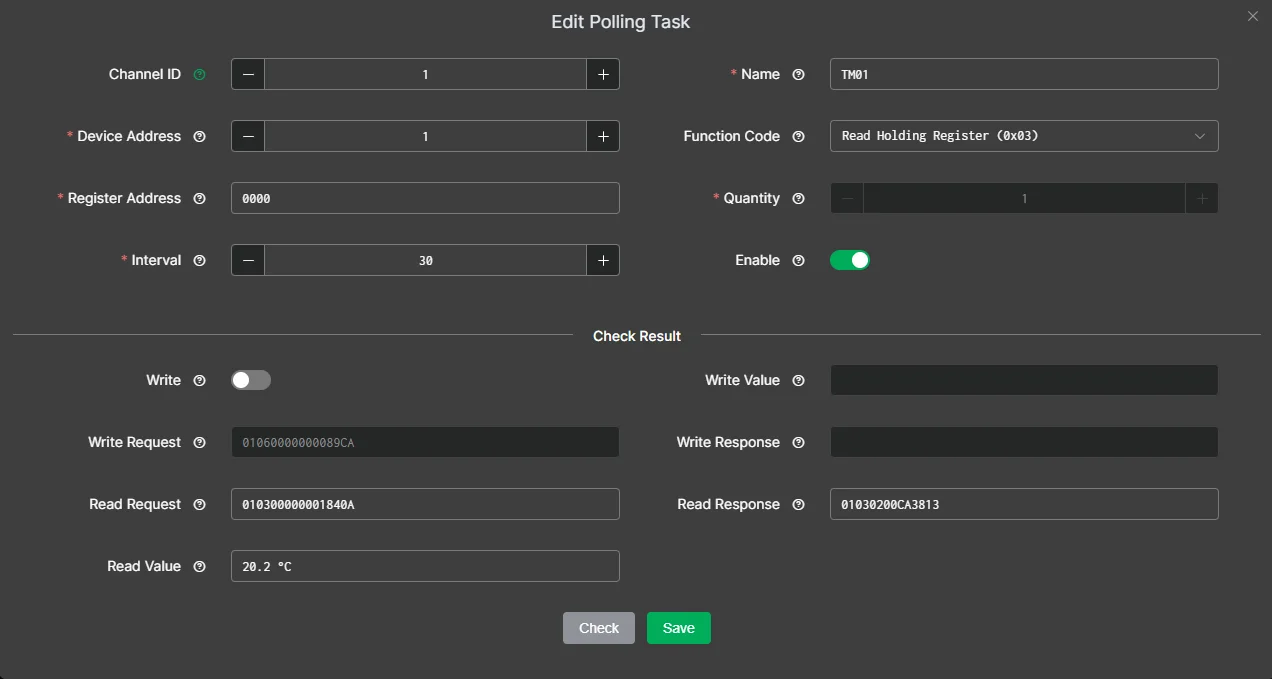 Figure 1: Polling Task
 - Use Check to validate communication with the connected device.
- Save the polling task when the returned data is correct.
Uplink Behavior
For each polling task, the Bridge device:
- Sends the configured Modbus request to the RS485 device.
- Receives the Modbus response.
- Forwards the raw response data over LoRaWAN without converting it into structured sensor values.
Downlink Behavior
Polling Transparent Mode also supports sending a Modbus request from the LoRaWAN Network Server to the connected RS485 device.
Use FPort 130 for Polling Transparent Mode downlink data.
The downlink payload should contain the Modbus command without the CRC. The Bridge device automatically appends the Modbus CRC before transmitting the request through the RS485 interface.
For example, to read one holding register starting from register address 0x0000 on Modbus device address 0x01, send:
01 03 00 00 00 01
The payload contains:
01: Modbus device address03: Read Holding Registers00 00: Starting register address00 01: Number of registers to read
Passive Transparent Mode
Configure Passive Transparent Mode
- In IO.Box, go to RS485.
- Set Transmission Mode to Passive Transparent Mode.
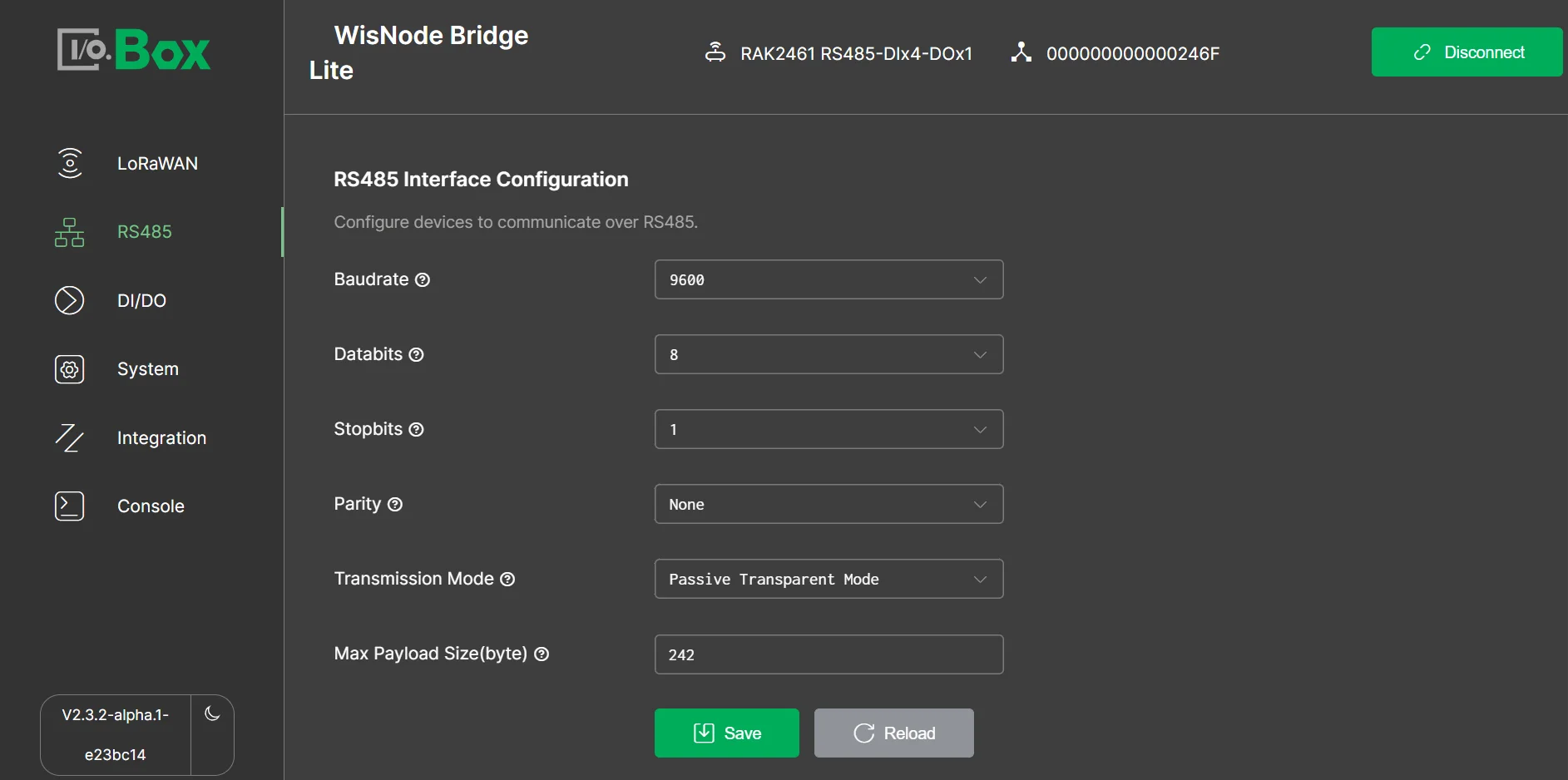 Figure 1: Passive TransparentNOTE
The Max Payload Size is determined automatically according to the configured LoRaWAN region and DataRate.
- Configure the RS485 communication parameters to match the connected RS485 device.
Uplink Behavior
When the Bridge device receives RS485 data, it collects the received data as an RS485 frame and forwards the raw data over LoRaWAN without application-layer parsing.
Downlink Behavior
Passive Transparent Mode supports forwarding downlink data from the LoRaWAN Network Server directly to the RS485 interface.
Use FPort 131 for transparent downlink data.
The Bridge device does not parse or interpret the payload. Construct the downlink payload according to the communication protocol of the connected RS485 device.


