RAK11160 WisDuo Module for LoRa P2P Communication Using AT Commands
This guide demonstrates how to configure two RAK11160 modules for LoRa P2P communication using AT commands. You will configure both modules with matching LoRa parameters, set one module to receive data, and use the other to transmit a payload.
Connect the RAK11160 to a PC
Connect both modules to a computer using USB-to-UART TTL adapters. Both modules must be connected simultaneously to test LoRa P2P communication. For detailed connection instructions, refer to the RAK11160 Quick Start Guide.
LoRa P2P Communication
It is recommended to start by testing the serial communication and verifying that the current configuration is working by sending these two AT commands:
AT
ATE
ATE will echo the commands you input to the module, which is useful for tracking the commands and troubleshooting.
You will receive OK when you input the two commands. After setting ATE, you can see all the commands you input together with the replies.
Try again AT and you should see it on the terminal followed by OK.
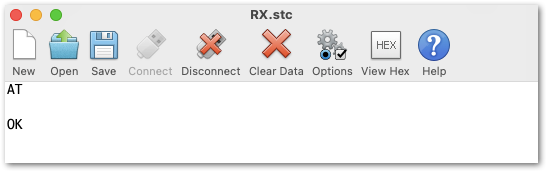 Figure 1: AT command response
- To set up the module to work in LoRa P2P mode, enter the work mode command on both units. You might need to disconnect and reconnect the module as it changes its mode of operation if you are sending commands via USB.
AT+NWM=0
- For this P2P setup, the LoRa parameters are the following:
- Link frequency: 868000000 Hz
- Spreading factor: 7
- Bandwidth: 125 kHz
- Coding Rate: 0 = 4/5
- Preamble Length: 10
- Power: 14 dBm
AT+P2P=868000000:7:125:0:10:14
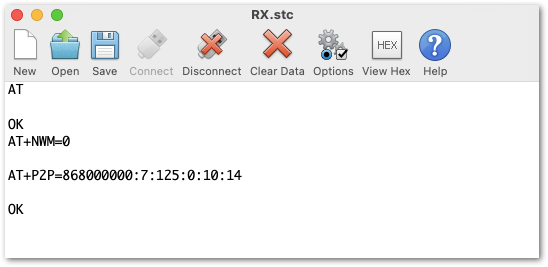 Figure 1: P2P setup
Refer to the P2P Mode section of the AT command documentation to learn more about the definition of the parameters used.
- To set one module as a receiver (RX), set the value of the P2P to receive a command to 65535.
AT+PRECV=65535
With one module configured as RX, the other device will be the TX. You can now try to send a P2P payload.
AT+PSEND=11223344
- If the
AT+PRECVvalue is set to 65534, the device will continuously listen to P2P LoRa TX packets without any timeout. This is the same as setting the device in RX mode. - If the
AT+PRECVvalue is set to 65535, the device will listen to P2P TX without a timeout. But it will stop listening once a P2P LoRa packet is received to save power. - If the
AT+PRECVvalue is 0, the device will stop listening to P2P TX data. The device is in TX mode.
 Figure 1: Sent and received P2P LoRa Packets


