RAK11720 WisDuo LPWAN+BLE Module Interface Access Using RUI3
This guide shows how to use RUI3 APIs to access the pinouts of RAK11720 WisDuo LPWAN+BLE Module. It includes code examples for digital I/O, analog input, UART, and I2C, as well as pinout information for SPI.
Before using the examples in this guide, make sure you have completed the hardware setup and Arduino IDE installation described in the RAK11720 WisDuo LPWAN+BLE Module Quick Start Guide.
Digital I/O
The RAK11720 supports digital input and output through its GPIO pins. Pins assigned to dedicated peripheral functions, such as UART and I2C, may also be used as digital I/O, but their use is subject to functional limitations.
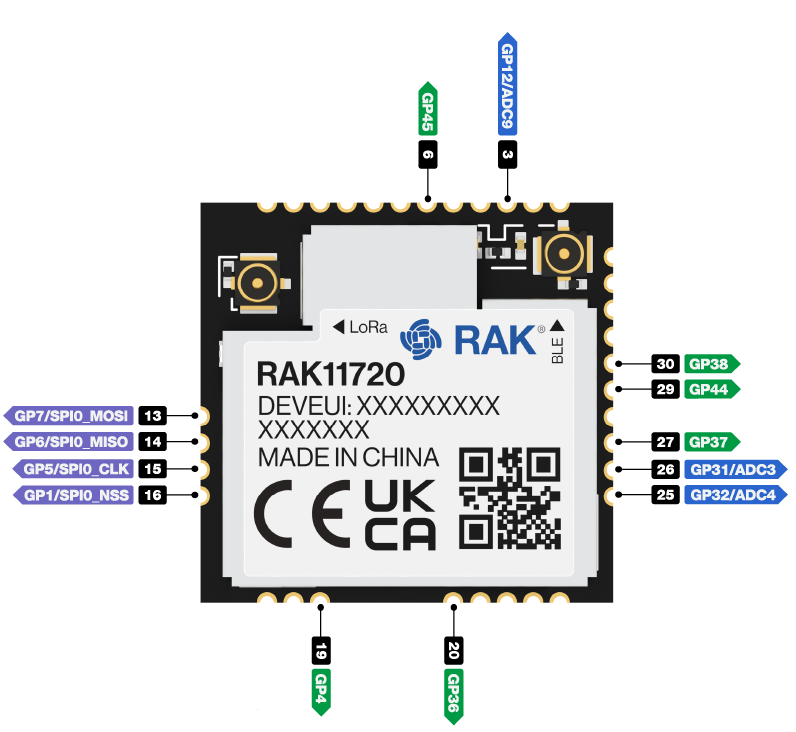 Figure 1: Available Digital I/O Pins in RAK11720
Click to view the code
/*
 RAK11720 Digital I/O Example

 You can use any of the following as Digital I/O:

P44
P45
P1
P5
P6
P7
P38
P4
P37
P31
P12
P36
P32
*/

void setup()
{
  pinMode(P44, OUTPUT); //Change the P44 to any digital pin you want. Also, you can set this to INPUT or OUTPUT
}

void loop()
{
  digitalWrite(P44,HIGH); //Change the P44 to any digital pin you want. Also, you can set this to HIGH or LOW state.
  delay(1000); // delay for 1 second
  digitalWrite(P44,LOW); //Change the P44 to any digital pin you want. Also, you can set this to HIGH or LOW state.
  delay(1000); // delay for 1 second
}
Analog Input
The RAK11720 supports analog input through its ADC-capable GPIO pins. Use analogRead() to read analog values from a selected pin.
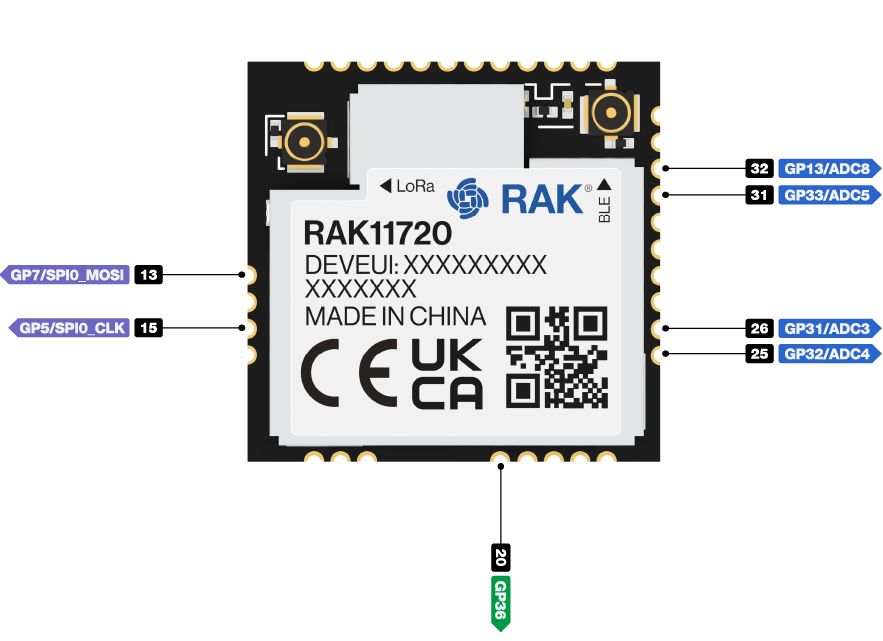 Figure 1: Available Analog Input Pins in RAK11720
Click to view the code
/*
RAK11720 Analog Input Pins

PIN_A0 P13
PIN_A1 P33
PIN_A3 P5
PIN_A4 P31
PIN_A5 P32
PIN_A6 P36
PIN_A7 P7

You can use either format: PIN_A0 or P13
*/

#define analogPin PIN_A0  // or you can use PIN_A0

int val = 0;  // variable to store the value read

void setup()
{
  Serial.begin(115200);
}

void loop()
{
  val = analogRead(analogPin);  // read the input pin
  Serial.println(val);          // debug value
}
Serial Interfaces
The RAK11720 provides UART, I2C, and SPI interfaces for communication with external devices.
UART
There are two UART peripherals available on the RAK11720. There are also different Serial Operating Modes possible in RUI3, namely Binary Mode, AT Mode, and Custom Mode.
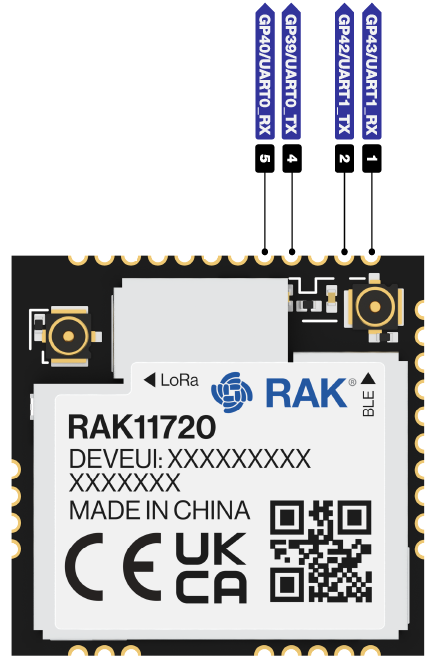 Figure 1: Available UART Pins in RAK11720
| Serial Port | Serial Instance Assignment | Default Mode |
|---|---|---|
| UART0 (Pin 5 - GP39/RX0)/(Pin 4 - GP40/TX0) | Serial | AT Command |
| UART1 (Pin 1 - GP43/RX1)/(Pin 2 - GP42/TX1) | Serial1 | Custom Mode |
| BLE Serial | Serial6 | Custom Mode |
Click to view the example code.
void setup()
{
  Serial.begin(115200);                   // By default Serial is used for FW update and AT command.
  Serial1.begin(9600,RAK_AT_MODE);        // By default AT is disabled. With RAK_AT_MODE, AT command is activated. Baud rate can be configured to other values as well.
  Serial6.begin(115200, RAK_CUSTOM_MODE); // BLE UART is accessible via Serial6.
}

void loop()
{
  Serial1.println("RAK11720 TEST!");
  delay(1000); // delay for 1 second
}
I2C
Make sure you have an I2C device connected to the specified I2C pins to run the example.
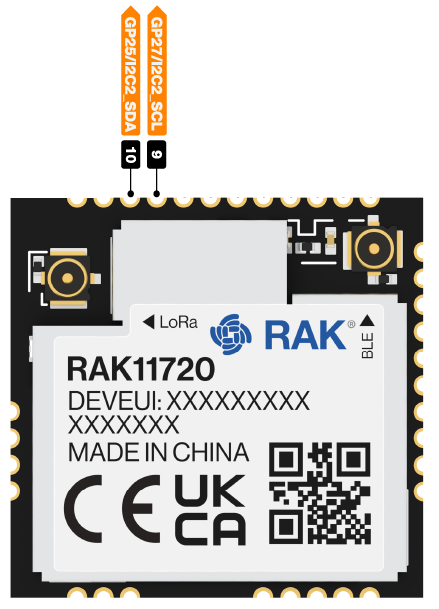 Figure 1: Available I2C Pins in RAK11720
Click to view the example code.
#include <Wire.h>

void setup()
{
  Wire.begin();

  Serial.begin(115200);
  while (!Serial);
  Serial.println("\nI2C Scanner");
}

void loop()
{
  byte error, address;
  int nDevices;

  Serial.println("Scanning...");

  nDevices = 0;
  for(address = 1; address < 127; address++ )
  {
    // The i2c_scanner uses the return value of
    // the Write.endTransmisstion to see if
    // a device did acknowledge to the address.
    Wire.beginTransmission(address);
    error = Wire.endTransmission();

    if (error == 0)
    {
      Serial.print("I2C device found at address 0x");
      if (address<16)
        Serial.print("0");
      Serial.print(address,HEX);
      Serial.println("  !");

      nDevices++;
    }
    else if (error==4)
    {
      Serial.print("Unknown error at address 0x");
      if (address<16)
        Serial.print("0");
      Serial.println(address,HEX);
    }
  }
  if (nDevices == 0)
    Serial.println("No I2C devices found\n");
  else
    Serial.println("done\n");

  delay(5000);           // wait 5 seconds for next scan
}
SPI
The RAK11720 supports SPI communication with external peripherals through dedicated SPI pins.
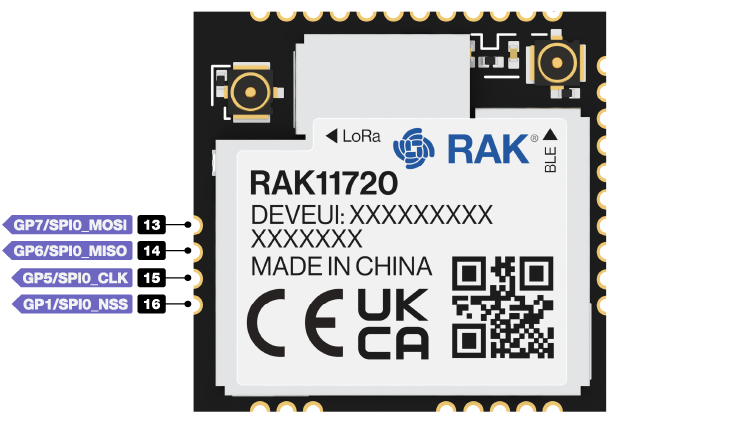 Figure 1: Available SPI Pins in RAK11720


