RAKPiOS Service Management
Every service on RAKPiOS runs in a Docker container, and rakpios-cli is the tool that deploys and manages them. It ships with the image, needs no configuration, and offers a curated catalogue of nearly 40 IoT services, including packet forwarders, network servers, databases, dashboards, VPNs, and home automation, that you can bring up in a couple of minutes without writing a docker run command or a compose file.
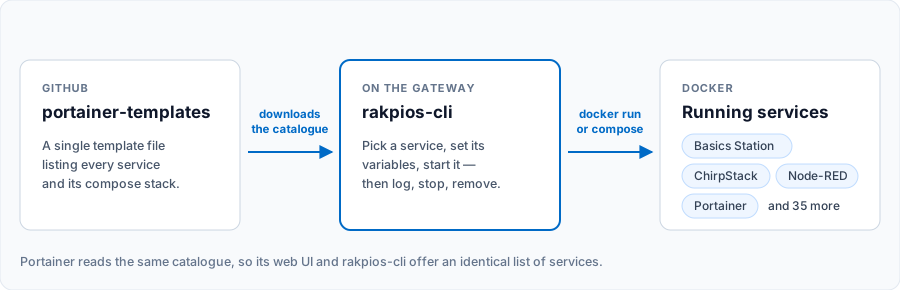 Figure 1: How rakpios-cli deploys a service
Up to RAKPiOS 0.9.x, services were deployed through a standalone portainer script. That script was removed in RAKPiOS 1.0.0. Portainer is now one of the services in the catalogue, deployed the same way as any other. If you run portainer on a 1.0.0 image, all you get is a message pointing you here.
Docker
Docker is an open-source platform for building, deploying, and managing containerized applications. Everything needed to run an application, including the source code, the operating system libraries, and the dependencies, is packed into a single container, which makes a service behave the same way wherever it runs.
Docker CE is pre-installed on RAKPiOS, together with the Compose plugin. To check the version on your device:
rak@rakpios:~ $ docker version
The rak user belongs to the docker group, so you never need to prefix docker with sudo. Compose is the v2 plugin, invoked as docker compose; a docker-compose alias is defined in ~/.bashrc so the older spelling keeps working.
Deploy a Service
Launch the tool and pick Deploy services from the main menu.
rak@rakpios:~ $ rakpios-cli
 Figure 1: rakpios-cli main menu
You will get the catalogue, sorted alphabetically. Select the service you want.
 Figure 1: rakpios-cli deploy services
Each service then offers two options:
- Configure environment variables: Lists every variable the service exposes with its current value. Pick one to change it. Variables with a fixed set of valid values are offered as a list rather than a free-text field, and a variable's description is shown while you edit it. Services with nothing to configure say so.
- Start the service: Asks for confirmation, then pulls the image if it is not already on the device and brings the container up.
When the service is up, rakpios-cli shows a Notes window with whatever that service needs you to know:
- The container ID
- The address to open in a browser
- Default credentials
- For LoRa packet forwarders, the Gateway EUI, read from the running container.
Pulling an image the first time needs internet access and can take a few minutes on a slow link. Later deployments of the same service reuse the local copy.
Manage a Running Service
Choose List services from the main menu to see every container on the device, running or stopped, sorted by name. The title bar shows the current state of the one you select (Up or Exited).
 Figure 1: rakpios-cli list services
Four actions are available for each service:
- Start the service: Starts it if it is not running.
- Stop the service: Stops it if it is running.
- Remove the service: Stops it first, then removes it.
- Check the logs: Follows the log stream with timestamps, showing the last 10 minutes.
 Figure 1: rakpios-cli service details
The log viewer runs inside tmux, so you can scroll back through the history with the mouse wheel. Press Ctrl+C and confirm to close it and return to the menu.
The log viewer uses a configuration file of its own under $HOME/.config/rakpios-cli. Your ~/.tmux.conf is never read or modified.
Where the Catalogue Comes From
The service catalogue is a Portainer app template, published in the RAKwireless portainer-templates repository. rakpios-cli downloads it on first use, caches it locally, and tells you when a newer version of the catalogue or of the tool itself is available.
Because it is the same template Portainer reads, both tools offer exactly the same list of services. Deploying from rakpios-cli and deploying from the Portainer web UI are two front ends over one catalogue.
Simple services are launched with docker run. Services that need more than one container, such as ChirpStack and The Things Stack, use a compose file in the Stack folder of the same repository. These services are launched with docker compose.
Portainer
Portainer CE is a web UI for Docker. It is useful when you want a graphical view of your containers, images, volumes, and networks, or when you would rather browse the app templates than page through a text menu.
Deploy it like any other service: Deploy services → Portainer → Start the service. The Notes window that follows gives you the URL to open. Set the administrator password on first login.
Once you are in, click the App Templates tab to get the same curated list of containers, with the environment variables presented as a web form. You are free to point Portainer at your own template file, or to build templates from an existing stack.
 Figure 1: Portainer application templates
Services Available
The catalogue currently holds 39 services, and the list grows over time. The authoritative list is always the one in the portainer-templates repository.
| Category | Services |
|---|---|
| LoRaWAN® | LoRa Basics™ Station, UDP Packet Forwarder, ChirpStack v3, ChirpStack v4, ChirpStack Concentrator, The Things Stack LNS, Helium gateway-rs |
| mioty® | Mioty BSSCI by Plasmonized |
| Automation and edge logic | Node-RED, Home Assistant, Open-PLC, RapidSCADA, ThingsBoard, TagoCore, OPC-UA Server, AWS IoT Greengrass |
| Data and dashboards | InfluxDB, TimescaleDB, MongoDB, Azure SQL Edge, Telegraf, Grafana |
| Messaging | Eclipse Mosquitto, RabbitMQ, NATS Server, Zigbee2MQTT |
| Networking and remote access | Tailscale, ZeroTier One, SSH No Ports, Pi-hole, AdGuard Home, iperf3 server |
| Management and storage | Portainer, File Browser, Seafile, Duplicati, Gitea, Registry, MotionEye |
Because RAKwireless is best known for its LoRaWAN gateways and modules, the sections below cover the services most often used to put a LoRaWAN network together. Everything else is deployed exactly the same way.
LoRaWAN Packet Forwarder
A packet forwarder is a program running on a LoRa gateway that forwards the RF packets received by the concentrator to a server over an IP link, and emits the RF packets the server sends back.
Templates are provided for the two main packet forwarder protocols: LoRa Basics Station and UDP Packet Forwarder.
LoRa Basics Station
This service deploys a LoRaWAN gateway running Semtech's Basics Station packet forward protocol in a Docker container. The protocol enables LoRa gateways to communicate with the cloud reliably and securely, and it is the standard packet forward protocol used by most LoRaWAN operators.
It supports all RAKwireless LoRa concentrators except the RAK2247 USB version and the RAK5148 2.4 GHz LoRaWAN concentrator. Use the UDP Packet Forwarder for those.
For the service documentation, visit the Basics Station Packet Forward protocol using Docker repository.
UDP Packet Forwarder
The Semtech UDP Packet Forwarder is the original LoRaWAN packet forwarder, connecting to servers via the Semtech protocol over UDP. It deploys a LoRaWAN gateway running the UDP Packet Forwarder protocol in a Docker container, and has been tested with The Things Stack Community Edition.
It supports all RAKwireless LoRa concentrators, USB and SPI, sub-GHz and 2.4 GHz.
For the service documentation, visit the UDP Packet Forwarder for Docker repository.
LoRaWAN Network Server
A LoRaWAN network server connects sensors, gateways, and end-user applications to the LoRaWAN network, and ensures reliable and secure data routing throughout it.
Templates are provided for ChirpStack and The Things Stack LNS.
ChirpStack Network Server
The ChirpStack open-source LoRaWAN Network Server stack offers open-source components for LoRaWAN networks. Together they form a ready-to-use solution with a web interface for device management and APIs for integration. Both v3 and v4 are in the catalogue; deploy v4 for a new installation.
The template is adapted from the docker-compose.yml file provided by ChirpStack. Check the ChirpStack Docker example repository for more on environment variables and configuration.
The Things Stack LNS
The Things Stack is a robust yet flexible LoRaWAN Network Server that meets the requirements of demanding deployments, from basic functionality to advanced security configurations and device life cycle management. The service deploys the Open Source Edition using Docker.
For the service documentation, visit The Things Stack LoRaWAN Network Server (Open Source Edition) using Docker repository.
mioty
The catalogue includes a mioty BSSCI service center by Plasmonized, which lets a mioty base station terminate locally on the gateway instead of forwarding to a cloud backend.
Setting up the mioty radio itself, the Miromico Miro EdgeCard, is done with the mioty-cli tool rather than with rakpios-cli. Refer to the Miromico Miro EdgeCard mioty Management page.
Node-RED
Node-RED is a programming tool for wiring together hardware devices, APIs, and online services. It includes a browser-based editor that lets you wire flows from a palette of nodes and deploy them to its runtime in a single click.
The catalogue ships a customized Node-RED image with RAKwireless nodes pre-installed, along with example flows. The sensor and I/O nodes are also published individually:
- ads7830 ADC node
- LIN bus node
- lps2x barometer sensor node
- ltr-390uv UV sensor node
- opt3001 ambient light sensor node
- pi4ioe5v GPIO expander node
- pn532 RFID node
- mcp23017 GPIO expander node
- shtc3 temperature and humidity sensor node
- adc121c021 ADC node
The source code for these nodes is in the RAKwireless Node-RED node repository.
Grafana and InfluxDB
Grafana is an open-source analytics and monitoring solution. It lets you query, visualize, and alert on your metrics no matter where they are stored, and share dashboards with your team. See the Grafana Docker documentation for reference.
InfluxDB is an open-source time-series platform, with APIs for storing and querying data, background processing for ETL or alerting, and dashboards for exploring it. See the InfluxDB Docker Hub page for configuration and environment variables.
Deployed together, and fed by Telegraf or by Node-RED, they make a self-contained metrics stack on the gateway itself.
Deploying Something Not in the Catalogue
rakpios-cli is a convenience, not a restriction. The rak user has full access to Docker, so anything you can run with docker run or docker compose runs on RAKPiOS:
rak@rakpios:~ $ docker compose up -d
Services started this way still appear under List services, and can be started, stopped, removed, and inspected from there like any other.


