AI/AO Configuration
The AI/AO interface includes Analog Input (AI) and Analog Output (AO) channels for handling continuously varying analog signals. By properly configuring the AI/AO interfaces, users can implement industrial process monitoring, environmental data acquisition, and closed-loop analog control.
Analog Input Interface
Analog Input (AI) interfaces are designed to collect continuously varying signals from external sensors, such as temperature, pressure, liquid level, and current transmitters. These signals are converted into digital values for system processing and monitoring.
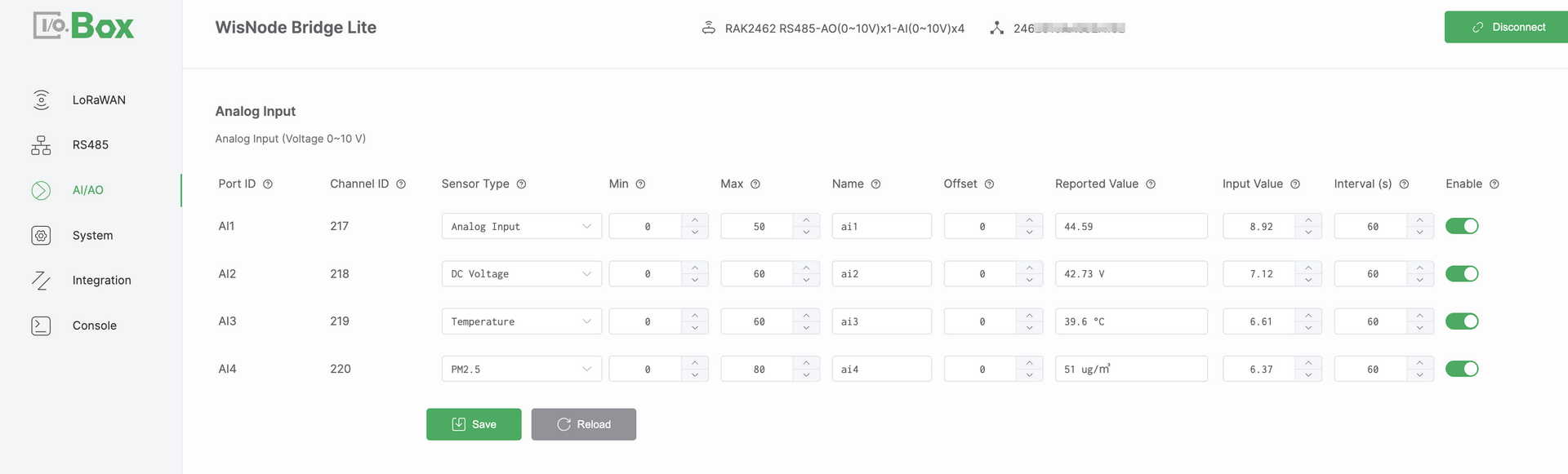 Figure 1: Analog Input configuration
Analog Input Setup
- Navigate to the AI/AO module and select the Analog Input menu.
- Select the target Port ID and configure the following parameters:
- Select a Sensor Type (for example,
Temperature). - Set the Min and Max values (obtained from the Device's specification datasheet), and configure the Offset parameter if required.
- Select a Sensor Type (for example,
- Turn on the Enable switch, then click Save to apply the configuration.
- Verify that the Reported Value is displayed correctly and updates as expected.
NOTE
If the Reported Value is not as expected, refer to Analog Output Scaling Logic to verify the mapping formula.
Analog Input Parameters
- Port ID: Physical AI port identifier, Corresponds one-to-one with the Bridge I/O hardware interface, Automatically assigned and cannot be modified.
- Channel ID: Unique channel identifier assigned by the system, Used internally for data identification, processing, and uplink reporting, Automatically assigned and cannot be modified.
- Sensor Type: Defines the semantic type of the connected sensor, Determines how the value is displayed and what it represents.
- Min: Defines the engineering value corresponding to the lower bound of the input signal, This value is obtained from the Device's specification datasheet.
- Max: Defines the engineering value corresponding to the upper bound of the input signal. This value is obtained from the Device's specification datasheet.
- Name: User-defined channel name.
- Offset: Value applied to correct numerical output, used to compensate for sensor zero drift or installation deviations.
- Reported Value: Final engineering value after Min or Max scaling and Offset adjustment. Represents the actual physical quantity.
- Input Value: Raw analog input value measured by the hardware, representing the actual electrical signal (current or voltage).
- Enable: Enables or disables the AI channel. When disabled, the channel does not collect or report data.
Analog Input Scaling Logic
The AI interface supports two analog input specifications: Voltage mode (0–10 V) and Current mode (4–20 mA). Each mode applies a different linear scaling formula to convert the measured Input Value into an engineering value, referred to as the Reported Value.
- Voltage mode (0–10 V):
Reported Value = (Input Value / 10) × (Max − Min) + Min + Offset - Current mode (4–20 mA):
Reported Value = ((Input Value − 4) / 16) × (Max − Min) + Min + Offset
This document uses the Voltage mode (0–10 V) as an example:
Assuming Min = 0, Max = 50, Offset = 0, and an input voltage of 8.92 V. The system applies linear scaling to convert the input voltage into an engineering value: Reported Value = (8.92 / 10) × 50 ≈ 44.6.
Analog Output Interface
Analog Output (AO) interfaces are used to generate analog control signals to drive actuators, such as control valves, variable-speed motors, or other industrial equipment.
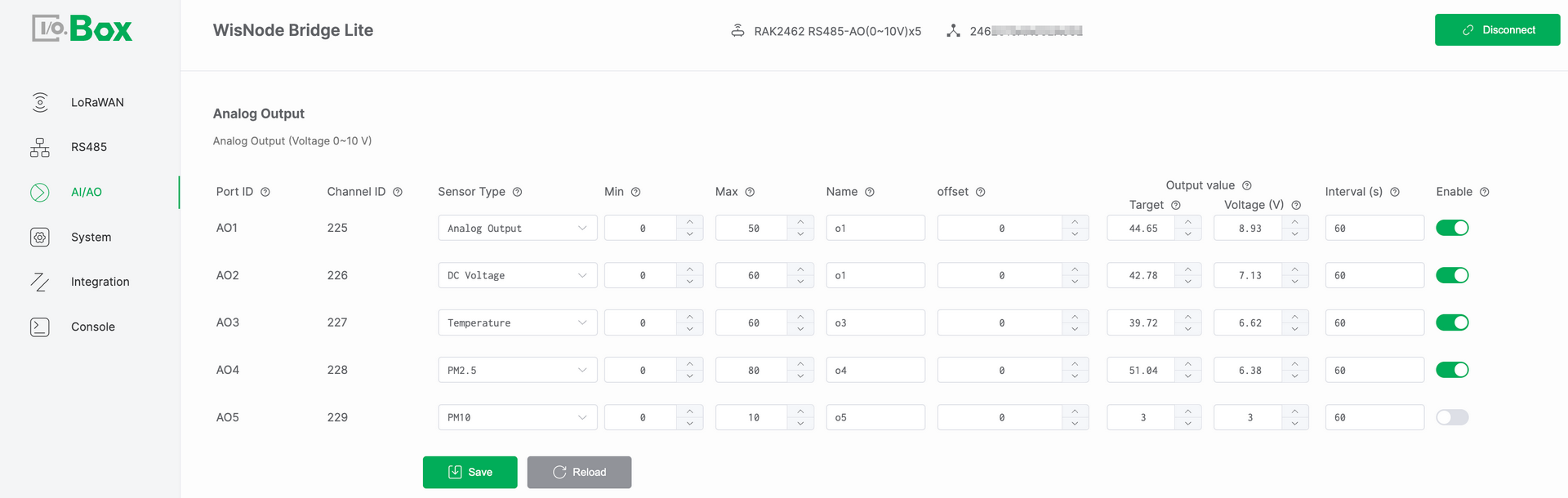 Figure 1: Analog Output configuration
Analog Output Setup
- Navigate to the AI/AO module and select the Analog Output menu.
- Select the target Port ID and configure the following parameters:
- Choose a Sensor Type (for example,
DC Voltage). - Set the Min and Max values (obtained from the Device's specification datasheet), and configure the Offset parameter if required.
- Configure the Target value,Set Enable to
ON.
- Choose a Sensor Type (for example,
- Click Save and verify that the output signal (Current (mA) or Voltage (V)) matches the expected value.
NOTE
If the output signal is not as expected, refer to Analog Output Scaling Logic to verify the conversion formula.
Analog Output Parameters
- Port ID: Physical AO port identifier, Corresponds one-to-one with the Bridge I/O hardware interface, Automatically assigned and cannot be modified.
- Channel ID: Unique channel identifier assigned by the system, Used internally for data identification, processing, and uplink reporting, Automatically assigned and cannot be modified.
- Sensor Type: Defines the semantic type of the output signal, Determines how the value is displayed and what it represents.
- Min: Defines the minimum engineering value of the output range, This value is obtained from the Device's specification datasheet.
- Max: Defines the maximum engineering value of the output range, This value is obtained from the Device's specification datasheet.
- Name: User-defined channel name.
- Offset: An offset applied to correct numerical values, used to compensate for sensor zero drift or installation deviations.
- Target: User-defined target engineering value set by the user. This value represents the desired control level in engineering terms (for example, a valve opening of 75%) and serves as the input reference for the AO output calculation.
- Output Value: Derived from the configured Target and serving as the basis for generating the physical analog output signal.
- Current (mA)/ Voltage (V): Real-time physical analog signal output by the AO port:
- Current (mA) in 4–20 mA mode
- Voltage (V) in 0–10 V mode
NOTEThis value reflects the actual electrical output and can be measured directly at the AO interface.
- Enable: Enables or disables the AO channel. When disabled, the channel does not output any signal.
Analog Output Scaling Logic
The Analog Output interface converts the target engineering value into a physical analog output signal using linear scaling. The applied formula depends on the AO hardware output mode. The AO interface supports two analog output specifications:
- Voltage mode (0–10 V):
Output Voltage (V) = (Target − Min) / (Max − Min) × 10. - Current mode (4–20 mA):
Output Current (mA) = (Target − Min) / (Max − Min) × 16 + 4.
This document uses the Voltage mode (0–10 V) as an example:
Assuming Min = 0, Max = 50, Offset = 0, and Target = 29. The system converts the target value into an analog voltage output: Output Voltage = (29 / 50) × 10 ≈ 5.8 V.


