RAK12034 WisBlock 9-Axis Accelerometer Module Quick Start Guide
Prerequisite
Package Inclusions
Before going through each and every step on using the RAK12034 9-Axis Accelerometer Sensor, make sure to prepare the necessary items listed below:
Hardware
- RAK12034 9-Axis Sensor
- Your choice of WisBlock Base
- Your choice of WisBlock Core
- USB Cable
- RAK19005 WisBlock Sensor Extension Cable (optional)
- Li-Ion/LiPo battery (optional)
- Solar charger (optional)
Software
- Download and install the Arduino IDE.
- To add the RAKwireless Core boards to your Arduino Boards Manager, install the RAKwireless Arduino BSP.
Product Configuration
Hardware Setup
The RAK12034 is a 9-Axis Sensor module, part of the RAKWireless WisBlock Sensor series. It is based on BMX160 Bosch Sensor, which is a highly integrated, low-power 9-axis sensor that provides the precise acceleration, an angular rate, and geomagnetic measurement in each spatial direction. For more information about the RAK12034, refer to the Datasheet.
The RAK12034 9-Axis Sensor can be mounted on the sensor slot of the WisBlock Base board, as shown in Figure 1. Also, always secure the connection of the WisBlock module by using compatible screws.
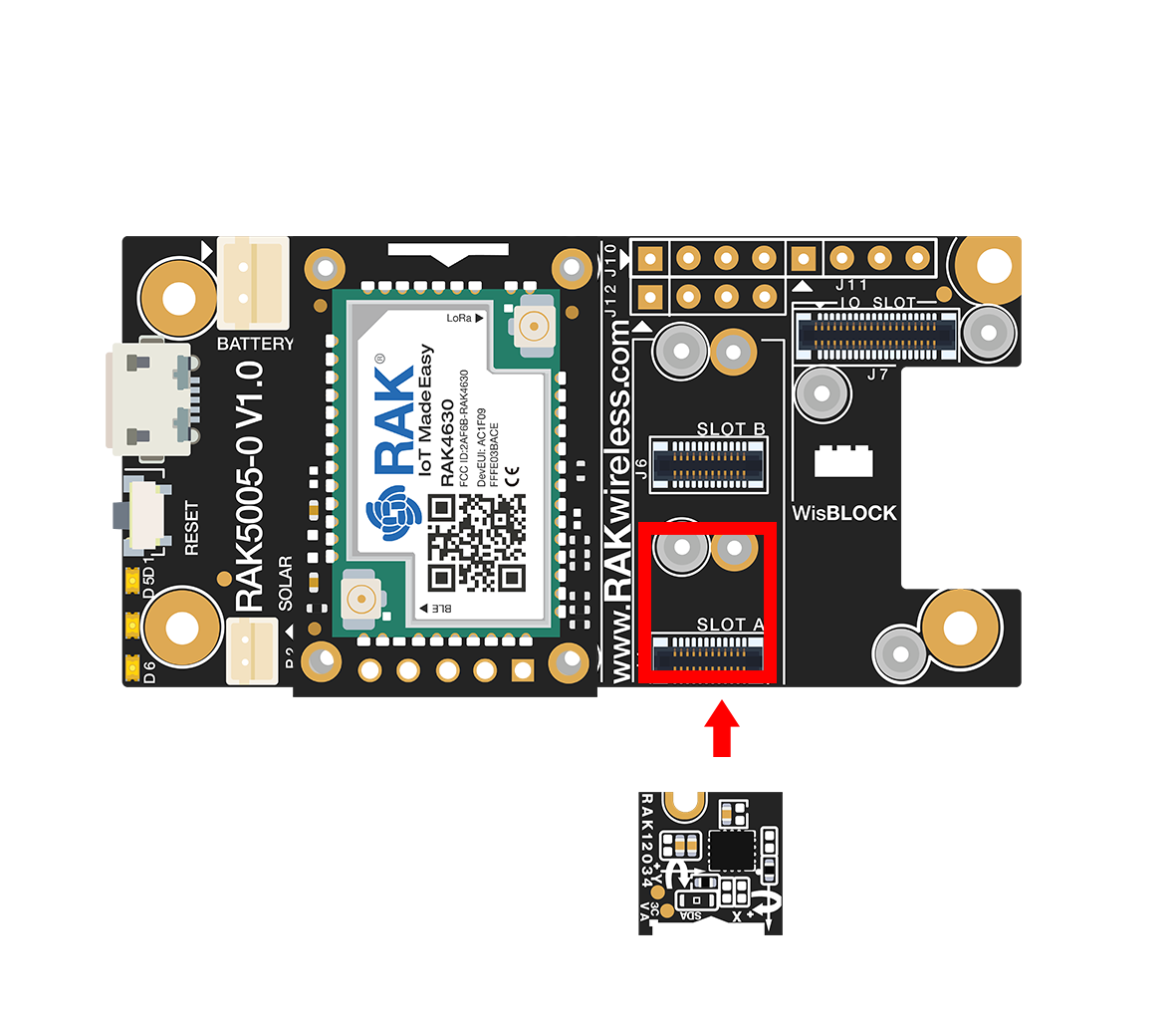 Figure 1: RAK12034 connection to WisBlock Base
Assembling and Disassembling of WisBlock Modules
Assembling
As shown in Figure 2, the location for the sensor slots is properly marked by silkscreen. Follow carefully the procedure defined in RAK5005-O module assembly/disassembly instructions to attach a WisBlock module. Once attached, carefully fix the module with three pieces of M1.2 x 3 mm screws.
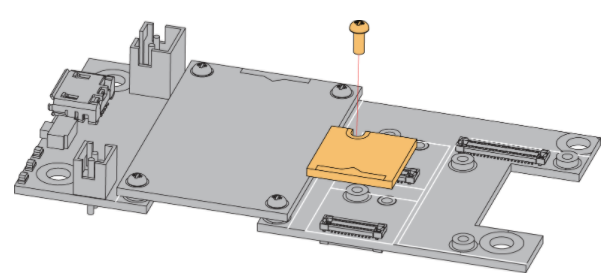 Figure 1: RAK12034 assembly to WisBlock Base
Disassembling
The procedure in disassembling any type of WisBlock module is the same.
- First, remove the screws.
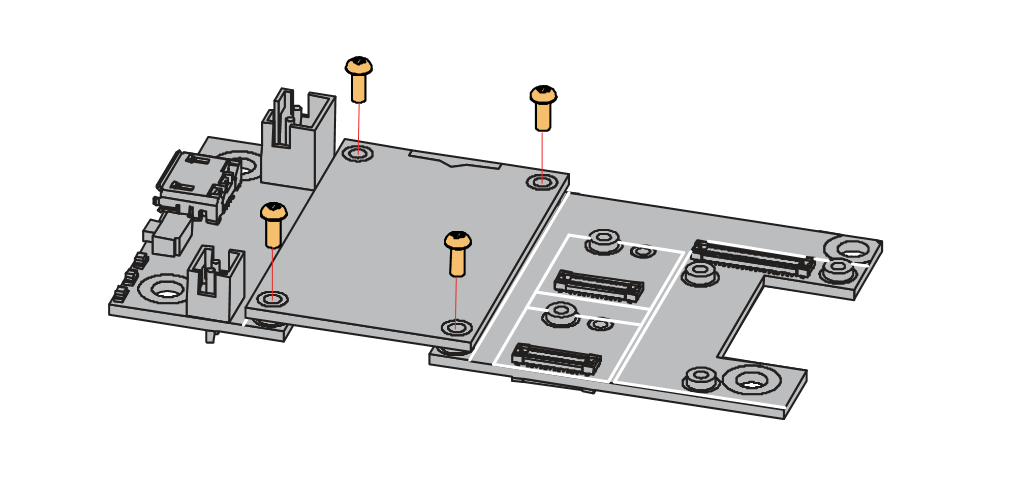 Figure 1: Removing screws from the WisBlock module
- Once the screws are removed, check the silkscreen of the module to find the correct location where force can be applied.
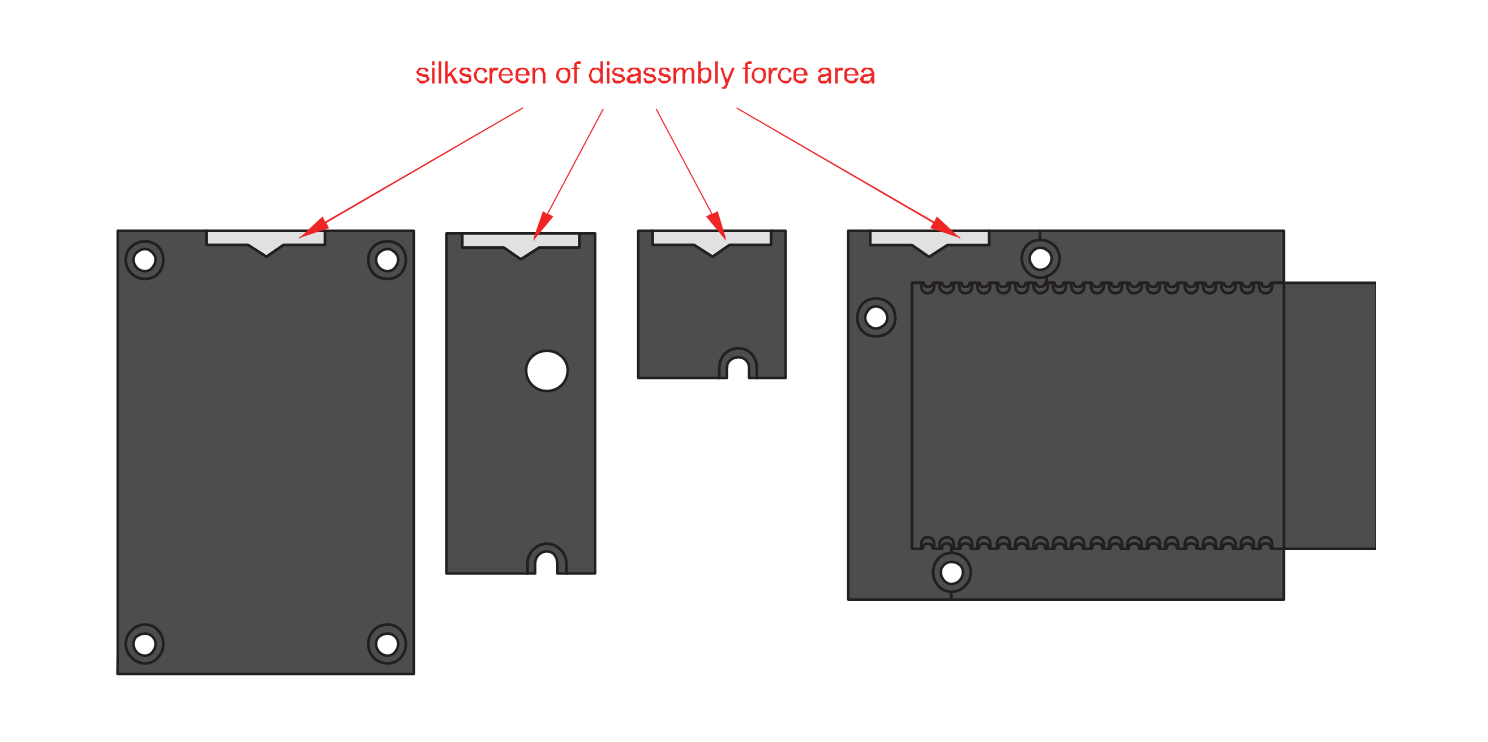 Figure 1: Detaching silkscreen on the WisBlock module
- Apply force to the module at the position of the connector, as shown in Figure 5, to detach the module from the baseboard.
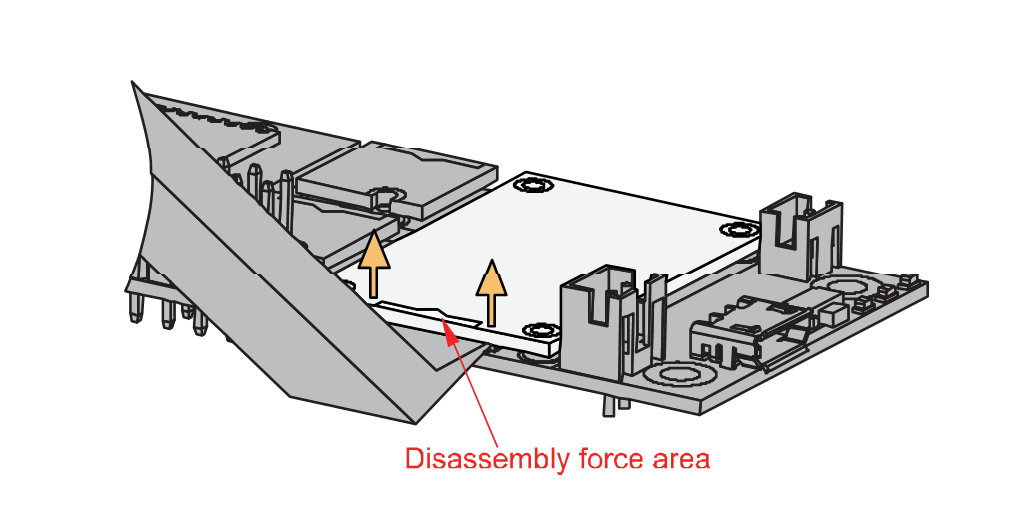 Figure 1: Applying even forces on the proper location of a WisBlock module
If you will connect other modules to the remaining WisBlock Base slots, check on the WisBlock Pin Mapper tool for possible conflicts.
After all this setup, you can now connect the battery (optional) and USB cable to start programming your WisBlock Core.
- Batteries can cause harm if not handled properly.
- Only 3.7-4.2 V rechargeable LiPo batteries are supported. It is highly recommended not to use other types of batteries with the system unless you know what you are doing.
- If a non-rechargeable battery is used, it has to be unplugged first before connecting the USB cable to the USB port of the board to configure the device. Not doing so might damage the battery or cause a fire.
- Only 5 V solar panels are supported. Do not use 12 V solar panels. It will destroy the charging unit and eventually other electronic parts.
- Make sure the battery wires match the polarity on the RAK5005-O board. Not all batteries have the same wiring.
Software Configuration and Example
In this example, you will be able to get all the data from the sensor.
- You need to select first the WisBlock Core you have, as shown in Figure 6 to Figure 8.
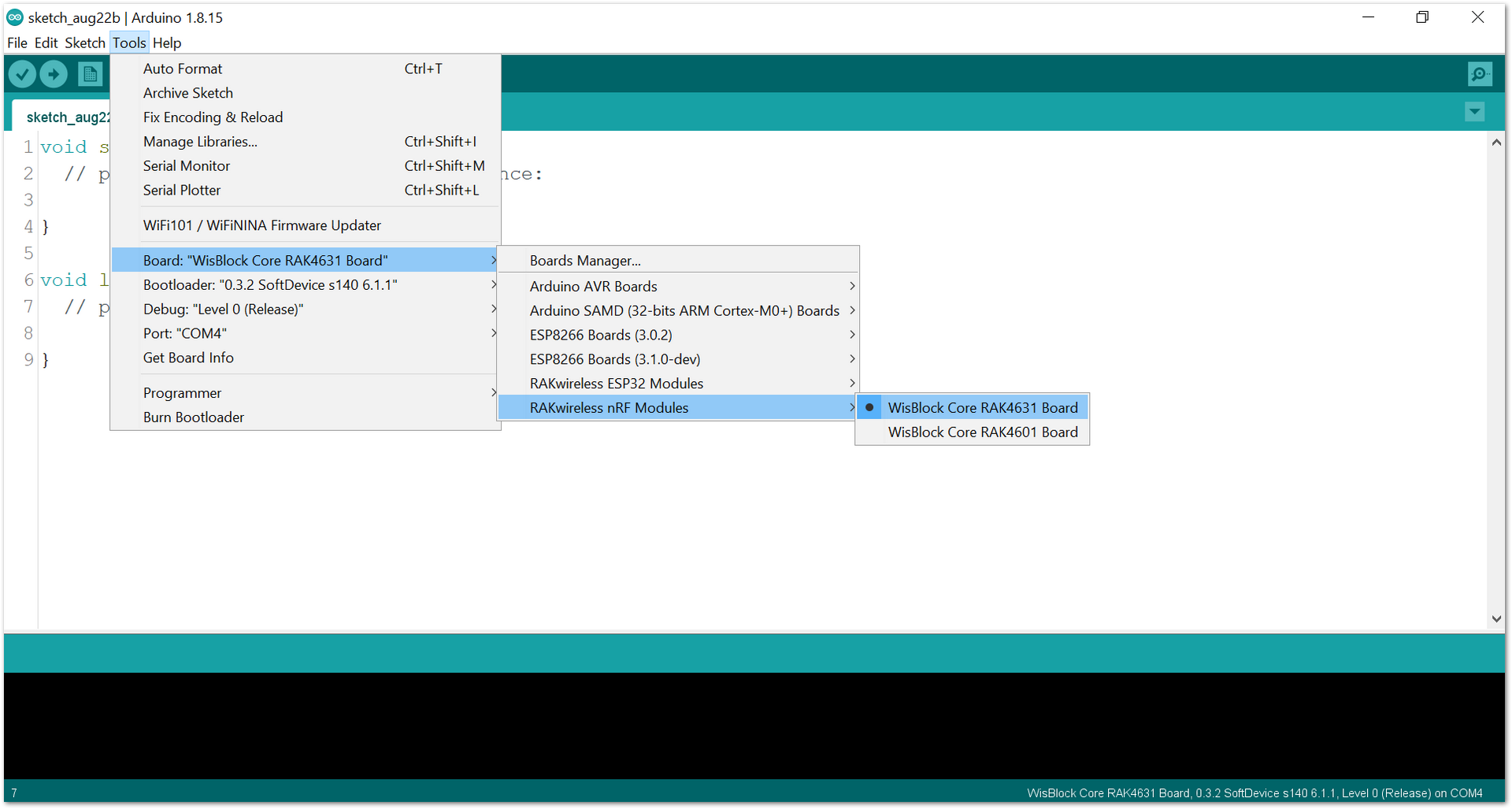 Figure 1: Selecting RAK4631 as WisBlock Core
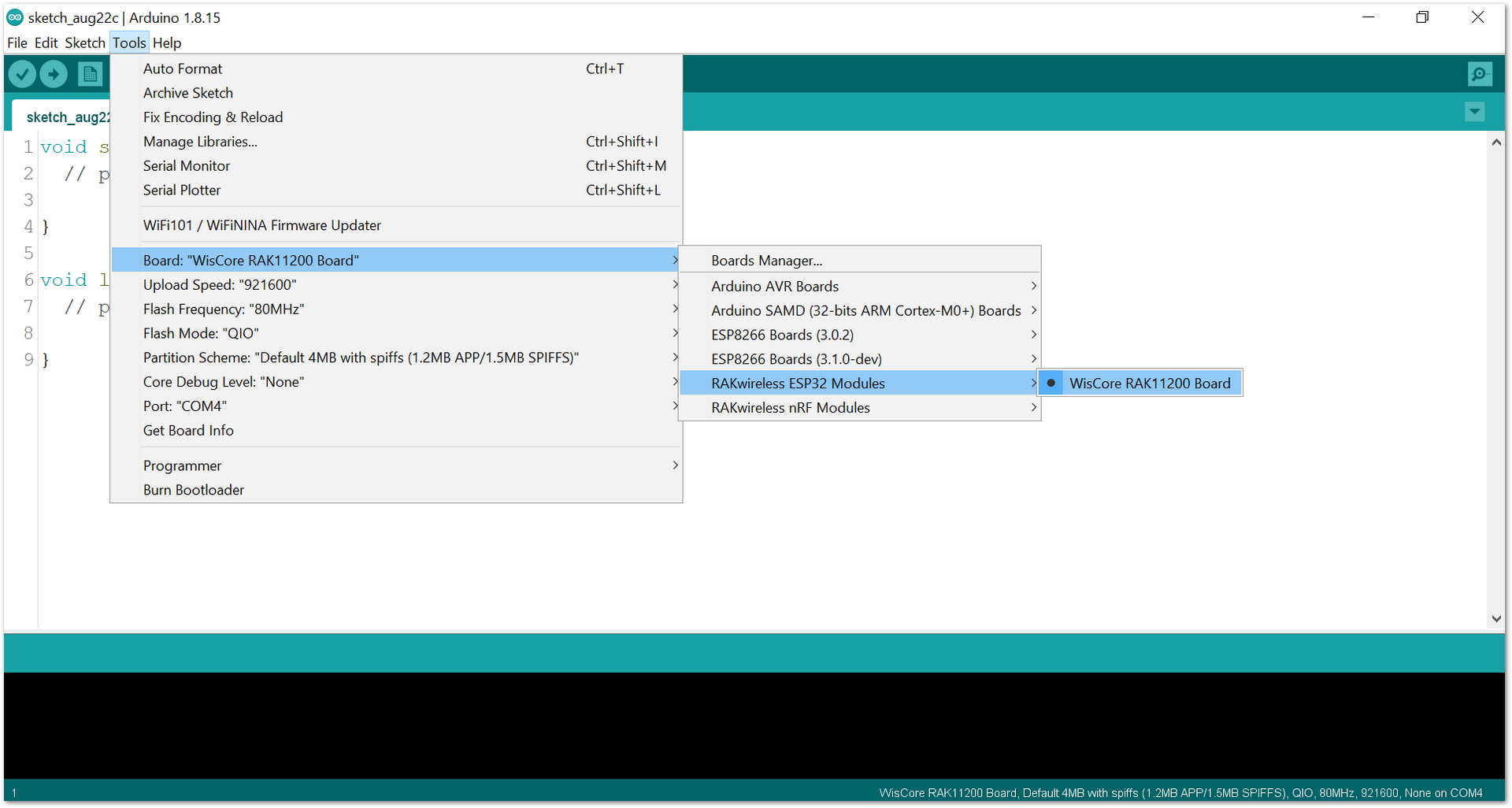 Figure 1: Selecting RAK11200 as WisBlock Core
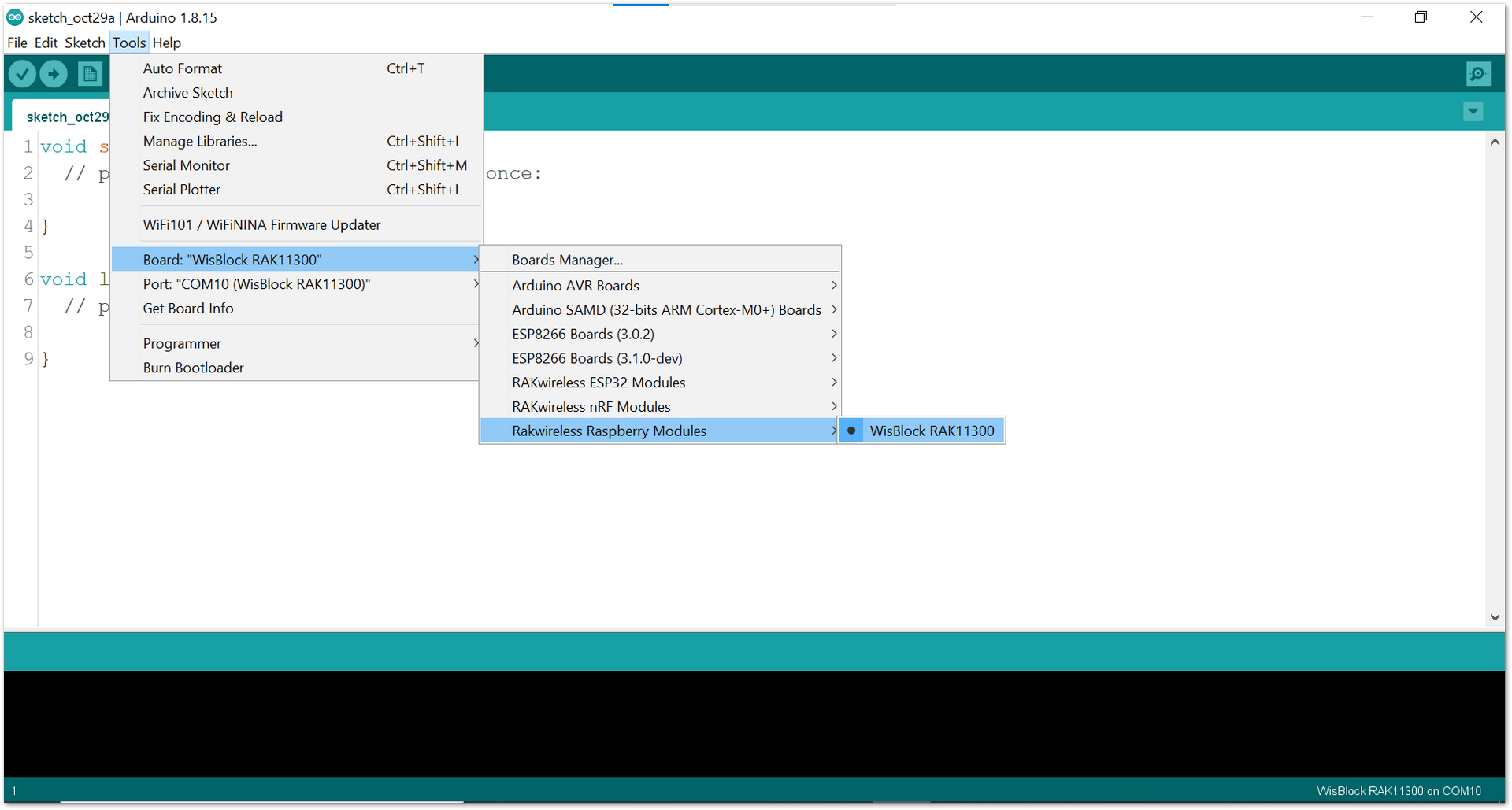 Figure 1: Selecting RAK11300 as WisBlock Core
- Copy the example code below:
Click to view the code
/*!
   @file readAllData.ino
   @author rakwireless.com
   @brief Through the example, you can get the sensor data by using getSensorData:
   @n     get all data of magnetometer, gyroscope, accelerometer.
   @n     With the rotation of the sensor, data changes are visible.
   @version 0.1
   @date 2022-01-04
   @copyright Copyright (c) 2020
*/

#include "Rak_BMX160.h"

#define  INT1_PIN   WB_IO2 //if use SLOT A INT1_PIN use WB_IO1, if use SLOT C,the INT1_PIN use WB_IO2,if use SLOT C,the INT1_PIN use WB_IO3.  if use SLOT D,the INT1_PIN use WB_IO5

#define  HIGH_G_INT 0x07    //accelerometer(0x01-x axis interrupt,0x02-y axis interrupt,0x04-z axis interrupt,0x07-x,y,z axis interrupt)
#define  HIGH_G_THRESHOLD 0x80

/*HIGH_G_THRESHOLD means to set the interrupt trigger threshold,If you want the accelerometer to trigger interrupts at 1g, just set HIGH_G_THRESHOLD to 0x80[0x80*7.81=999.68mg(2g range)].
  Because accelerometers have different ranges, so the interrupt threshold is set differently. threshold = (HIGH_G_THRESHOLD*7.81) mg(2g range), (HIGH_G_THRESHOLD*15.63 )mg (4g range), (HIGH_G_THRESHOLD*31.25)mg (8g range),(HIGH_G_THRESHOLD* 62.5)mg (16g range) */

RAK_BMX160 bmx160;

bool INT1_Flag = false;

void setup() {
  pinMode(LED_BLUE, OUTPUT);
  digitalWrite(LED_BLUE, HIGH);
  time_t timeout = millis();
  Serial.begin(115200);
  while (!Serial)
  {
    if ((millis() - timeout) < 5000)
    {
      delay(100);
    }
    else
    {
      break;
    }
  }

  pinMode(INT1_PIN, INPUT_PULLDOWN);
  attachInterrupt(digitalPinToInterrupt(INT1_PIN), To_INT1_Interrupt, RISING);

  //init the hardware bmx160
  if (bmx160.begin() != true) {
    Serial.println("bmx160 init false");
    while (1) delay(100);
  }

  Serial.println("RAK12034 Test!!");
  //  bmx160.setLowPower();   //disable the gyroscope and accelerometer sensor
  bmx160.wakeUp();        //enable the gyroscope and accelerometer sensor

  uint8_t PMU_Status = 0;
  bmx160.readReg(0x03, &PMU_Status, 1);
  Serial.printf("PMU_Status=%x\r\n", PMU_Status);


  bmx160.InterruptConfig(HIGH_G_INT, HIGH_G_THRESHOLD);//Enable HIGH_G_Interrupt ands et the accelerometer threshold

  bmx160.ODR_Config(BMX160_ACCEL_ODR_200HZ, BMX160_GYRO_ODR_200HZ); //set output data rate

  float OrdBuf[2] = {0};
  bmx160.get_ORD_Config(&OrdBuf[0], &OrdBuf[1]);
  Serial.printf("OrdBuf[0]=%f,OrdBuf[1]=%f\r\n", OrdBuf[0], OrdBuf[1]);

  /**
     enum{eGyroRange_2000DPS,
           eGyroRange_1000DPS,
           eGyroRange_500DPS,
           eGyroRange_250DPS,
           eGyroRange_125DPS
           }eGyroRange_t;
   **/
  bmx160.setGyroRange(eGyroRange_500DPS);

  /**
      enum{eAccelRange_2G,
           eAccelRange_4G,
           eAccelRange_8G,
           eAccelRange_16G
           }eAccelRange_t;
  */
  bmx160.setAccelRange(eAccelRange_2G);
  delay(100);
}

void loop() {
  sBmx160SensorData_t Omagn, Ogyro, Oaccel;
  float Temp = 0;
  bmx160.getTemperature(&Temp);
  Serial.print("Temperature:");
  Serial.println(Temp);
  /* Get a new sensor event */
  bmx160.getAllData(&Omagn, &Ogyro, &Oaccel);
  /* Display the magnetometer results (magn is magnetometer in uTesla) */
  Serial.print("M ");
  Serial.print("X: "); Serial.print(Omagn.x); Serial.print("  ");
  Serial.print("Y: "); Serial.print(Omagn.y); Serial.print("  ");
  Serial.print("Z: "); Serial.print(Omagn.z); Serial.print("  ");
  Serial.println("uT");

  /* Display the gyroscope results (gyroscope data is in °/s) */
  Serial.print("G ");
  Serial.print("X: "); Serial.print(Ogyro.x); Serial.print("  ");
  Serial.print("Y: "); Serial.print(Ogyro.y); Serial.print("  ");
  Serial.print("Z: "); Serial.print(Ogyro.z); Serial.print("  ");
  Serial.println("°/s");

  /* Display the accelerometer results (accelerometer data is in m/s^2) */
  Serial.print("A ");
  Serial.print("X: "); Serial.print(Oaccel.x); Serial.print("  ");
  Serial.print("Y: "); Serial.print(Oaccel.y); Serial.print("  ");
  Serial.print("Z: "); Serial.print(Oaccel.z); Serial.print("  ");
  Serial.println("m/s^2");
  Serial.println("");
  if (INT1_Flag)
  {
    Serial.println("INT1 High Interrupt");
    Serial.println();
    INT1_Flag = false;
  }
  delay(500);
}

void To_INT1_Interrupt(void)
{
  INT1_Flag = true;
}
If you experience any error in compiling the example sketch, check the updated code for the RAK12034 9-Axis Sensor that can be found on the RAK12034 WisBlock Example Code Repository.
- Go to Menu Bar > Sketch > Include Library > Manage Libraries, as shown in Figure 9.
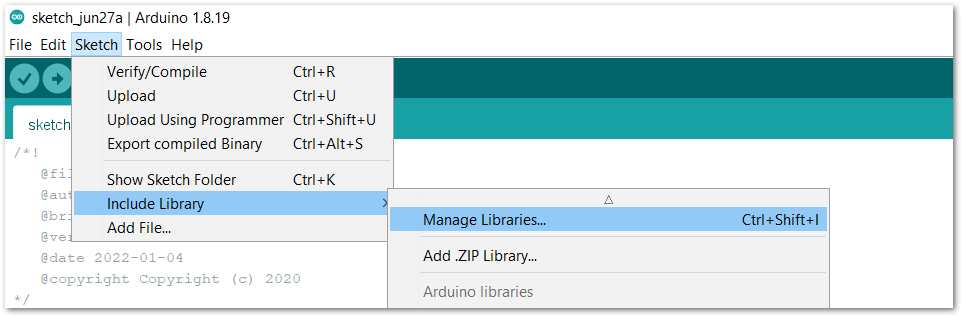 Figure 1: Navigating to Library Manager
- Type RAK12034 in the search box, and install the library, as shown in Figure 10.
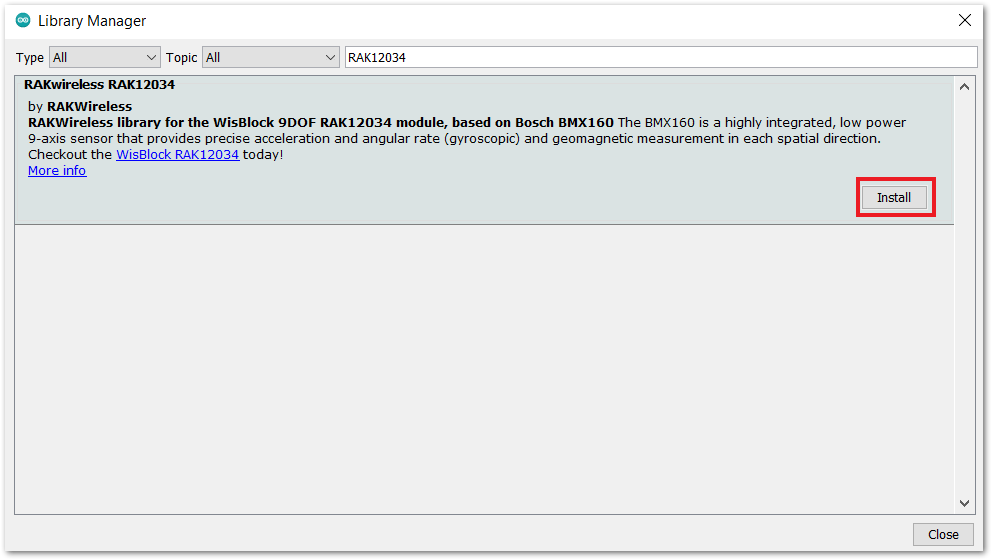 Figure 1: RAK12034 library installation
- Select the right serial port and upload the code, as shown in Figure 11 and Figure 12.
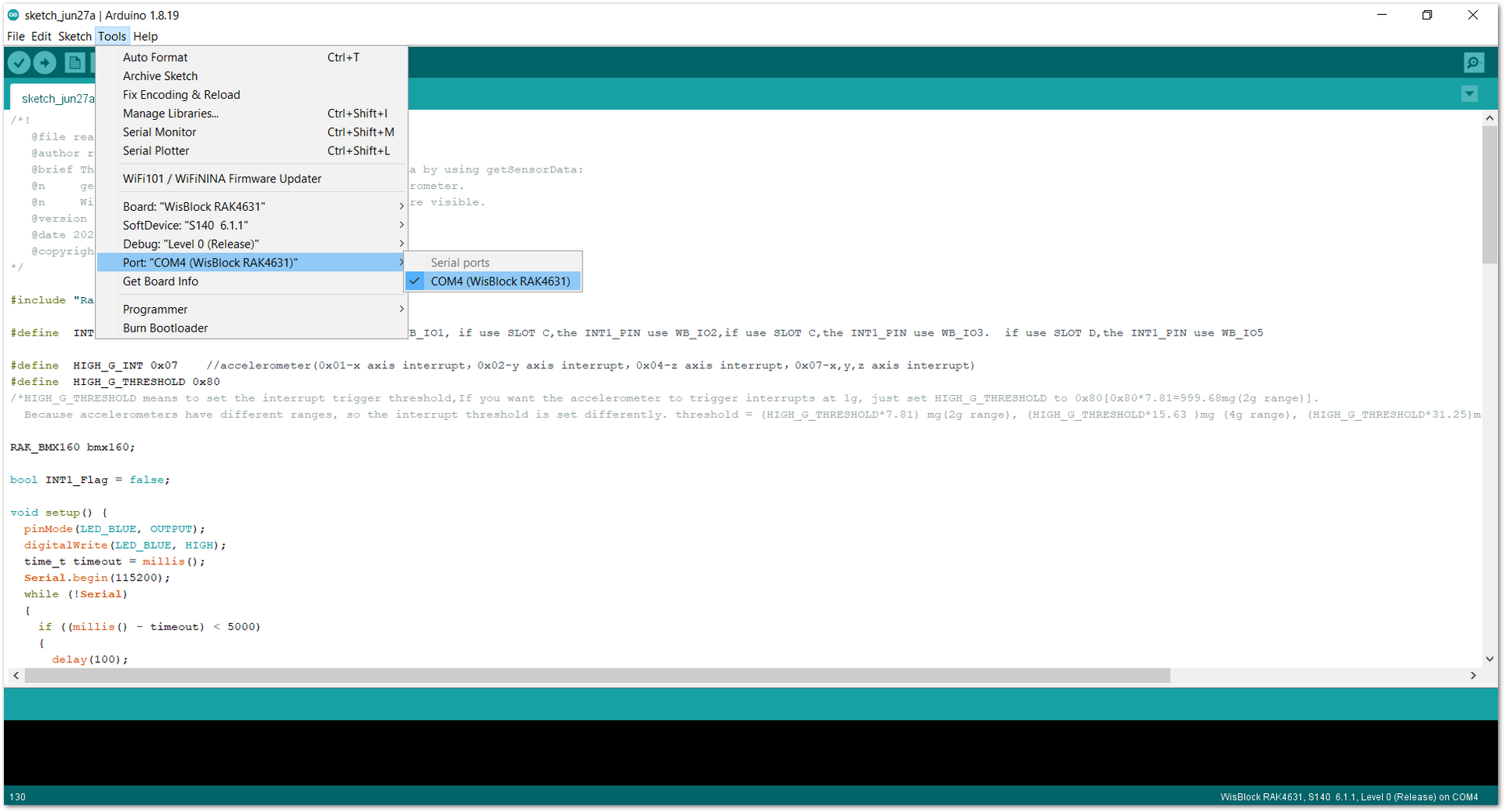 Figure 1: Selecting the correct serial port
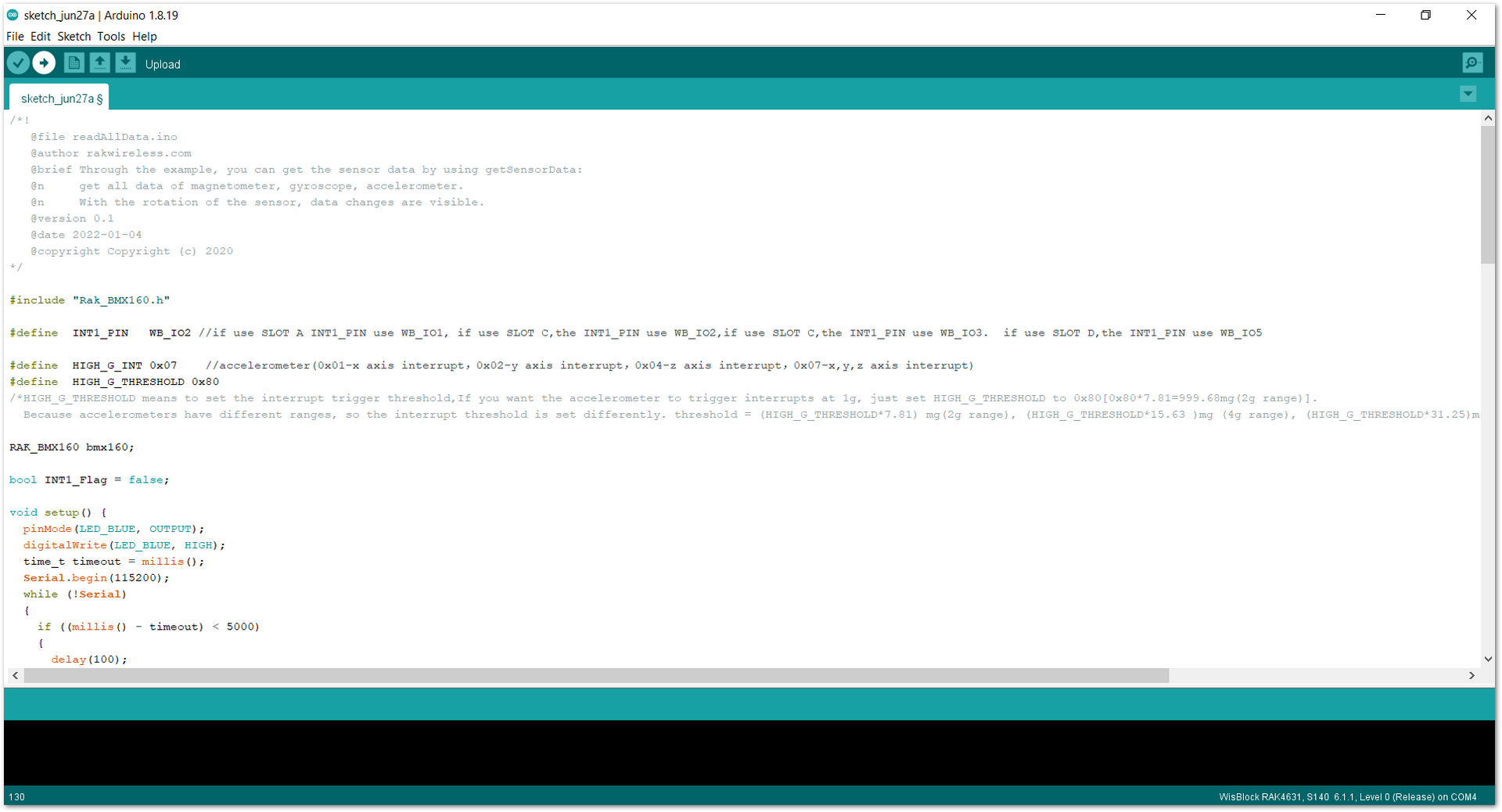 Figure 1: Uploading the sample code
RAK11200 requires the BOOT0 pin to be configured properly before uploading. If not done properly, uploading the source code to RAK11200 will fail. Check the full details on the RAK11200 Quick Start Guide.
- When you have successfully uploaded the sample code, you may open up your serial monitor, as shown in Figure 13.
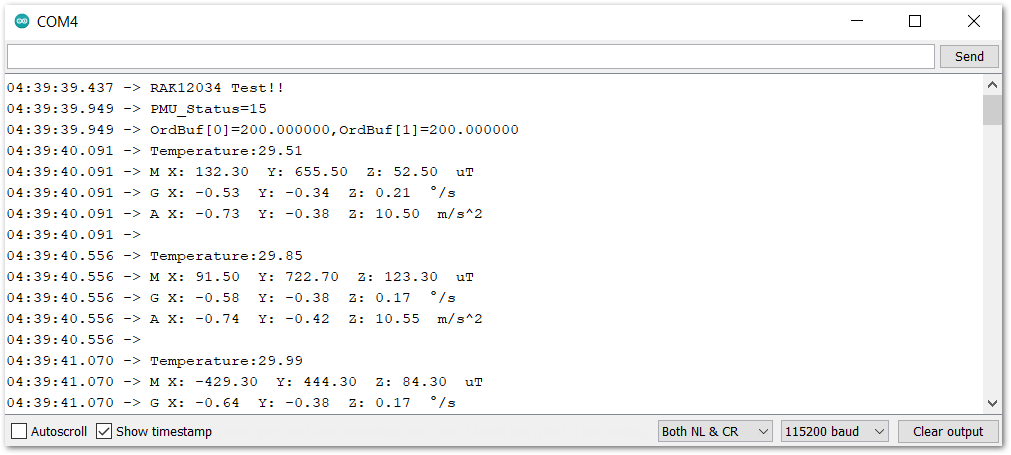 Figure 1: RAK12034 all data in serial monitor


