RAK1906 LoRaWAN Environmental Monitoring Solution
This solution shows how to create an environmental data sensor node. The sensor node measures air temperature, air humidity, barometric pressure, and gas levels. After the node joins to server successfully, it then transmits this data periodically to a LoRaWAN server.
Prerequisite
Prepare hardware and software before configuring the solution:
- 1 x WisBlock Base board
- 1 x RAK4631 WisBlock Core
- 1 x RAK1906 WisBlock Environmental Sensor
- 1 x RAK1921 WisBlock Display
- 1 x LoRaWAN gateway
- Arduino IDE
- RAKwireless Arduino BSP
- Adafruit BME680 Library
- SX126x-Arduino Library
- U8g2 Library
This guide uses the RAK4631 WisBlock Core to demonstrate the configuration process. To build the solution with the RAK11300 WisBlock Core, replace the RAK4631 with one RAK11300 and install the Arduino BSP for the RAK11300. The remaining hardware and software requirements are unchanged.
Configuring LoRaWAN
There are configurations that you need to setup to ensure that the device can join a LoRaWAN Network server.
The steps below will explain the default settings and how to configure it.
- Set up the LoRa Region.
Default region is EU868.
LoRaMacRegion_t g_CurrentRegion = LORAMAC_REGION_EU868;
You can change this to a region that is applicable to you like LORAMAC_REGION_US915, LORAMAC_REGION_AU915, etc.
- Set up the LoRaWAN activation method.
Default is OTAA.
bool doOTAA = true;
To configure the device to ABP, you need to make this boolean variable false.
- Set up the message type if confirmed or not.
Default is confirmed message.
lmh_confirm g_CurrentConfirm = LMH_CONFIRMED_MSG;
You can change to unconfirmed message by changing the value to LMH_UNCONFIRMED_MSG.
- Set up device class.
Default is Class A.
DeviceClass_t g_CurrentClass = CLASS_A;
You can change this to CLASS_B (still under development) or CLASS_C.
- Set up the keys.
- Configuration keys for OTAA Activation:
uint8_t nodeDeviceEUI[8] = {0x88, 0x88, 0x88, 0x88, 0x88, 0x88, 0x33, 0x33};
uint8_t nodeAppEUI[8] = {0xB8, 0x27, 0xEB, 0xFF, 0xFE, 0x39, 0x00, 0x00};
uint8_t nodeAppKey[16] = {0x88, 0x88, 0x88, 0x88, 0x88, 0x88, 0x88, 0x88, 0x88, 0x88, 0x88, 0x88, 0x88, 0x88, 0x88, 0x88};
- Configuration keys for ABP Activation:
uint32_t nodeDevAddr = 0x260116F8;
uint8_t nodeNwsKey[16] = {0x7E, 0xAC, 0xE2, 0x55, 0xB8, 0xA5, 0xE2, 0x69, 0x91, 0x51, 0x96, 0x06, 0x47, 0x56, 0x9D, 0x23};
uint8_t nodeAppsKey[16] = {0xFB, 0xAC, 0xB6, 0x47, 0xF3, 0x58, 0x45, 0xC7, 0x50, 0x7D, 0xBF, 0x16, 0x8B, 0xA8, 0xC1, 0x7C};
- Set up uplink period.
The default is 20000 mS.
#define LORAWAN_APP_INTERVAL 20000
Data Format
| Byte1 | Byte2 | Byte3 | Byte4 | Byte5 |
|---|---|---|---|---|
| 1 | Temperature1 | Temperature2 | Humidity1 | Humidity2 |
| Byte6 | Byte7 | Byte8 | Byte9 | Byte10 | Byte11 | Byte12 | Byte13 |
|---|---|---|---|---|---|---|---|
| Barometric1 | Barometric2 | Barometric3 | Barometric4 | Gas1 | Gas2 | Gas3 | Gas4 |
- Byte1 is a marker for the data type, here always 1.
- Every byte value is MSB first.
- Temperature is sent as two bytes, enlarged 100 times for accuracy. For example, 2510 means 25.01 C, sent as 0x09 0xCE.
- Humidity is sent as two bytes, enlarged 100 times for accuracy. For example, 4173 means 41.73%, sent as 0x10 0x4D.
- Barometric pressure is sent as four bytes, enlarged 100 times for accuracy. For example, 100945 means 1009.45 hPa, sent as 0x00 0x01 0x8A 0x51.
- Gas resistance is sent as four bytes. For example, 63560 Ohm, sent as 0x00 0x00 0xF8 0x48.
Attention
If this example is implemented for the Region US915, DR0 cannot be used because the package size is too large to fit into the allowed payload.
When you successfully uploaded the example sketch, open the Serial Monitor of the Arduino IDE to see the sensor's reading logs. If you see the logs, as shown below, then your RAK1906 is properly communicating to the WisBlock core.
10:30:07.777 -> =====================================
10:30:07.777 -> Welcome to RAK4630 LoRaWan!!!
10:30:07.777 -> Type: OTAA
10:30:07.777 -> Region: EU868
10:30:07.777 -> =====================================
10:30:07.777 -> Chip ID=0x61
10:30:12.974 -> OTAA Mode, Network Joined!
10:30:33.999 -> Sending frame now...
10:30:33.999 -> result: Tem:28.70C Hum:67.00% Pres:948.50KPa Gas:27646Ohms
10:30:33.999 -> lmh_send ok count 1
10:30:53.979 -> Sending frame now...
10:30:53.979 -> result: Tem:28.70C Hum:67.00% Pres:948.50KPa Gas:242488Ohms
10:30:54.012 -> lmh_send ok count 2
10:31:14.006 -> Sending frame now...
10:31:14.006 -> result: Tem:28.70C Hum:67.00% Pres:948.50KPa Gas:457174Ohms
10:31:14.006 -> lmh_send ok count 3
10:31:33.997 -> Sending frame now...
10:31:33.997 -> result: Tem:28.69C Hum:67.00% Pres:948.50KPa Gas:74102Ohms
10:31:34.032 -> lmh_send ok count 4
Data arrives at LoRaWAN server.
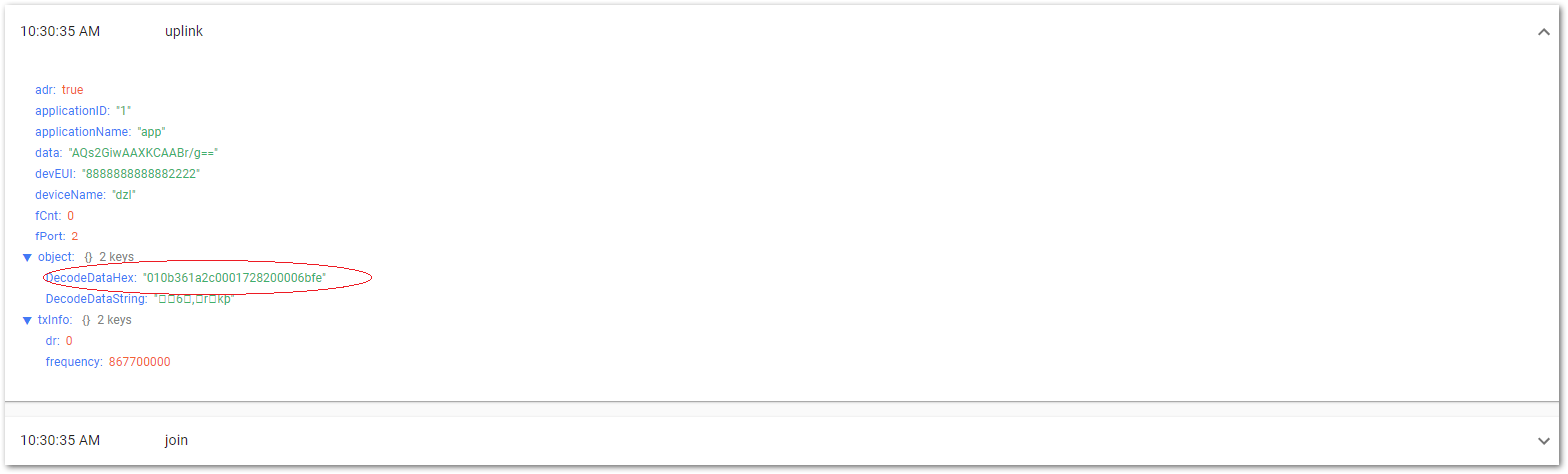 Figure 1: LoRaWAN Environment Monitoring example
Resources
The RAK1906 environmental monitoring solution is available for different WisBlock Core modules. Select the example that matches the WisBlock Core used in your project:
- For the RAK4631 WisBlock Core, refer to the RAK1906 Environmental Monitoring Solution.
- For the RAK11300 WisBlock Core, refer to the RAK1906 Environmental Monitoring Solution.


