RAK1906 WisBlock Environmental Sensor Module Quick Start Guide
The RAK1906 is a 4-in-1 Environmental Sensor board that contains the Bosch BME680 chip. It is specially designed for wearables where size and low power consumption are critical requirements. The BME680 contains a small Metal-Oxide (MOX) sensor and an I2C interface used to communicate with WisBlock Core.
The BME680 requires a burn-in period to collect accurate readings. The burn-in procedure can be achieved by reading all sensors once every 5 seconds for at least 20 minutes the first time that you use it. For each subsequent use, the readings should stabilize 2-3 minutes after power-up.
Prerequisite
- Prepare a WisBlock Base, a compatible WisBlock Core, and the RAK1906 module. For assembly instructions, refer to the RAK1906 Installation Guide.
- Install the Arduino IDE and the RAKwireless Arduino BSP to add the supported WisBlock Core boards to the Arduino Boards Manager.
- USB cable
- RAK19005 WisBlock Sensor Extension Cable (optional)
- Li-Ion/LiPo battery (optional)
- Solar charger (optional)
Initial Test of the RAK1906 WisBlock Module
- This guide uses the RAK4631 WisBlock Core for the configuration example. You can also use the RAK11200 or RAK11300 WisBlock Core.
- If you are using the RAK11200 as your WisBlock Core, the RAK11200 requires the Boot0 pin to be configured properly first before uploading. If not done properly, uploading the source code to RAK11200 will fail. Check the full details on the RAK11200 Quick Start Guide.
-
Install the RAKwireless Arduino BSP using the
package_rakwireless_index.jsonboard installation package. The supported WisBlock Core boards will then be available in the Arduino IDE. -
You need to select the WisBlock Core you have.
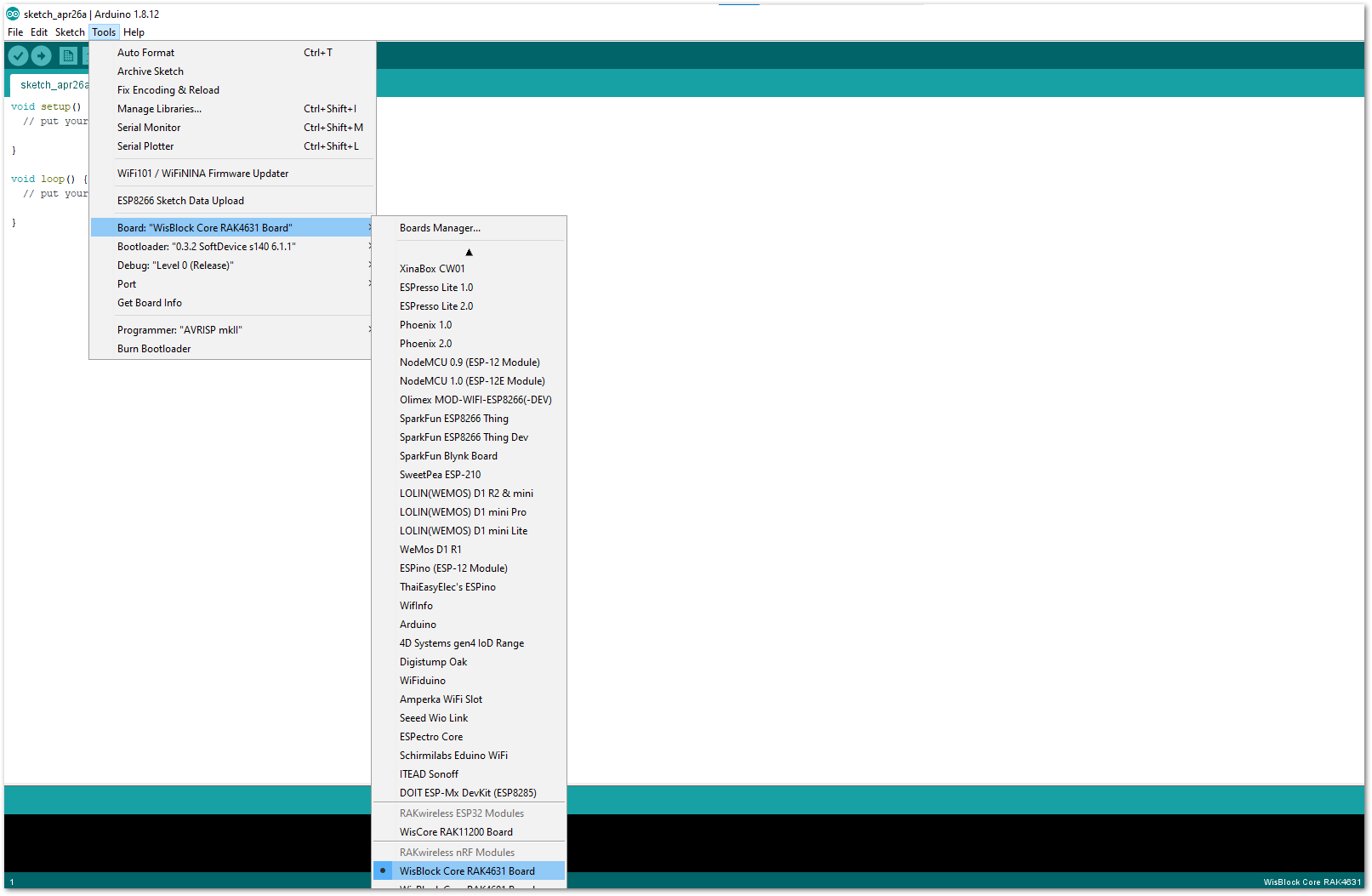 Figure 1: Selecting RAK4631 as WisBlock Core
- Copy the following sample code into your Arduino IDE:
Click to view the code
/**
   @file RAK1906_Environment_BME680.ino
   @author rakwireless.com
   @brief Setup and read values from bme680 sensor
   @version 0.1
   @date 2020-12-28
   @copyright Copyright (c) 2020
**/

#include <Wire.h>
#include <Adafruit_Sensor.h>
#include <Adafruit_BME680.h> // Click to install library: http://librarymanager/All#Adafruit_BME680

Adafruit_BME680 bme;
// Might need adjustments
#define SEALEVELPRESSURE_HPA (1010.0)

void bme680_init()
{
  Wire.begin();

  if (!bme.begin(0x76)) {
    Serial.println("Could not find a valid BME680 sensor, check wiring!");
    return;
  }

  // Set up oversampling and filter initialization
  bme.setTemperatureOversampling(BME680_OS_8X);
  bme.setHumidityOversampling(BME680_OS_2X);
  bme.setPressureOversampling(BME680_OS_4X);
  bme.setIIRFilterSize(BME680_FILTER_SIZE_3);
  bme.setGasHeater(320, 150); // 320*C for 150 ms
}

void bme680_get()
{
  Serial.print("Temperature = ");
  Serial.print(bme.temperature);
  Serial.println(" *C");

  Serial.print("Pressure = ");
  Serial.print(bme.pressure / 100.0);
  Serial.println(" hPa");

  Serial.print("Humidity = ");
  Serial.print(bme.humidity);
  Serial.println(" %");

  Serial.print("Gas = ");
  Serial.print(bme.gas_resistance / 1000.0);
  Serial.println(" KOhms");

  Serial.println();
}

void setup()
{
  // Initialize the built in LED
  pinMode(LED_BUILTIN, OUTPUT);
  digitalWrite(LED_BUILTIN, LOW);

  // Initialize Serial for debug output
  Serial.begin(115200);

  time_t serial_timeout = millis();
  // On nRF52840 the USB serial is not available immediately
  while (!Serial)
  {
    if ((millis() - serial_timeout) < 5000)
    {
      delay(100);
      digitalWrite(LED_BUILTIN, !digitalRead(LED_BUILTIN));
    }
    else
    {
      break;
    }
  }

  bme680_init();
}

void loop()
{
  if (! bme.performReading())
  {
    Serial.println("Failed to perform reading :(");
  }
  bme680_get();
  delay(5000);
}
If you experience any error in compiling the example sketch, check the updated code for your WisBlock Core Module that can be found on the RAK1906 WisBlock Example Code Repository and this sample code in Github will work on all WisBlock Core.
- Once the example code is open, install the Adafruit BME680 library by clicking the link highlighted in yellow.
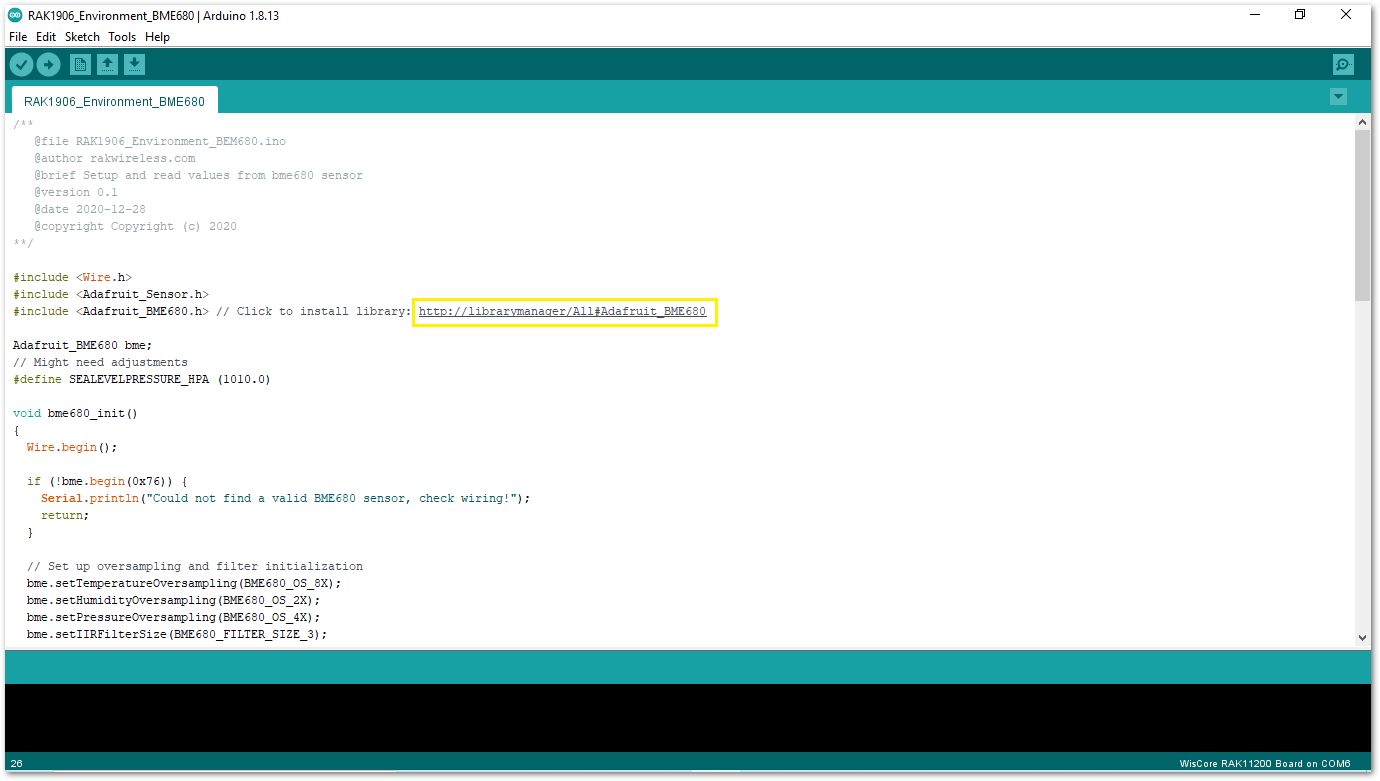 Figure 1: Select Adafruit BME680 library
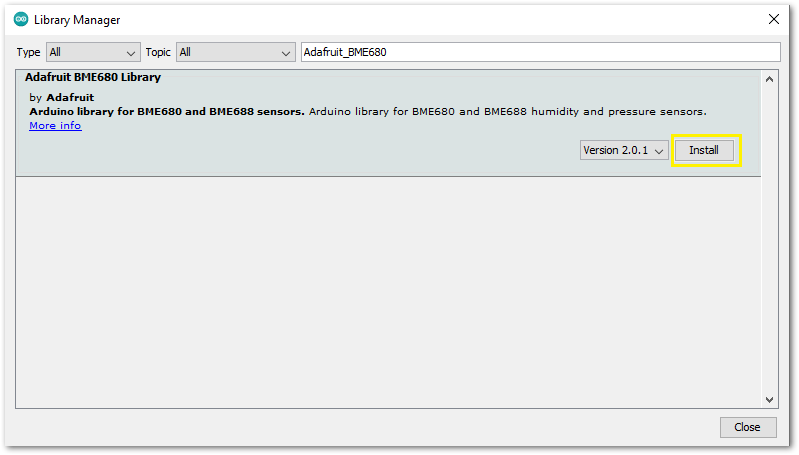 Figure 1: Installing Adafruit BME680 library
During the installation, you will be asked to install the Adafruit Unified Sensor library. Install it as well.
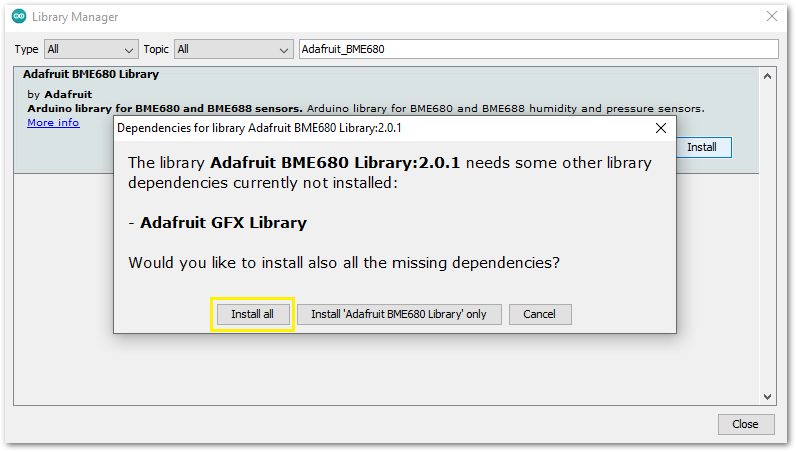 Figure 1: Installing Adafruit Unified Sensor Library
- After successful installation of the library, you can now select the right serial port and upload the code.
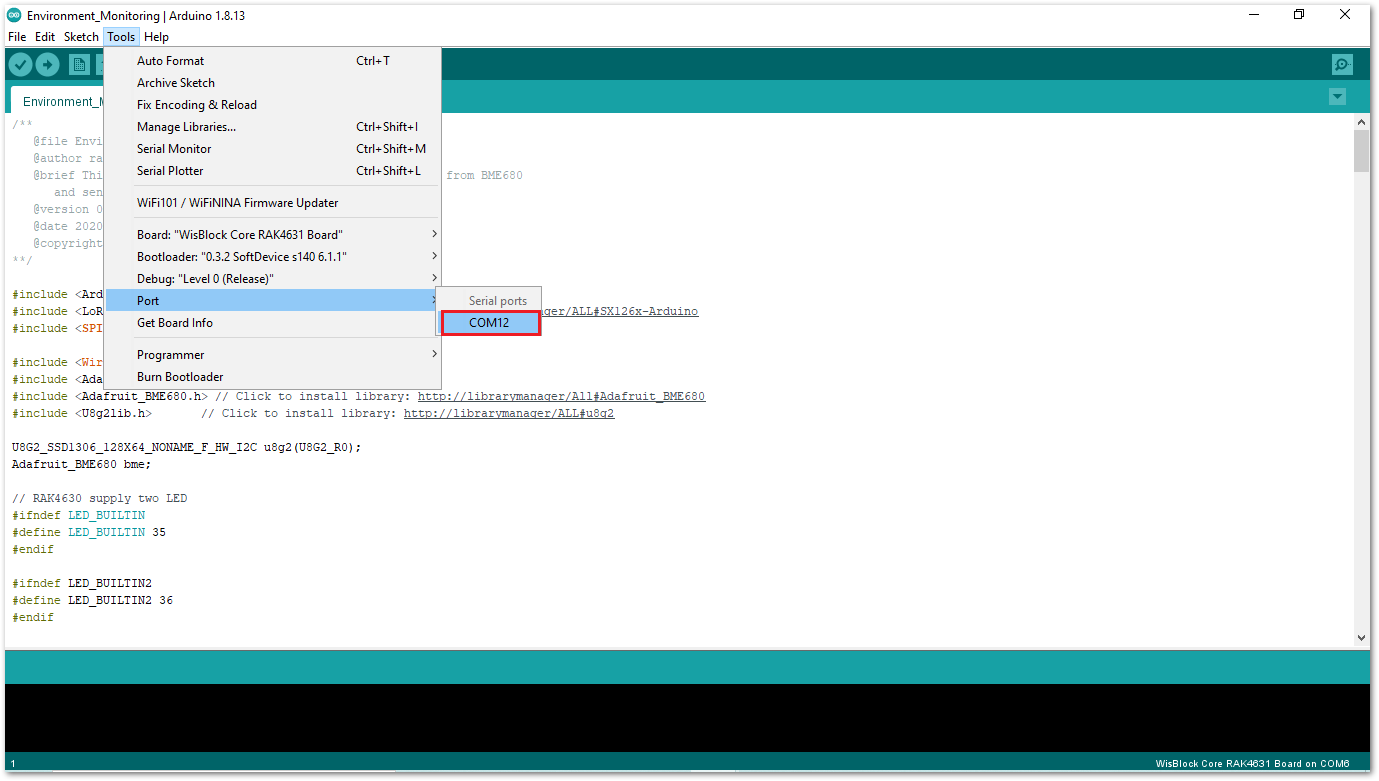 Figure 1: Selecting the correct Serial Port
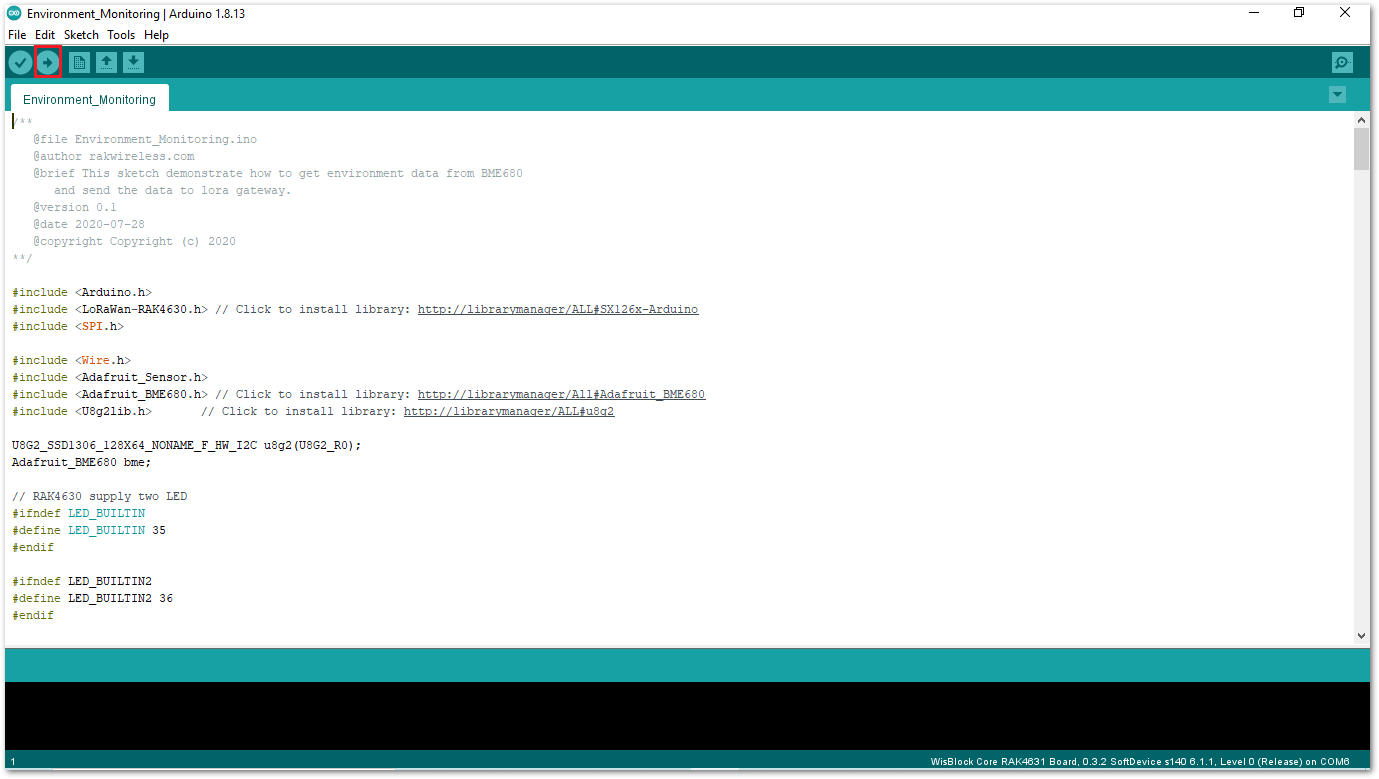 Figure 1: Uploading the RAK1906 example code
- The RAK1906_Environment_BME680 application gets BME680 sensor data every 5 seconds and prints the results on the serial port.
Temperature = 30.66 *C
Pressure = 1013.80 hPa
Humidity = 44.38 %
Gas = 3.89 KOhms

Temperature = 30.69 *C
Pressure = 1013.78 hPa
Humidity = 44.59 %
Gas = 3.88 KOhms

Temperature = 30.72 *C
Pressure = 1013.82 hPa
Humidity = 44.37 %
Gas = 3.87 KOhms
Resources
Select the sample code based on the WisBlock Core used in your RAK1906 environmental monitoring project:
- RAK4631 WisBlock Core: Environment Monitoring Sample Code
- RAK11200 WisBlock Core: Weather Display Sample Code
- RAK11300 WisBlock Core: Environment Monitoring Sample Code


