RAK7392 WisGate Connect Router Datasheet
Overview
Description
The RAK7392 WisGate Connect Router is the world's first 4-port router based on Raspberry Pi Compute Module 4 (CM4), also compatible with CM5.
The device features three 1 Gb Ethernet Ports and one 2.5 Gb Ethernet port. On top of that, the board includes a MiniPCIe slot with SPI and USB interfaces, suitable for different radio technologies such as LoRa®, mioty, and cellular. Whether used as an industrial device with custom IoT services or an office router running SOHO software, the RAK7392 provides a platform for custom networking and edge solutions.
Aside from the connectivity features, the RAK7392 has two USB 3.0 Type-A ports, a USB-C port for console access, a second USB-C port to flash a custom OS on the compute module, an accessible SD card slot to support Compute Module Lite versions, and a reset button. It also has an onboard RTC with battery backup, two notification LEDs (power and activity) and one user LED for custom notifications.
The RAK7392 comes with a compact enclosure with aluminum base that doubles as a compute module and provides holes for two SMA antennas (Wi-Fi plus whatever radio you have on the MiniPCIe slot).
For more advanced applications, it also has one WisBlock Sensor slot and one WisBlock IO slot with I2C and GPIO signals for adding industrial interfaces. This may require an enclosure different from the standard one.
The devices is powered by a 2.1 × 5.5 mm barrel connector providing 12 V. Power consumption is 5-7 W in normal operation with a CM4.
Features
Hardware
- Supports the complete range of CM4/CM5 modules, including Lite modules
- 12 VDC using standard 2.1 × 5.5 mm barrel jack with surge protection
- Three 1 Gb Ethernet and one 2.5 Gb Ethernet ports
- One mPCIe slot with USB2 interface
- Two USB 3.0 Type-A external ports
- Type-C USB socket to updating the CM4/CM5
- Accessible switch and reset button to enable flash mode
- Micro SD card socket for CM4/CM5 Lite modules
- Debug UART port with USB-C interface
- PCF85063AT RTC with battery socket and ability to wake up CM4/CM5
- ATECC608 Crypto Chip
Software
The RAK7392 supports multiple operating systems to meet different application requirements.
RAKPiOS
A custom distribution for the WisGate Connect, called RAKPiOS, has been developed. RAKPiOS is a fork of the Raspberry Pi OS, pre-installed at the factory, featuring all the necessary drivers for the device, security enhancements, helper scripts, and Docker preinstalled. You can easily deploy several IoT services from a curated list of Docker containers available from the device.
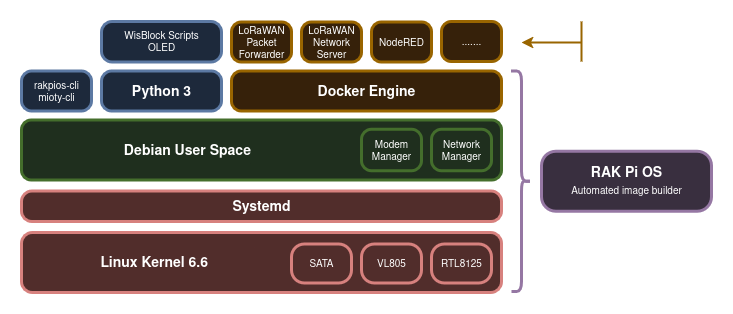 Figure 1: Software structure
ConnectOS
ConnectOS is an OpenWrt-based operating system designed for WisGate Connect gateways. It provides web-based gateway management and supports LoRaWAN, mioty, and Docker applications.
Typical Application
- 8-channel LoRaWAN® gateway.
- mioty base station.
- Zigbee or Z-Wave router.
- Generic purpose router/switch with cellular backhaul.
- Edge gateway or standalone gateway (with embedded LNS and application services)
Specifications
Overview
 Figure 1: RAK7392 block diagram
Hardware
The hardware specification is divided into three parts:
- Power Source and Backhaul Connectivity: Details the primary specifications for power and network connectivity options.
- Interfacing Options: Explains the various interfacing capabilities available on the device.
- Pinouts: Provides the pinout details for the RAK7392 WisGate Connect Router.
Main Specifications
Power
| Feature | Value |
|---|---|
| DC inputs | 1 (2.1 × 5.5 mm DC jack) |
| DC voltage | 12 V |
Wireless (Optional)
| Feature | Value |
|---|---|
| Wireless 2.4 GHz generation | Wi-Fi 5 |
| Wireless 2.4 GHz standards | IEEE 802.11 b/g/n/ac |
| Wireless 5.0 GHz generation | Wi-Fi 5 |
| Wireless 5.0 GHz standards | IEEE 802.11 b/g/n/ac |
| Bluetooth Low Energy | 5.0 |
Ethernet
| Feature | Value |
|---|---|
| 1 GB Ethernet Port | 3 |
| 2.5 GB Ethernet Port | 1 |
Peripherals
| Feature | Value |
|---|---|
| mPCIe slots | 1 (USB, SPI, UARTand GPIO) |
| USB3 ports | 2 |
System Features
| Feature | Value |
|---|---|
| Real-time clock | Yes |
| Operating temperature | -20º C to 85º C (except for USB3 and Buzzer which are rated 0-70º C) |
Compute Module Connector
The RAK7392 is based on Raspberry Pi CM4. The following table shows the CPU features:
| Feature | Description |
|---|---|
| CPU | Broadcom BCM2711 |
| Architecture | ARMv8 Cortex-A72 64 bits |
| CPU core count | 4 |
| CPU nominal frequency | 1.5 GHz |
| Operating system | RAKPiOS |
| RAM | 1, 2, 4, or 8 GB DDR4-3200 |
| Storage | 0, 8, 16, or 32 eMMC |
The RAK7392 is also compatible with the Raspberry Pi CM5. The following table shows the CPU features:
| Feature | Description |
|---|---|
| CPU | Broadcom BCM2712 |
| Architecture | ARMv8 Cortex-A76 64 bits |
| CPU core count | 4 |
| CPU nominal frequency | 2.4 GHz |
| Operating system | RAKPiOS |
| RAM | 2, 4, 8, or 16 GB DDR4-4267 |
| Storage | 0, 16, 32, or 64 eMMC |
PSU Input
The device can be powered through the 2.1 × 5.5 mm center-positive 12 VDC barrel connector. The exact current required from the +12 V PSU is dependent on the application and what is connected to the RAK7392. It is recommended to budget 25 W for the CM4/CM5.
Ethernet
The RAK7392 features three 1 Gb Ethernet ports and one 2.5 Gb port.
The CM4/CM5 module includes a built-in 1 Gb Ethernet interface directly connected to eth1. The other ports are connected through a PCIe switch with PCI-to-Ethernet bridges. For high-speed network requirements, the 2.5 Gb Ethernet port can be used. This port connects to the PCI bus, which is shared with two other Ethernet ports and the USB 3.0 ports.
The actual maximum throughput depends on CPU usage and the other peripherals connected to the board. Under normal operating conditions and without modifying the CM4/CM5 configuration, speeds of 1.8–2.0 Gbps can typically be achieved on the 2.5 Gb Ethernet port, with an aggregated throughput of more than 4 Gbps across all four ports.
USB 3.0 Hub
The RAK7392 board features an onboard PCIe to USB 3.0 hub that provides two USB 3.0 interfaces, both available from the outside. Note that the PCIe line is shared with two 1 Gb Ethernet ports and the 2.5 Gb Ethernet port.
There is an internal current limit switch to provide VBUS to the USB connectors. The current limit is set to approximately 1 A.
USB Type-C Flash Connector
The Type-C Flash connector is used to flash the eMMC on CM4/CM5 non-lite versions via rpiboot. When a Type-C cable is connected, the USB 2.0 hub is automatically disabled, and the CM4/CM5 functions as a USB device.
To enable flash mode on the CM4/CM5 module, set the flash switch to ON and press the reset button or power cycle the device.
Micro SD Card Socket
The micro SD Card socket is a PUSH-PUSH socket. To release the micro SD Card, gently push it inward until it ejects. This socket is only used with CM4/CM5 Lite modules that do not have onboard eMMC storage.
Real-Time Clock
The RAK7392 has a PCF85063AT RTC onboard. A battery socket is provided for a CR2032 battery. On initial setup, the CLKOUT of the RTC should be disabled to save power. The alarm output of the RTC is used to wake up the CM4/CM5 from a previous halt mode. If an alarm goes off during normal operation the CM4/CM5 will be reset, this can be used as a watchdog timer if required.
mPCIe Interfaces
The RAK7392 has one mPCIe interface, which can connect different modules, making the product very flexible. The following products are supported:
- RAK5146-USB LoRaWAN Concentrator
- RAK2287-USB LoRaWAN Concentrator
- RAK2247-USB LoRaWAN Concentrator
- RAK8213 EG95-E/NA LTE Module (external SIM slot)
- Miromico mioty Edge Card
- Z-Wave.Me mPCIe
- Mixtile Zigbee & Z-Wave mPCIe
The mPCIe interface schematic:
 Figure 1: mPCIe Schematic
Available signals:
- SPI0.0 (
/dev/spidev0.0) - UART0 (GPIO 14/15)
- GPIO17 is reset signal (SX130X_RESET).
- GPIO25 is connected to pin 23 (RESET_GPS on some LoRaWAN concentrators).
- GPIO26 is connected to pin 19 (PPS on some LoRaWAN concentrators).
- GPIO27 is connected to pin 13 with a pull-up (!WAKE on cellular modems).
MiniPCIe slot #1 has its UART connected to the main UART on the CM4/CM5. To use a LoRaWAN concentrator with GPS support over UART, install it in this slot. Then, disable the login shell and enable the serial port using raspi-config to access GPS data on /dev/ttyAMA0 or /dev/ttyS0.


