MQTT Integration
Configure MQTT integration for the BACnet Gateway to publish equipment data or data point information to an MQTT broker.
The BACnet Gateway Extension supports dual services: BACnet/IP Gateway and MQTT. If you need to integrate with third-party MQTT applications, follow the steps below to configure the MQTT settings.
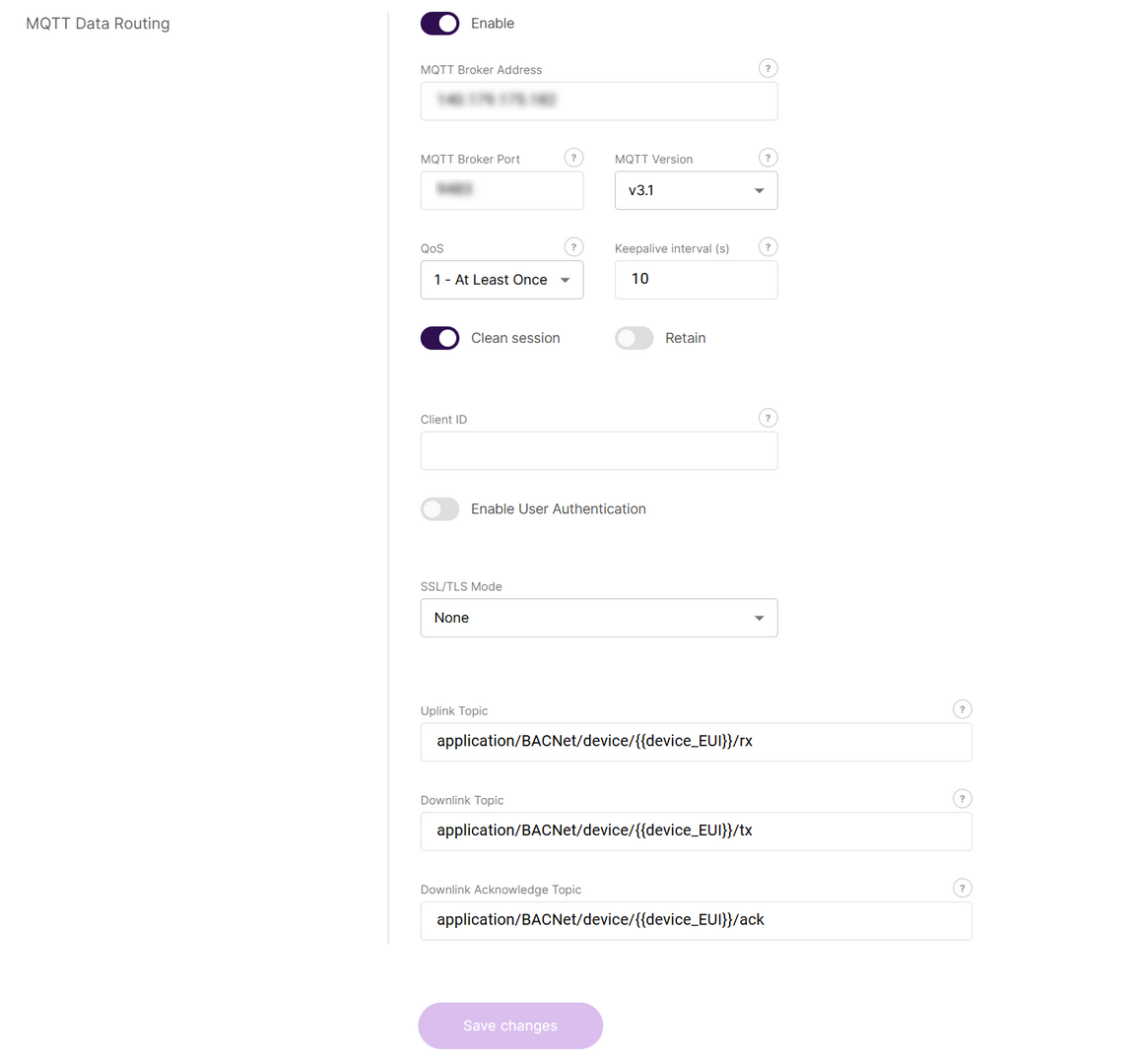 Figure 1: Configure MQTT Integration
- In the MQTT Data Routing section, click the Enable button to activate MQTT integration.
- Configure the MQTT integration parameters:
- MQTT Broker Address: The hostname or IP address of the MQTT server to connect to.
- MQTT Broker Port: The port number for the MQTT server (default: 1883 for unencrypted, 8883 for TLS).
- MQTT Version: Select the MQTT protocol version to match your server.
- QoS: Quality of Service level for message delivery
- 0: At most once
- 1: At least once
- 2: Exactly once
- Keepalive interval (s): Heartbeat interval in seconds to keep the connection alive between client and broker.
- Clean session: If enabled, the broker does not store session data when the client disconnects.
- Retain: If enabled, the broker retains the last message sent to each topic.
- Client ID: Unique identifier for this MQTT client, used to distinguish between multiple clients.
- Enable User Authentication: Requires username/password login to the MQTT broker for enhanced security.
- Username: The username used to authenticate with the MQTT broker.
- Password: The password corresponding to the above username.
- SSL/TLS Mode: Option to enable encrypted communication between client and broker.
- None: No encryption
- CA certificate: The CA root certificate to verify the MQTT broker’s identity.
- Client certificate: The X.509 certificate for client authentication (for mutual TLS).
- Client key: The private key file matching the client certificate.
- Key Pass Phrase (optional): The password for the encrypted private key file.
- TLS Version: Specify the TLS version for securing the connection
- Uplink Topic/Downlink Topic/Downlink Acknowledge Topic: MQTT topics used by the gateway to publish and receive messages to/from the broker.
- Click Save changes.
After MQTT integration is enabled, the BACnet Gateway publishes device uplink data to the configured MQTT broker in JSON format.
Click to view the structure of the published message
{
  "deduplicationId": "89a5c63d-8371-4cb9-93b7-9ba71888b785",
  "time": "2026-01-21T06:41:47.256070904+00:00",
  "deviceInfo": {
    "tenantId": "52f14cd4-c6f1-4fbd-8f87-4025e1d49242",
    "tenantName": "ChirpStack",
    "applicationId": "f07368c1-00cd-4edc-b531-ebd61a273977",
    "applicationName": "BACNet",
    "deviceProfileId": "e392f363-f742-4096-b143-9b71f7869e60",
    "deviceProfileName": "20100",
    "deviceName": "20100",
    "devEui": "70b3d58c9000042b",
    "deviceClassEnabled": "CLASS_A",
    "tags": {
      "payload_type": "NONE",
      "integration_http_enabled": "false"
    }
  },
  "devAddr": "0241e033",
  "adr": true,
  "dr": 5,
  "fCnt": 20,
  "fPort": 10,
  "confirmed": false,
  "data": "ASFkAQABHwAAAAA=",
  "rxInfo": [
    {
      "gatewayId": "ac1f09fffe1057bd",
      "uplinkId": 1878154886,
      "nsTime": "2026-01-21T06:41:47.006301626+00:00",
      "rssi": -103,
      "snr": 8.8,
      "location": {
        "source": "GPS"
      },
      "context": "rM+kgw=="
    }
  ],
  "txInfo": {
    "frequency": 923200000,
    "modulation": {
      "lora": {
        "bandwidth": 125000,
        "spreadingFactor": 7,
        "codeRate": "CR_4_5"
      }
    }
  },
  "regionConfigId": "as923",
  "decodedPayload": [
    {
      "name": "Temperature",
      "channel": 1,
      "value": 25.6,
      "unit": "°C"
    },
    {
      "name": "Humidity",
      "channel": 2,
      "value": 28.7,
      "unit": "%"
    },
    {
      "name": "Battery",
      "channel": 3,
      "value": 100,
      "unit": "%"
    },
    {
      "name": "HumidityLowAlart",
      "channel": 4,
      "value": 0,
      "unit": null
    },
    {
      "name": "HumidityHighAlart",
      "channel": 5,
      "value": 0,
      "unit": null
    },
    {
      "name": "TemperatureLowAlart",
      "channel": 6,
      "value": 0,
      "unit": null
    },
    {
      "name": "TemperatureHighAlart",
      "channel": 7,
      "value": 0,
      "unit": null
    },
    {
      "name": "ButtonPressed",
      "channel": 8,
      "value": 1,
      "unit": null
    }
  ]


