RAK7590 Field Tester Pad
What Is Field Test Pad?
The RAK7590 Field Test Pad is a handheld device designed for indoor and outdoor LoRaWAN network testing and deployment verification. It enables real-time measurement of uplink and downlink signal quality (RSSI, SNR) and packet loss rate, helping users evaluate network coverage during installation or maintenance.
This device features a large LCD screen for on-device parameter configuration and test result visualization. With its built-in GPS module, users can associate test data with precise location information and view signal distribution on the map. It also supports test report viewing and downloading for efficient data tracking and comparison.
The RAK7590 works with the Field Test Data Processor Extension on WisGateOS 2, which performs backend data parsing and analysis to deliver a complete LoRaWAN® network testing workflow from data collection to performance evaluation.
Key Features
- Designed based on the Raspberry Pi CM4 platform.
- LoRaWAN® 1.0.3 compliant, supporting RU864, IN865, EU868, US915, AU915, KR920, and AS923-1/2/3/4 bands.
- Supports TTN, ChirpStack, AWS IoT Core for LoRaWAN, and private networks using WisGateOS 2 Built-in Network Server (no Internet required).
- Map display with offline map support, enabling field testing in areas without Internet connectivity.
- Supports manual location labeling for marking specific test points.
- Heatmap visualization for quick signal-quality assessment.
- Built-in test report viewer with export options for data comparison and analysis.
- Equipped with a 20,000 mAh (3.7 V) rechargeable lithium battery, providing over 11 hours of operation on a full charge.
- Supports dual power modes: USB Type-C external power input or internal rechargeable battery.
- Built-in GPS, Wi-Fi, and BLE antennas.
- External LoRa® antenna for enhanced RF performance.
- Supports OTAA activation and Class A modes.
- Integrated RTC with up to 5 years of operation using its auxiliary power source.
- Features a 7-inch, 1024 × 600 resolution LCD screen.
How It Works
System Components
| Component | Description |
|---|---|
| Field Tester Pad | Sends LoRaWAN uplinks and displays real-time real-time link metrics such as RSSI, SNR, and packet-loss rate. |
| LoRaWAN Gateway | Receives uplinks from the Field Tester and forwards them to the configured LoRaWAN Network Server (LNS) |
| Network Server | Handles LoRaWAN sessions and provides uplink/downlink communication. Supported platforms include:
|
| Field Test Data Processor Extension | Installed on a RAK gateway, it subscribes to uplinks through MQTT, processes signal-quality details locally, and sends the computed results back to the Field Tester, providing a complete, real-time view of network quality. |
System Workflow Diagram
This diagram shows how the Field Tester, gateway, and LNS work together to measure LoRaWAN network coverage:
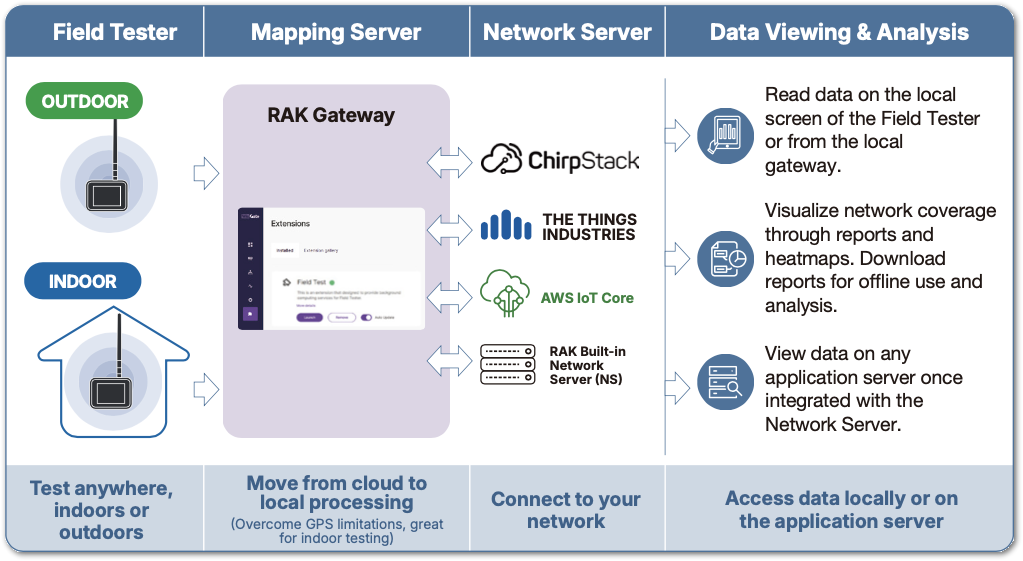 Figure 1: Field Tester Roadmap
Uplink Data Flow
- The Field Tester periodically sends uplink packets containing GPS coordinates or manually assigned location labels.
- The gateway receives these uplinks and forwards them to the LoRaWAN Network Server.
- The Network Server publishes the decoded uplink data to the MQTT broker.
- The Field Test Data Processor Extension subscribes to these MQTT topics, processes the incoming messages, and calculates key performance metrics such as RSSI, SNR, and packet-loss rate.
Downlink Data Flow
- The extension generates a downlink message containing the computed signal-quality results.
- The LoRaWAN Network Server schedules the downlink, and the gateway sends it to the Field Tester.
- The Field Tester updates its user interface with a complete, real-time representation of the LoRaWAN link performance.
Work Modes
Field Tester Pad offers two operational modes, depending on whether the Field Test Data Processor Extension is installed and properly connected:
| Mode | Description |
|---|---|
| Field Tester Mode | Full-feature mode. The RAK gateway runs the Field Test Data Processor Extension, computes uplink statistics, and sends enhanced results back to the Pad. The Pad Displays both uplink and downlink metrics. |
| LinkCheck Mode | Basic mode. Used when no extension is installed. The Pad only receives standard LoRaWAN downlinks and displays basic RSSI/SNR and number of responding gateways based on LinkCheck MAC responses. |
Typical Applications
Field Tester Pad is ideal for a variety of real-world LoRaWAN validation scenarios:
- Pre-deployment testing: Check signal conditions at potential gateway locations to choose the best installation point.
- Post-deployment validation: Walk through the site to confirm actual coverage and quickly spot weak-signal areas.
- Indoor / GPS-denied testing: Use manual location tags and offline maps to record accurate test points inside buildings.
- Outdoor range testing: Measure how far the network can reliably reach and identify coverage boundaries.


