RAK7432 WisNode Bridge Analog Datasheet
Overview
Description
RAK7432 WisNode Bridge Analog is a 4-20 mA analog to LoRaWAN converter designed for industrial applications. It can read values from devices supporting the current loop.
RAK7432 can operate in all of the LoRaWAN bands within the standard parameters defined by the LoRa Alliance. Its line of sight range is 15+ km and in industrial cases, where there are heavy obstructions in the path of the RF signal performance is improved compared to conventional wireless systems due to the characteristics of LoRa as a modulation technique. This allows for consistently good signal quality within large factories, densely populated offices, storehouses, etc.
Together with the RAK gateway and LoRa Server products, it can easily and quickly build a wireless industrial system or extend an already existing one. It adopts industrial protection design, supports a wide range voltage supply supports wall mounting and DIN rail installation and facilitates field installation and use.
Features
- LoRaWAN 1.0.3 protocol stack, supports Class A, B, and C modes
- Low-power consumption mode, wakes up regularly to collect analog input data and report
- 4-20 mA acquisition accuracy 0.01 mA, error range 0.1%
- Remote management function
- Supports active query function. The remote server sends query commands to read 4-20 mA analog data
- Supports external LoRa antennas
- Maximum LoRa transmission power: 20 dBm
- IP31 protection
- Mounting options: Wall mounting, DIN rail, & Magnetic installation
Specifications
Networking Applications
RAK7432 WisNode Bridge Analog can convert 4-20 mA analog data into LoRaWAN wireless packets through ADC, which can be sent to the cloud via a standard LoRaWAN gateway. Using the RAK7432, you can extend your analog sensors and devices into a wireless network solution.
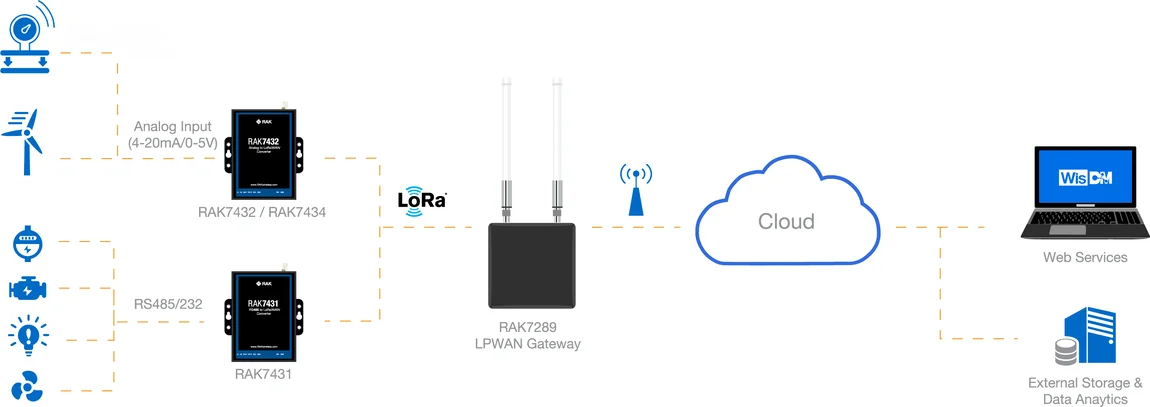 Figure 1: RAK7432 WisNode Bridge Analog network structure
Technical Specifications
The table below shows the full specification of the RAK7432 WisNode Bridge Analog.
| Parameter | Value | Remarks |
|---|---|---|
| LoRaWAN Protocol | LoRaWAN 1.0.3 | |
| LoRa Frequency | RU864, IN865, EU868, US915, AU915, KR920, KR923 | Different models support different frequency bands |
| LoRaWAN Mode | Class A/B/C | |
| LoRa Tx Power | 20 dBm | |
| LoRa Antenna interface | RP-SMA FEMALE, External Omnidirectional Antenna | |
| 4-20 mA input | 2 inputs/channels | |
| 4-20 mA input interface range | 0-24 mA | |
| Interface protection | 18 kV HBM protection | |
| Interface protection | 13 kV IEC61000-4-2 contact discharge | |
| Interface protection | 4 kV IEC61000-4-4 fast transient burst | |
| Input Voltage | 12 V - 24 V | 5 V for Micro USB |
| Rated Power | Maximum 1 W | |
| Output Voltage | 12 VDC | |
| Configuration Interface | Micro USB | |
| Indicator LED | Power LED, Data LED | |
| Housing Material | Metal | |
| Dimension | 93.6 x 100.3 x 24 mm | |
| Protection Grade | IP31 | |
| Installation | Wall mounting, DIN rail installation, magnetic mounting | The magnetic mounting requires optional accessories |
| Working Temperature | -30° C ~ 65° C | |
| Storage Temperature | -40° C ~ 85° C |
Hardware
The hardware specification covers not only the interfacing and detailed parameters and functions of the RAK7432 WisNode Bridge Analog. It also includes the installation of which different types of mounting are presented.
Interfaces
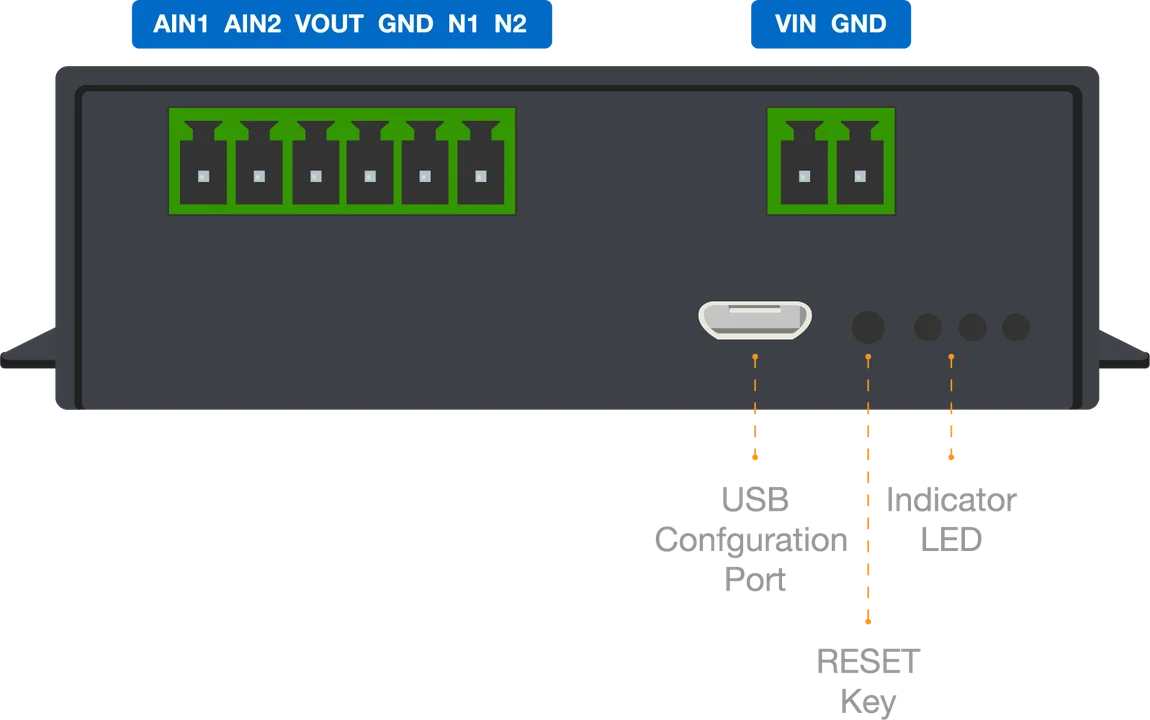 Figure 1: RAK7432 WisNode Bridge Analog bottom panel
Power Supply and Configuration Interface
The RAK7432 WisNode Bridge Analog can be powered through either the DC terminal or the Micro USB port.
- DC terminal: Supports 12–24 VDC input. The rated power of the device is 1 W.
- Connect Vin to the positive terminal of the power supply.
- Connect GND to the negative terminal of the power supply.
- Micro USB port: Supports 5 V / 500 mA DC input and can also be used as the device configuration interface.
Reset Key and Indicator LED
| Item | Description |
|---|---|
| Reset key | Press the reset key shortly to restart the system |
| Red LED | Power indicator (Only valid when using the USB power) |
| Green LED | System working indicator, flashing when there is data transmission |
Installation
RAK7432 allows for three installation methods: wall mounting, DIN rail installation, and magnetic mounting. The wall installation and the DIN rail installation is the standard installation mode. The accessories required for magnetic mounting are optional.
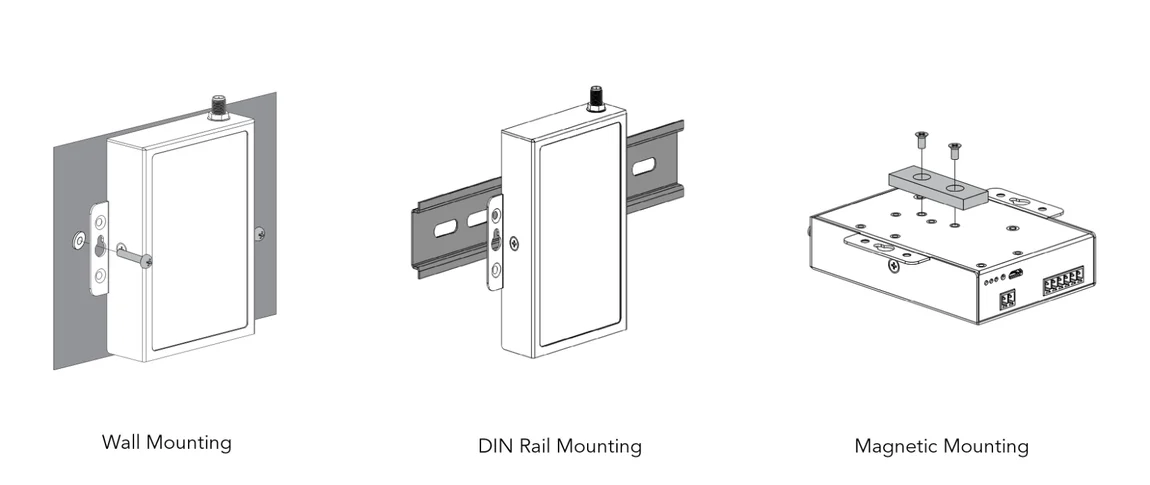 Figure 1: Different types of mounting


