RAK13001 WisBlock Relay IO Module Quick Start Guide
Prerequisite
- Assemble the RAK13001 with a WisBlock Base and WisBlock Core by following the RAK13001 Installation Guide.
- Download and install the Arduino IDE, then add the RAKwireless Core boards by installing the RAKwireless Arduino BSP.
- USB Cable
- Li-Ion/LiPo battery (optional)
- Solar charger (optional)
- LED
- 1 kΩ Resistor
Software Configuration and Example
The relay is used as a wet contact. Before connecting high-voltage modules to the RAK13001, always follow safety precautions.
The accessible pin assignments for the RAK13001 in the Arduino IDE are:
WB_IO3— Optocoupler Input pinWB_IO4— Relay Output pin
You can connect any module to the RAK13001 as long as it operates within its recommended voltage rating.
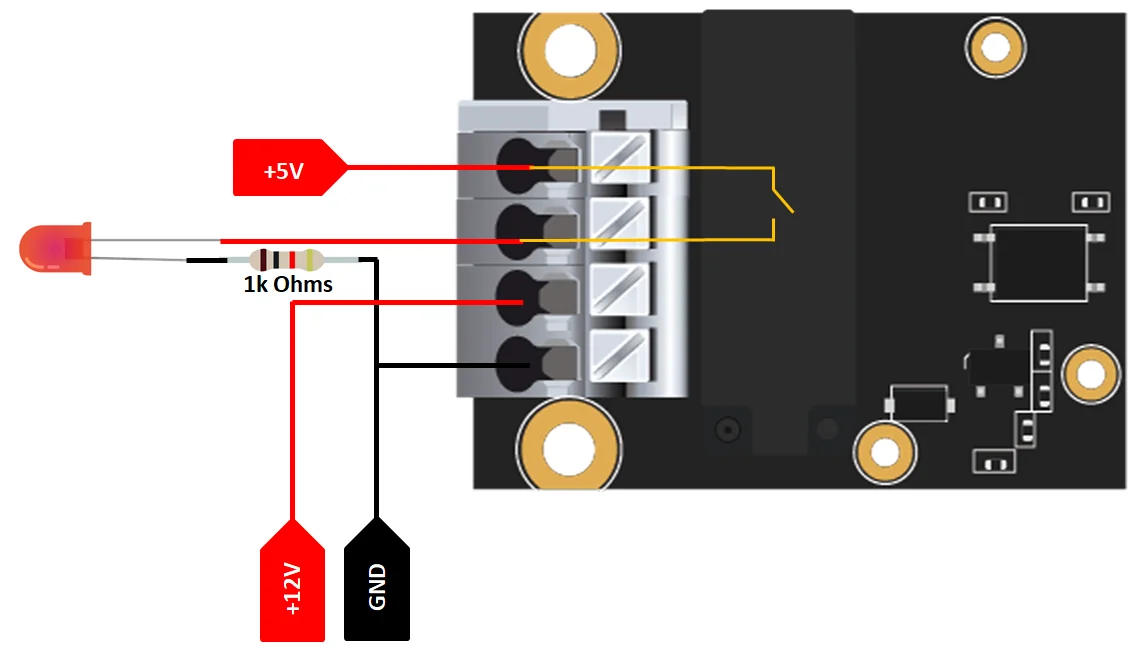 Figure 1: RAK13001 switching the LED
Quick links to the software guide for the specific WisBlock Core module you use:


