API Integration
Overview
The WisDM API enables secure, programmatic access to WisDM data through API key authentication. It allows third-party systems to integrate, automate, and analyze operations using WisDM's RESTful interface.
- Available for Enterprise and On-Demand subscription tiers.
- Bound to an Organization and managed by its Administrator.
- Each API key has an independent permission scope and can be activated, revoked, or regenerated at any time.
To begin any integration, you must first generate an API key, which serves as the authentication credential for your external system.
WisDM API Key
Create Your API Key
- From the left menu, navigate to Settings > API Key.
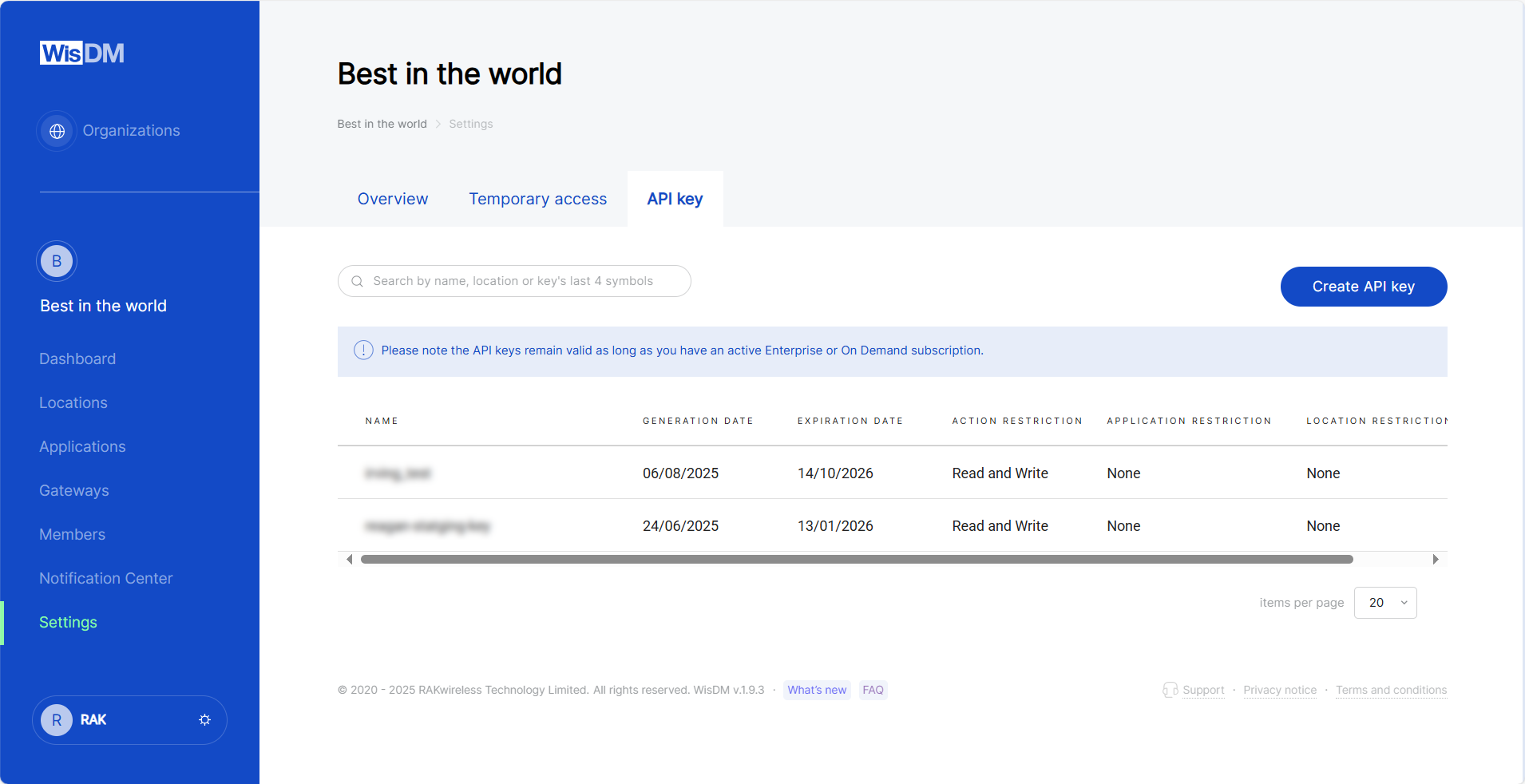 Figure 1: API overview
- Click Create API Key in the top-right corner.
- Enter a name for the new key.
- Configure the key settings:
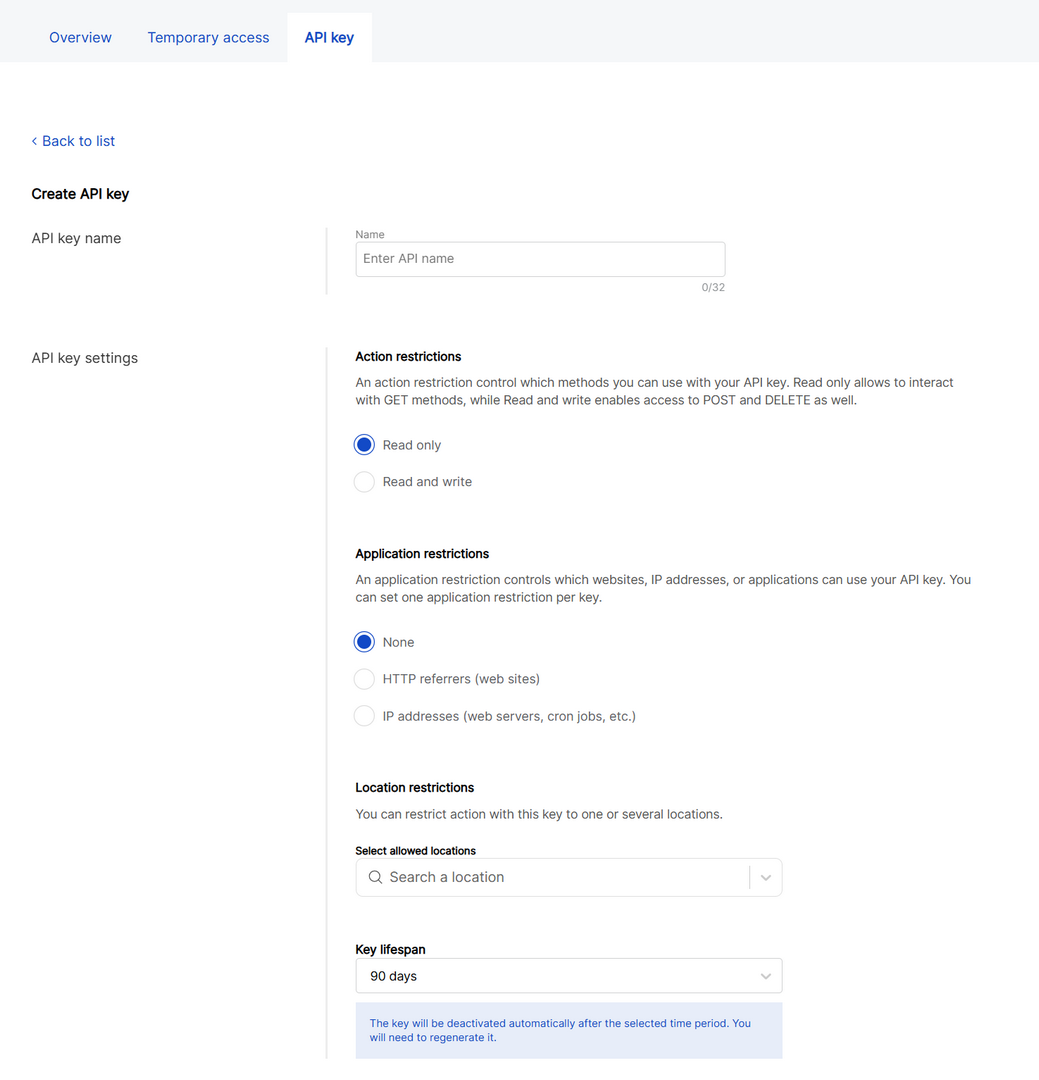 Figure 1: Configure the key
- Action restrictions
- Read only: Grants access to
GETmethods (for data retrieval only). - Read and Write: Grants access to
POSTandDELETEmethods. You must explicitly select the write permissions required for your integration.Write Permission Description Assign gateway to location Registers unassigned gateways to a specific location. Create location (BS) Creates new locations configured in Basics Station mode. Firmware upgrade Remotely upgrades or downgrades gateway firmware. Network interface settings Modifies WAN/LAN interface configurations and priority settings. Reboot gateway Remotely reboots a gateway. Reset password Resets the local root password of a gateway. Solar battery monitoring (enable/disable) Enables or disables solar battery monitoring services. System settings Updates system-level configurations such as syslog settings.
- Read only: Grants access to
- Application restrictions
- None: No restriction; the key can be used from any source.
- HTTP referrers (websites): Restricts API use to specific web origins.
- IP addresses (web servers, cron jobs, etc.): Allow API use only from specified IP addresses.
- Location restrictions
- Optionally limit API use to one or more locations.
- Key Lifespan
- Defines the validity period. The key will automatically expire after this chosen period.
- After configuring the settings, click Generate key.
- Enter your WisDM account password and the 6-digit verification code (if enabled) from your authenticator app. Then, click Generate key again to confirm.
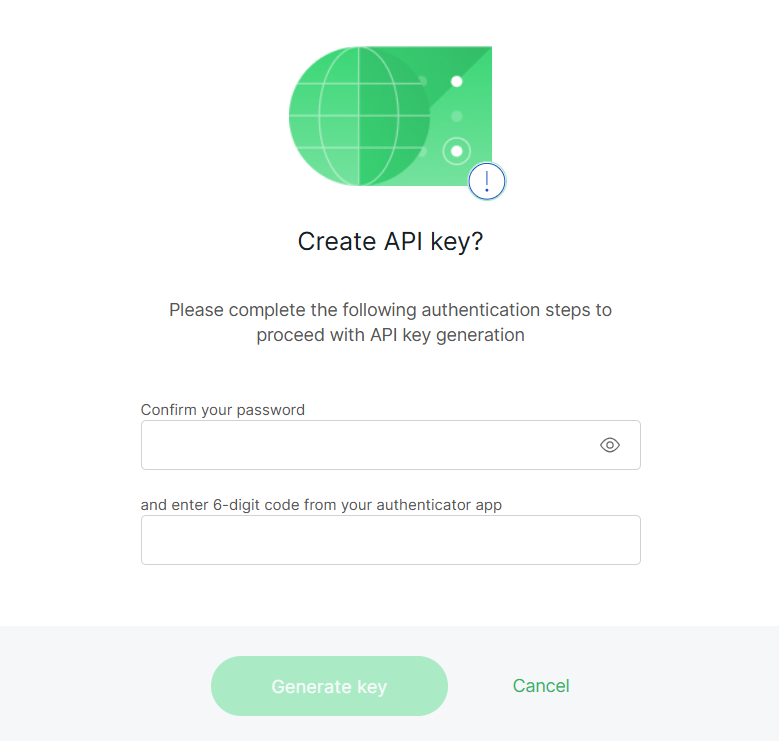 Figure 1: Confirm API key creation
- Once generated, a pop-up window will display your new API key.
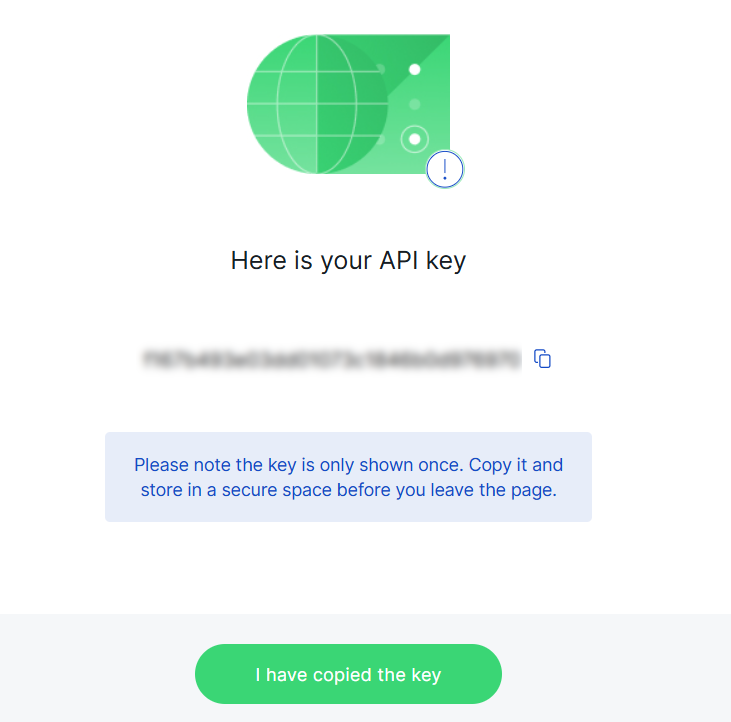 Figure 1: Copy and securely store your API key
The API key is displayed only once. Copy and store it securely before leaving the page. Lost keys cannot be retrieved and must be regenerated.
Manage API Keys
Once an API key has been created, you can view and manage it on the Settings > API Key page. Each key can be edited, regenerated, or deleted.
Edit an API Key
- From the key list, select the API key you want to modify.
- Update the name or modify permission settings as needed.
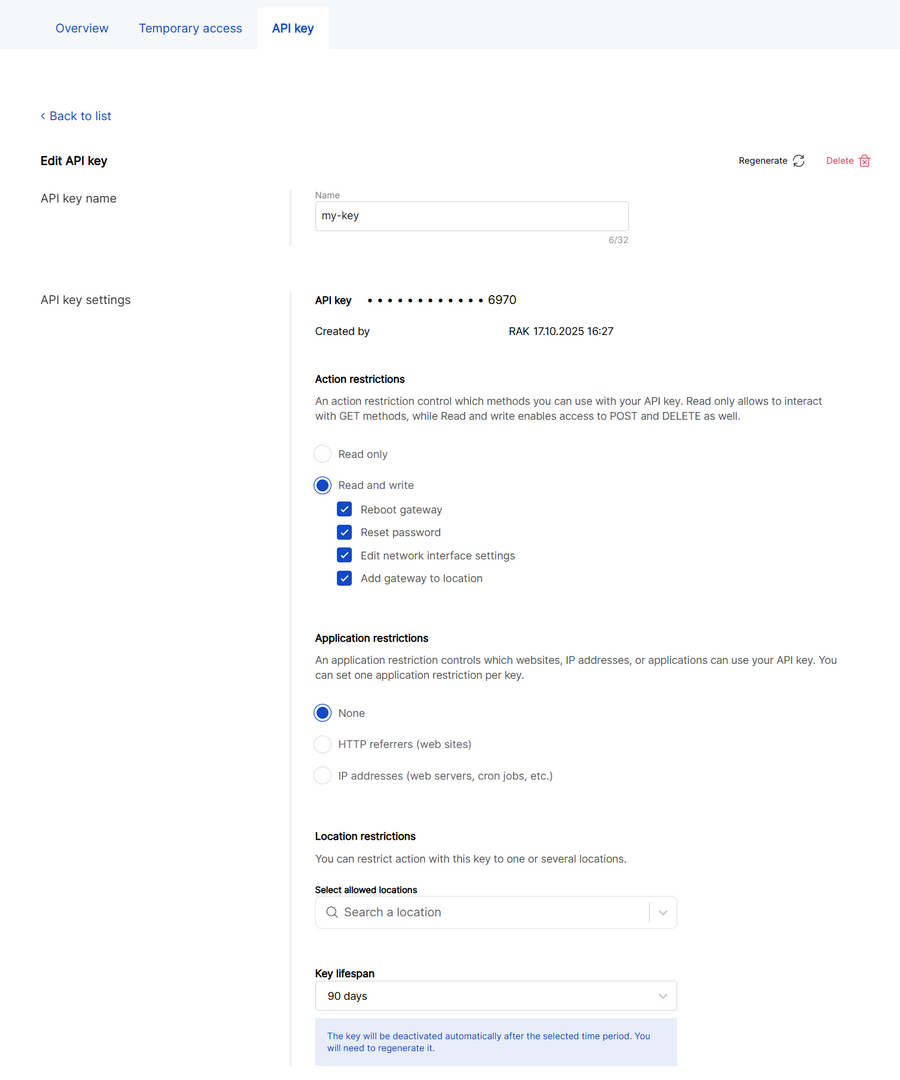 Figure 1: Update your API key
- Click Save changes to apply updates.
Regenerate a Key
Regenerate your API key when it expires or if you suspect it has been compromised. The new key will replace the old one while retaining all previous configurations.
Click the Regenerate icon in the top-right corner, enter your credentials, and then click Regenerate API key to confirm.
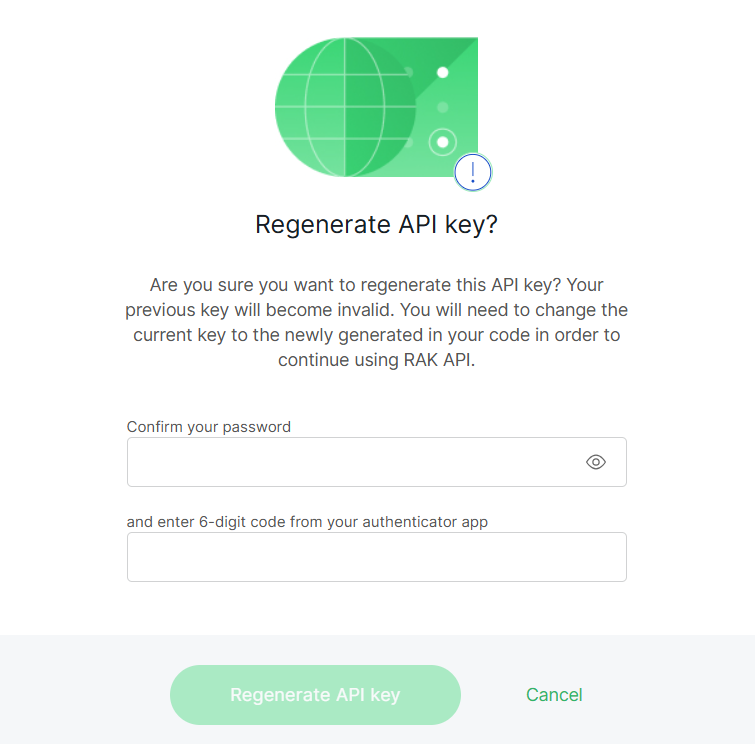 Figure 1: Regenerate a Key
Delete a Key
Delete an API key when it is no longer needed or has been replaced by a new one. Once deleted, all systems using this key will immediately lose API access.
Click the Delete icon in the top-right corner. Confirm your action, and then click Delete API Key to permanently remove it.
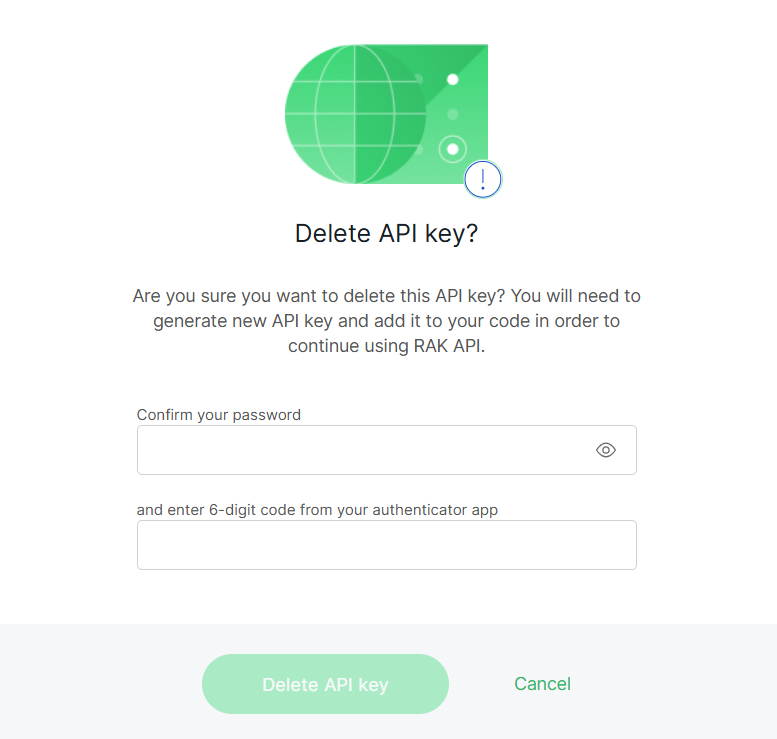 Figure 1: Delete a Key
Deleting a key cannot be undone. Any integration using this key will immediately lose access to the WisDM API.
Access the WisDM API
Access the WisDM API using any REST-compatible client, such as a backend service, automation script, or integration framework. It employs standard HTTP methods (GET, POST, etc.) and exchanges data in JSON format to ensure interoperability with most systems.
All WisDM API requests must be sent to the following domain:
https://api.wisdm.network
Each API endpoint is appended to this base URL. For example:
GET https://api.wisdm.network/v4/organization
Authentication Header
Every request requires a valid API key for authentication.
X-API-KEY: <Your_API_Key>
Accept-Encoding: gzip
X-API-KEY: Identifies your organization and permission scope.Accept-Encoding: gzip: Enables compressed responses for better efficiency.
Test Your Connection
Before integration, make sure that your API key and environment are correctly configured.
Request Example
GET https://api.wisdm.network/v4/organization
X-API-KEY: <Your_API_Key>
Accept-Encoding: gzip
Response Example
{
    "id": "7e0abc48-63b4-475c-a632-ea5bcde5c66d",
    "name": "Best in the world"
}
If your response matches the example above, it confirms the following:
- The WisDM API is reachable.
- Your API key is valid and active.
- You can proceed with further API operations.
- If the API returns 403 Action is not allowed, verify that your key has the required permission level.
- Each key belongs to one Organization and cannot access others.
- Generate separate keys for each system to enhance traceability and audit control.
API Reference
This section lists all available WisDM API endpoints and their usage details. All endpoints are versioned under /v4/ and require an authentication header that includes a valid API key.
For the complete and regularly maintained endpoint reference, you may also see the WisDM API Overview.
System APIs
Provides system-level endpoints for API version verification
Get API Version
Retrieves the current WisDM API version for connection testing and environment verification.
Requires a valid API key with Read permission.
Endpoint
GET /v4/version
Request Example
GET https://api.wisdm.network/v4/version
X-API-KEY: <Your_API_Key>
Accept-Encoding: gzip
Response Example
{
  "version": "v4.0.0",
  "commitId": "a12b3c4"
}
Response Fields
| Field | Type | Description |
|---|---|---|
| version | string | Current WisDM API version number |
| commitId | string | Internal system build identifier |
Error Codes
| HTTP Code | Meaning |
|---|---|
| 400 | Invalid parameters |
| 403 | Insufficient permission |
| 500 | Internal Server Error |
Organization APIs
Get Organization Information
Retrieves information about the organization associated with your API key.
Requires a valid API key with Read permission.
Endpoint
GET /v4/organization
Request Example
GET https://api.wisdm.network/v4/organization
X-API-KEY: <Your_API_Key>
Accept-Encoding: gzip
Response Example
{
  "id": "f53d5b7d-2413-44f3-b206-8295e16a19cd",
  "name": "yolo"
}
Response Fields
| Field | Type | Description |
|---|---|---|
| id | string | Organization unique ID |
| name | string | Organization name |
Error Codes
| HTTP Code | Meaning |
|---|---|
| 400 | Invalid parameters |
| 403 | Insufficient permission |
| 404 | Resource Not Found |
| 500 | Internal Server Error |
List Locations
Lists all locations under an organization, returning their IDs and names.
Requires a valid API key with Read permission.
Endpoint
GET /v4/organization/{organizationId}/locations
Request Example
GET https://api.wisdm.network/v4/organization/{organizationId}/locations
X-API-KEY: <Your_API_Key>
Accept-Encoding: gzip
Response Example
{
  "total": 2,
  "locations": [
    { "id": "4fed110b-461b-4815-8bfc-4866b3b74c27", "name": "Factory A" },
    { "id": "58bbb735-dbdc-4787-9c8e-b9cacf098d80", "name": "Factory B" }
  ]
}
Response Fields
| Field | Type | Description |
|---|---|---|
| total | integer | Total number of locations |
| id | string | Location ID |
| name | string | Location name |
Create Location (Basics Station)
Creates a new Location under an Organization and configures it for Basics Station work mode in a single call.
Requires a valid API Key with WRITE_ADD_LOCATION_TO_ORGANIZATION permission.
Endpoint
POST /v4/organization/{organizationId}/locations
Request Example
POST https://api.wisdm.network/v4/organization/{organizationId}/locations
X-API-KEY: <Your_API_Key>
Accept-Encoding: gzip
Content-Type: application/json

{
"name": "Factory A",
"address": {
"country": "Bulgaria",
"addressLine1": "1 Industrial St",
"city": "Sofia",
"state": "Sofia",
"zip": "1000",
"latitude": 42.6977,
"longitude": 23.3219
},
"workMode": "Basics station",
"enableCriticalFwAutoUpdate": true,
"basicStation": {
"serverType": "CUPS",
"serverURL": "https://cups.example.com",
"serverPort": 443,
"authenticationMode": "TLS Server Authentication",
"trustCACertificate": "-----BEGIN CERTIFICATE-----...-----END CERTIFICATE-----",
"useIndividualKeys": true
},
"advancedFrequencySettings": {
"region": "EU868",
"regionVariation": "default",
"isLoRaWANPublic": true,
"frequencySubBand": "G1"
},
"channelsNumber": 8
}
Request Fields
| Field | Type | Description |
|---|---|---|
| name | string | Human-friendly location name displayed in WisDM UI (min 4, max 50 characters) |
| address | object | Optional. If omitted, the organization's registered address is used |
| workMode | string | Work mode of the location. Only Basics station is supported |
| enableCriticalFwAutoUpdate | boolean | Enables automatic installation of critical firmware updates |
| basicStation | object | Basics Station server configuration |
| advancedFrequencySettings | object | Frequency plan configuration |
| channelsNumber | integer | Number of channels supported (8 or 16). Default: 8 |
Request Fields - Address Object (address)
| Field | Type | Description |
|---|---|---|
| country | string | Country name |
| addressLine1 | string | Street address |
| city | string | City |
| state | string | State / Region |
| zip | string | ZIP / Postal code |
| latitude | number | Latitude coordinate |
| longitude | number | Longitude coordinate |
Request Fields - Basics Station Object (basicStation)
| Field | Type | Description |
|---|---|---|
| serverType | string | CUPS-BOOT / CUPS / LNS |
| serverURL | string | Fully qualified server URL |
| serverPort | integer | TCP port (1-65535) |
| authenticationMode | string | None / TLS Server Authentication / TLS Server and Client Authentication / TLS Server Authentication and Client Token Authentication |
| trustCACertificate | string | PEM-encoded CA certificate |
| useIndividualKeys | boolean | Enables per-gateway credentials |
| clientCertificate | string | PEM client certificate (required for shared TLS client auth) |
| clientKey | string | PEM client private key (required for shared TLS client auth) |
| token | string | Token used for client authentication |
Response Example
{
"locationId": "58bbb735-dbdc-4787-9c8e-b9cacf098d80",
"organizationId": "f53d5b7d-2413-44f3-b206-8295e16a19cd",
"name": "Factory A",
"workMode": "Basics station"
}
Response Fields
| Field | Type | Description |
|---|---|---|
| locationId | string | Unique identifier of the created location |
| organizationId | string | Organization ID that owns the location |
| name | string | Location name |
| workMode | string | Work mode applied to the location |
Error Codes
| HTTP Code | Meaning |
|---|---|
| 400 | Invalid parameters |
| 403 | Insufficient permission |
| 404 | Organization not found |
| 409 | Location already exists or conflicting configuration |
| 500 | Internal Server Error |
Location APIs
List Gateways by Location
Lists all gateways in a specific location, including their model and status.
Requires a valid API Key with Read permission.
Endpoint
GET /v4/location/{locationId}/gateways
Request Example
GET https://api.wisdm.network/v4/location/{locationId}/gateways
X-API-KEY: <Your_API_Key>
Accept-Encoding: gzip
Response Example
{
    "total": 1,
    "gateways": [
        {
            "sn": "918100M46020602001",
            "eui": "ac1f09fffe0707a1",
            "name": "RAK7268V2H-918100M46020602001",
            "model": "RAK7268V2H",
            "mac": "AC:1F:09:07:07:A1",
            "status": "ONLINE",
            "lastDyingGasp": "None"
        }
    ]
}
Response Fields
| Field | Type | Description |
|---|---|---|
| sn | string | Gateway serial number |
| eui | string | Gateway EUI |
| name | string | Gateway name |
| model | string | Device model |
| mac | string | MAC address |
| status | string | ONLINE / OFFLINE / PROVISIONING |
| lastDyingGasp | string | Last event timestamp |
Register Gateway
Registers an unassigned gateway under a specific location. This API is essential for automated factory provisioning or field deployment.
Requires a valid API Key with WRITE_ADD_GATEWAY_TO_LOCATION permission.
Before registration, ensure the following conditions are met:
- The target Location operates in Basics Station mode.
- The gateway was pre-provisioned during factory setup.
- If factory provisioning is incomplete, registration will fail.
Endpoint
POST /v4/location/{locationId}/gateways
Request Example
POST https://api.wisdm.network/v4/location/4fed110b-461b-4815-8bfc-4866b3b74c27/gateways
X-API-KEY: <Your_API_Key>
Accept-Encoding: gzip
Content-Type: application/json

{
  "sn": "GW123456",
  "eui": "ABCDEF1234567890",
  "name": "Gateway-1",
  "bsHasLocalAuthSuite": true,
  "bsClientCertificate": "-----BEGIN CERTIFICATE-----...",
  "bsClientKey": "-----BEGIN PRIVATE KEY-----...",
  "bsToken": "eyJhbGciOiJIUzI1NiIs..."
}
Request Fields
| Field | Type | Description |
|---|---|---|
| sn | string | Gateway Serial Number |
| eui | string | Gateway EUI (unique hardware identifier) |
| name | string | Gateway name |
| bsHasLocalAuthSuite | boolean | Set to false for gateways without pre-configured Basics Station certificates. Set to true if the gateway has factory-preconfigured Basics Station certificates. Only gateways with version v2.2.15 or newer support this feature. |
| bsClientCertificate | string | Client certificate for TLS authentication. Required when bsHasLocalAuthSuite is false and location uses TLS Server and Client Authentication mode. |
| bsClientKey | string | Client private key for TLS authentication. Required when bsHasLocalAuthSuite is false and the location uses TLS Server and Client Authentication mode. |
| bsToken | string | Authentication token for token-based authentication. Required when bsHasLocalAuthSuite is false and the location uses TLS Server Authentication and Client Token Authentication mode. |
WisDM verifies the request through several steps:
- Checks API key ownership and write permission scope.
- Confirms that the gateway belongs to the same organization.
- Validates that the target location supports Basics Station mode.
- If TLS or token-based authentication is required, validates the credentials.
- Upon success, WisDM establishes a binding between the gateway and the location, returning a 201 Created response.
Response Example
{
  "locationId": "4fed110b-461b-4815-8bfc-4866b3b74c27",
  "sn": "GW123456",
  "eui": "ABCDEF1234567890"
}
Response Fields
| Field | Type | Description |
|---|---|---|
| locationId | string | ID of the Location the gateway was registered to |
| sn | string | Gateway serial number |
| eui | string | Gateway EUI |
Error Codes
| HTTP Code | Meaning |
|---|---|
| 400 | Invalid Parameters |
| 403 | Insufficient Permission |
| 404 | Resource Not Found |
| 406 | Invalid Mode Location is not in Basics Station mode, or the gateway is not factory-registered |
| 500 | Internal Server Error |
Get Gateway Status by Location
Retrieves the operational status of all gateways under a specific Location, with pagination support for large deployments.
Requires a valid API key with Read permission.
Endpoint
GET /v4/location/{locationId}/gateways/status
Request Example
GET https://api.wisdm.network/v4/location/4fed110b-461b-4815-8bfc-4866b3b74c27/gateways/status?pageSize=100
X-API-KEY: <Your_API_Key>
Accept-Encoding: gzip
Response Example
{
  "pageSize": 100,
  "totalPages": 3,
  "nextToken": "eyJwYWdlIjoyfQ==",
  "gateways": [
        {
            "sn": "918100RC6050800000",
            "eui": "ac1f09fffe990000",
            "name": "RAK7289V2",
            "model": "RAK7289CV2",
            "mac": "00:3D:C6:FD:58:C5",
            "status": "ONLINE",
            "lastDyingGasp": "None",
            "system": {
                "uptime": 10372,
                "cpu": 33,
                "memory": 51
            },
            "gps": {
                "longitude": 174.966721,
                "latitude": -38.0526032
            },
            "network": {
                "lan": {
                    "subnet": "192.168.230.1/24",
                    "ethernet": {
                        "enabled": false
                    },
                    "wifi": {
                        "enabled": false,
                        "ssid": "ltDhgPVEZUqClu4=",
                        "encryption": "NONE",
                        "key": "xZ5+9j2p8+4=",
                        "channel": "Auto",
                        "hidden": false
                    }
                },
                "wan": {
                    "active": "CELLULAR",
                    "ethernet": {
                        "enabled": true,
                        "priority": 1,
                        "online": false,
                        "uptime": 0
                    },
                    "wifi": {
                        "enabled": false,
                        "priority": 2
                    },
                    "cellular": {
                        "enabled": true,
                        "priority": 3,
                        "online": true,
                        "ipv4AddrMask": "100.94.77.194/30",
                        "uptime": 10299,
                        "sim_present": true,
                        "imsi": "234106459829513",
                        "iccid": "89883070000054069701",
                        "imei": "862869033261012",
                        "signalLevel": 1,
                        "rsrp": -102,
                        "rsrq": -6,
                        "sinr": 18,
                        "rssi": -76,
                        "rat": "LTE",
                        "networkType": "FDD LTE",
                        "autoSelect": true,
                        "plmn": "53001"
                    }
                }
            },
            "lora": {
                "activeNodes": 0,
                "txPackets": 2,
                "rxPackets": 119
            },
            "storage": {
                "healthy": true,
                "total": 15185,
                "free": 15048,
                "used_percent": 0
            }
        },
......
  ]
}
Response Fields
| Field | Type | Description |
|---|---|---|
| pageSize | integer | Number of results per page |
| totalPages | integer | Total number of available pages |
| nextToken | string | Pagination token for the next page This field is omitted if there are no additional pages to fetch. |
| gateways | array | List of gateway status summaries |
Response Fields - Gateway Object (gateways)
| Field | Type | Description |
|---|---|---|
| sn | string | Gateway serial number |
| eui | string | Gateway EUI |
| name | string | Gateway name |
| model | string | Device model |
| mac | string | MAC address |
| status | string | Current status (ONLINE / OFFLINE / PROVISIONING) |
| lastDyingGasp | string | Data and time of the last dying gasp event |
| system | object | System Statistics |
| gps | object | GPS status of the gateway |
| network | object | Network status of the gateway |
| lora | object | LoRa packet statistics of the gateway |
| storage | object | Storage status of the gateway |
Get Gateway Battery Status by Location
Retrieves the solar battery health and power metrics for all gateways within a specific location.
Requires a valid API key with Read permission.
Endpoint
GET /v4/location/{locationId}/gateways/battery
Request Example
GET https://api.wisdm.network/v4/location/f53d5b7d-2413-44f3-b206-8295e16a19cd/gateways/battery?pageSize=100
X-API-KEY: <Your_API_Key>
Accept-Encoding: gzip
Response Example
{
  "pageSize": 100,
  "totalPages": 2,
  "nextToken": "eyJwYWdlIjoyfQ==",
  "gateways": [
    {
        "sn": "9181016S6041224001",
        "battery": {
            "temperature": 28,
            "voltage": 22.03,
            "soc": 48,
            "current": 60,
            "soh": 100,
            "cycles": 3,
            "remainCapacity": 24410,
            "fullChargeCapacity": 50000,
            "mode": "CHARGING"
        }
    }
  ]
}
Response Fields
| Field | Type | Description |
|---|---|---|
| pageSize | integer | Number of results returned per page |
| totalPages | integer | Total number of pages available |
| nextToken | string | Pagination token for next page This field is omitted if there are no additional pages to fetch. |
| gateways | array | List of gateways with associated battery data |
Battery Object Fields
| Field | Type | Description |
|---|---|---|
| temperature | integer | Battery temperature (°C) |
| voltage | integer | Battery voltage (V) |
| soc | integer | State of Charge (percentage) |
| current | integer | Current of the solar battery in mA |
| soh | integer | State of Health (percentage) |
| cycles | integer | Cycle count of the solar battery |
| remainCapacity | integer | Remaining capacity of the solar battery in mAh |
| fullChargeCapacity | integer | Full charge capacity of the solar battery in mAh |
| mode | string | Battery working mode (CHARGING / DISCHARGING / FULLY_CHARGED) |
Gateway APIs
Get Single Gateway Status
Retrieves the real-time operational status of a specific gateway, including its system performance, network interfaces, GPS state, LoRa activity, and storage health.
Requires a valid API Key with Read permission.
This API is ideal for targeted monitoring or troubleshooting at the device level.
- When invoked, WisDM returns the most recent runtime snapshot for the gateway identified by its Serial Number (SN).
- If the gateway is offline, the API returns the latest cached state reported before disconnection.
Endpoint
GET /v4/gateway/{sn}/status
Request Example
GET https://api.wisdm.network/v4/gateway/918100RN6040814001/status
X-API-KEY: <Your_API_Key>
Accept-Encoding: gzip
Response Example
{
    "sn": "918100RN6040814001",
    "eui": "ac1f09fffe16882b",
    "name": "RAK7268CV2",
    "model": "RAK7268CV2",
    "mac": "AC:1F:09:16:88:2B",
    "status": "ONLINE",
    "lastDyingGasp": "None",
    "system": {"uptime": 3142,"cpu": 35,"memory": 51},
    "gps": {
        "state": "GPS_NO_OUTPUT",
        "satellites_number": 0,
        "longitude": 0.0,
        "latitude": 0.0
    },
    "network": {
        "lan": {
            "subnet": "192.168.230.1/24",
            "ethernet": {"enabled": false},
            "wifi": {
                "enabled": true,
                "ssid": "RAK-865",
                "encryption": "WPA2-PSK",
                "key": "test-key",
                "channel": "Auto",
                "hidden": false
            }
        },
        "wan": {
            "active": "ETH",
            "ethernet": {
                "enabled": true,
                "priority": 3,
                "online": true,
                "ipv4AddrMask": "10.0.10.74/24",
                "uptime": 2544
            },
            "wifi": {"enabled": false,"priority": 1},
            "cellular": {"enabled": true,"priority": 2,"online": false,"uptime": 0}
        }
    },
    "lora": {"activeNodes": 3,"txPackets": 0,"rxPackets": 497},
    "storage": {"healthy": true,"total": 15176,"free": 15139,"used_percent": 0}
}
Response Fields
| Field | Type | Description |
|---|---|---|
| sn | string | Serial number of the gateway |
| eui | string | EUI of the Gateway |
| name | string | Name of the Gateway |
| model | string | Model of the device |
| mac | string | MAC address of the gateway |
| status | string | Current status (ONLINE / OFFLINE / PROVISIONING) |
| lastDyingGasp | string | Date and time of the last dying gasp event |
| system | object | System statistics |
| gps | object | GPS status of the gateway |
| network | object | Network status of the gateway |
| lora | object | LoRa packet statistics of the gateway |
| storage | object | Storage status of the gateway |
Get Gateway Performance Metrics
Retrieves historical performance metrics for a specific gateway, including RSSI, SNR, uplink, and downlink statistics.
Requires a valid API Key with Read permission.
Endpoint
GET /v4/gateway/{sn}/perf/{metric}
Request Example
GET https://api.wisdm.network/v4/gateway/GW123456/perf/rssi?interval=12h
X-API-KEY: <Your_API_Key>
Accept-Encoding: gzip
Request Fields
| Parameter | Type | Description |
|---|---|---|
| sn | string | Gateway serial number |
| metric | string | Metric type (rssi / snr / uplink / downlink) |
| interval | string | Time range |
Response Example
{
  "result": [
    { "value": 120, "timestamp": "2025-10-09T10:00:00Z" },
    { "value": 98, "timestamp": "2025-10-09T10:10:00Z" }
  ],
  "nextToken": "abc123",
  "clientToken": "xyz456"
}
Response Fields
| Field | Type | Description |
|---|---|---|
| result | array | List of metric values and timestamps |
| value | number | Metric value at a specific time |
| timestamp | string | UTC timestamp of recorded data |
| nextToken | string | Token for the next page (if data continues) |
| clientToken | string | Identifier for tracking multi-page queries |
Get Gateway Battery Information
Retrieves the solar battery information for a specific gateway, including temperature, voltage, state of charge (SOC), state of health (SOH), and charging mode.
Requires a valid API Key with Read permission.
Endpoint
GET /v4/gateway/{sn}/battery
Request Example
GET https://api.wisdm.network/v4/gateway/GW123456/battery
X-API-KEY: <Your_API_Key>
Accept-Encoding: gzip
Response Example
{
    "sn": "918100QL6041021001",
    "battery": {
        "temperature": 26,
        "voltage": 13.6,
        "soc": 51,
        "current": -180,
        "soh": 100,
        "cycles": 5,
        "remainCapacity": 25520,
        "fullChargeCapacity": 50000,
        "mode": "DISCHARGING"
    }
}
Response Fields
| Field | Type | Description |
|---|---|---|
| sn | string | Gateway serial number |
| battery | object | Battery information |
Response Fields - Battery Object (battery)
| Field | Type | Description |
|---|---|---|
| temperature | integer | Battery temperature (°C) |
| voltage | integer | Battery voltage (V) |
| soc | integer | State of Charge (percentage) |
| current | integer | Current of the solar battery in mA |
| soh | integer | State of Health (percentage) |
| cycles | integer | Number of cycles completed by the solar battery |
| remainCapacity | integer | Remaining capacity of the solar battery in mAh |
| fullChargeCapacity | integer | Full charge capacity of the solar battery in mAh |
| mode | string | Battery operating mode (CHARGING / DISCHARGING / FULLY_CHARGED) |
Enable Solar Battery Monitoring
Enables or disables the solar battery monitoring service for the gateway.
Requires a valid API Key with WRITE_ENABLE_BATTERY_MONITORING permission.
Endpoint
POST /v4/gateway/{sn}/battery
Request Example
POST https://api.wisdm.network/v4/gateway/{sn}/battery
X-API-KEY: <Your_API_Key>
Accept-Encoding: gzip
Content-Type: application/json

{
    "enabled": true
}
Request Fields
| Field | Type | Description |
|---|---|---|
| enabled | boolean | Enables or disables solar battery monitoring |
Response Example
204 No Content
Error Codes
| HTTP Code | Meaning |
|---|---|
| 400 | Invalid Parameters |
| 403 | Insufficient permission |
| 404 | Gateway Not Found |
| 500 | Internal Server Error |
Send Asynchronous Command
Submits a remote command to a specific gateway for diagnostic or maintenance purposes. The request immediately returns a commandId, which can later be used to check the execution result via
GET /v4/gateway/{sn}/async-cmd/{commandId}.
This API supports a limited set of commands, such as netstat, which is used to inspect the network status of a gateway.
Requires Read and Write permission for supported diagnostic commands.
Endpoint
POST /v4/gateway/{sn}/async-cmd
Request Example
POST https://api.wisdm.network/v4/gateway/GW123456/async-cmd
X-API-KEY: <Your_API_Key>
Accept-Encoding: gzip
Content-Type: application/json

{
  "command": "netstat",
  "args": "-apn",
  "pipes": [
    { "command": "grep", "args": "LISTEN" }
  ],
  "timeout": 60
}
Request Fields
| Field | Type | Description |
|---|---|---|
| command | string | Command to be executed (e.g., netstat) |
| args | string | Command-line arguments |
| pipes | array | Optional chained commands |
| timeout | integer | Maximum execution time in seconds (default: 60) |
Response Example
{ "commandId": 1760413840}
Error Codes
| HTTP Code | Meaning |
|---|---|
| 400 | Invalid Parameters |
| 403 | Insufficient permission |
| 404 | Gateway Not Found |
| 500 | Internal Server Error |
Query Asynchronous Command Result
This endpoint allows you to confirm whether the command has completed successfully and to view its console output.
When a gateway executes a queued command, the result is uploaded to WisDM. This endpoint queries that stored result and reports one of the following states:
- PENDING: Command has been queued or is waiting for execution.
- SUCCESS: Command executed successfully; result is available.
- FAILED: Execution failed or timed out.
Requires a valid API Key with Read permission.
Endpoint
GET /v4/gateway/{sn}/async-cmd/{commandId}
Request Example
GET https://api.wisdm.network/v4/gateway/GW123456/async-cmd/cmd-1760413840
X-API-KEY: <Your_API_Key>
Accept-Encoding: gzip
Response Example
{
  "sn": "GW123456",
  "commandId": "1760413840",
  "result": "tcp  0  0 0.0.0.0:80  0.0.0.0:* LISTEN ..."
}
Response Fields
| Field | Type | Description |
|---|---|---|
| sn | string | Gateway serial number |
| commandId | string | Unique command identifier |
| result | string | Command output or execution message |
Error Codes
| HTTP Code | Meaning |
|---|---|
| 400 | Incorrect or missing commandId |
| 403 | Insufficient permission |
| 404 | CommandId does not exist or has expired |
| 500 | Gateway offline or internal fault |
Reboot Gateway
Sends a remote reboot command to a specific gateway.
Requires API Key with WRITE_REBOOT_GATEWAY permission.
Endpoint
POST /v4/gateway/{sn}/reboot
Request Example
POST https://api.wisdm.network/v4/gateway/GW123456/reboot
X-API-KEY: <Your_API_Key>
Accept-Encoding: gzip
Response Example
204 No Content
Error Codes
| HTTP Code | Meaning |
|---|---|
| 400 | Missing or incorrect Serial Number |
| 403 | Insufficient Permission |
| 404 | Gateway Not Found |
| 500 | Gateway offline or unable to receive command |
Reset Gateway Password
Resets the local root password of a specific gateway.
Requires API Key with WRITE_RESET_PASSWORD permission.
Endpoint
POST /v4/gateway/{sn}/password
Request Example
POST https://api.wisdm.network/v4/gateway/GW123456/password
X-API-KEY: <Your_API_Key>
Accept-Encoding: gzip
Content-Type: application/json

{
  "password": "StrongPass!2025"
}
Request Fields
| Field | Type | Description |
|---|---|---|
| password | string | The new password to set for the gateway |
Response Example
204 No Content
Error Codes
| HTTP Code | Meaning |
|---|---|
| 400 | The password field was omitted or invalid |
| 403 | Insufficient Permission |
| 500 | Gateway offline or internal configuration issue |
Upgrade Gateway Firmware
Upgrades the gateway firmware to the specified version.
Requires a valid API Key with WRITE_UPGRADE_FIRMWARE permission.
Endpoint
POST /v4/gateway/{sn}/upgrade
Request Example
POST https://api.wisdm.network/v4/gateway/{sn}/upgrade
X-API-KEY: <Your_API_Key>
Accept-Encoding: gzip
Content-Type: application/json

{

"version": "2.2.13"

}
Request Fields
| Field | Type | Description |
|---|---|---|
| version | string | Target firmware version (upgrade or downgrade) |
Response Example
204 No Content
Error Codes
| HTTP Code | Meaning |
|---|---|
| 400 | Invalid serial number or firmware version |
| 403 | Insufficient Permission |
| 404 | Gateway Not Found |
| 500 | Internal Server Error |
Get Network Priority
Retrieves the current WAN interface priority configuration for a specific gateway.
Requires a valid API Key with Read permission.
Endpoint
GET /v4/gateway/{sn}/network/priority
Request Example
GET https://api.wisdm.network/v4/gateway/GW123456/network/priority
X-API-KEY: <Your_API_Key>
Accept-Encoding: gzip
Response Example
{
  "sn": "GW123456",
  "priority": "ETH_CELLULAR_WIFI"
}
Response Fields
| Field | Type | Description |
|---|---|---|
| sn | string | Gateway serial number |
| priority | string | Current interface order (e.g., ETH_CELLULAR_WIFI, CELLULAR_WIFI_ETH, etc.) |
Error Codes
| HTTP Code | Meaning |
|---|---|
| 400 | Incorrect or missing Serial Number |
| 403 | Insufficient Permission |
| 404 | Gateway Not Found |
| 500 | Gateway not reachable or config file error |
Set Network Priority
Sets the WAN interface priority order for a specific gateway.
Requires API Key with WRITE_EDIT_NETWORK_INTERFACE permission.
Endpoint
POST /v4/gateway/{sn}/network/priority
Request Example
POST https://api.wisdm.network/v4/gateway/GW123456/network/priority
X-API-KEY: <Your_API_Key>
Accept-Encoding: gzip
Content-Type: application/json

{
  "priority": "ETH_CELLULAR_WIFI"
}
Request Fields
| Field | Type | Description |
|---|---|---|
| priority | string | Defines interface order; supports combinations such as: ETH_CELLULAR_WIFI, ETH_WIFI_CELLULAR, CELLULAR_WIFI_ETH, WIFI_ETH_CELLULAR, etc. |
Response Example
204 No Content
Error Codes
| HTTP Code | Meaning |
|---|---|
| 400 | Missing priority field or incorrect syntax |
| 403 | Insufficient Permission |
| 404 | Gateway Not Found |
| 500 | Gateway not reachable or config file error |
Get LAN Configuration
Retrieves the current LAN configuration of a specific gateway, including both Ethernet and Wi-Fi LAN interfaces.
Requires a valid API Key with Read permission.
Endpoint
GET /v4/gateway/{sn}/network/lan
Request Example
GET https://api.wisdm.network/v4/gateway/GW123456/network/lan
X-API-KEY: <Your_API_Key>
Accept-Encoding: gzip
Response Example
{
    "sn": "918100M46020602001",
    "ethernet": {
        "enabled": false
    },
    "wifi": {
        "enabled": true,
        "ssid": "GW-LAN",
        "encryption": "WPA2-PSK",
        "key": "StrongKey123",
        "channel": "Auto",
        "hidden": false
    }
}
Response Fields
| Field | Type | Description |
|---|---|---|
| sn | string | Serial number of the gateway |
| ethernet.enabled | boolean | Indicates if the Ethernet LAN interface is active |
| wifi.enabled | boolean | Indicates if the Wi-Fi LAN interface is active |
| wifi.ssid | string | Name of the Wi-Fi network (SSID) |
| wifi.encryption | string | Type of encryption used (NONE / WPA-PSK / WPA2-PSK / WPA-WPA2-PSK-MIXED) |
| wifi.hidden | boolean | Indicates if the SSID broadcast is hidden |
| wifi.channel | string | Current Wi-Fi channel (e.g., "Auto" or "2412MHz") |
Error Codes
| HTTP Code | Meaning |
|---|---|
| 400 | Missing or malformed Serial Number |
| 403 | Insufficient Permission |
| 404 | Gateway Not Found |
| 500 | Gateway unreachable or data retrieval error |
Configure LAN Interface
Configures the LAN interface parameters of a specific gateway.
Requires API Key with WRITE_EDIT_NETWORK_INTERFACE permission.
Ethernet LAN configuration changes are restricted to prevent accidental disconnection from WisDM.
Endpoint
POST /v4/gateway/{sn}/network/lan
Request Example
POST https://api.wisdm.network/v4/gateway/GW123456/network/lan
X-API-KEY: <Your_API_Key>
Accept-Encoding: gzip
Content-Type: application/json

{
  "wifi": {
    "enabled": true,
    "ssid": "GW-LAN",
    "encryption": "WPA2-PSK",
    "key": "StrongKey123",
    "channel": "Auto",
    "hidden": false
  }
}
Request Fields
| Field | Type | Description |
|---|---|---|
| wifi.enabled | boolean | Enables or disables the Wi-Fi LAN interface |
| wifi.ssid | string | Wi-Fi network name (maximum 32 characters) |
| wifi.encryption | string | Encryption mode (NONE / WPA-PSK / WPA2-PSK / WPA-WPA2-PSK-MIXED) |
| wifi.key | string | Wi-Fi password (8-63 characters, alphanumeric and special symbols) |
| wifi.channel | string | Wi-Fi channel selection (default: "Auto") |
| wifi.hidden | boolean | Hides the SSID from broadcast if set to true |
Response Example
204 No Content
Error Codes
| HTTP Code | Meaning |
|---|---|
| 400 | JSON syntax error or missing required field |
| 403 | Insufficient Permission |
| 404 | Gateway Not Found |
| 500 | Gateway unreachable or failed configuration push |
Get WAN Configuration
Retrieves the WAN interface settings of the gateway.
Requires a valid API Key with Read permission.
Endpoint
GET /v4/gateway/{sn}/network/wan
Request Example
GET https://api.wisdm.network/v4/gateway/{sn}/network/wan
X-API-KEY: <Your_API_Key>
Accept-Encoding: gzip
Response Example
{
"ethernet": {
  "enabled": true,
  "protocol": "dhcp",
  "dhcpClient": { "useDNS": true },
  "tracking": {
    "trackMethod": "ping",
    "trackTargets": ["8.8.8.8"],
    "reliability": 1,
    "pingCount": 1,
    "pingInterval": 5,
    "pingTimeout": 2,
    "interfaceDown": 3,
    "interfaceUp": 3
    }
  },
"wifi": {
  "enabled": false
},
"cellular": {
  "enabled": true,
  "apn": "internet",
  "tracking": {
    "trackMethod": "ping",
    "trackTargets": ["1.1.1.1"],
    "reliability": 1,
    "pingCount": 1,
    "pingInterval": 5,
    "pingTimeout": 2,
    "interfaceDown": 3,
    "interfaceUp": 3
    }
  }
}
Response Fields
| Field | Type | Description |
|---|---|---|
| ethernet | object | WAN Ethernet configuration |
| wifi | object | WAN Wi-Fi configuration |
| cellular | object | WAN Cellular configuration |
Configure WAN Interfaces
Sets the WAN interface settings of the gateway (Ethernet / Wi-Fi / Cellular).
Requires a valid API Key with WRITE_EDIT_NETWORK_INTERFACE permission.
Endpoint
POST /v4/gateway/{sn}/network/wan
Request Example
POST https://api.wisdm.network/v4/gateway/{sn}/network/wan
X-API-KEY: <Your_API_Key>
Accept-Encoding: gzip
Content-Type: application/json

{
  "ethernet": {
    "enabled": true,
    "protocol": "dhcp",
    "dhcpClient": { "useDNS": true },
    "tracking": {
      "trackMethod": "ping",
      "trackTargets": ["8.8.8.8"],
      "reliability": 1,
      "pingCount": 1,
      "pingInterval": 5,
      "pingTimeout": 2,
      "interfaceDown": 3,
      "interfaceUp": 3
    }
  },

  "wifi": {
    "enabled": false
  },
  "cellular": {
    "enabled": false
  }
}
Request Fields - Ethernet Configuration
| Field | Type | Description |
|---|---|---|
| enabled | boolean | Enable or disable WAN Ethernet |
| protocol | string | dhcp / static / pppoe |
| staticAddress | object | Required when protocol is static |
| dhcpClient | object | Required when protocol is dhcp |
| pppoe | object | Required when protocol is pppoe |
| tracking | object | Connectivity tracking settings |
Request Fields - Wi-Fi Configuration
| Field | Type | Description |
|---|---|---|
| enabled | boolean | Enable or disable WAN Wi-Fi |
| ssid | string | Wi-Fi SSID |
| encryption | string | Encryption type |
| key | string | Wi-Fi password |
| protocol | string | dhcp / static |
| staticAddress | object | Required when protocol is static |
| dhcpClient | object | Required when protocol is dhcp |
| tracking | object | Connectivity tracking settings |
Request Fields - Cellular Configuration
| Field | Type | Description |
|---|---|---|
| enabled | boolean | Enable or disable WAN Cellular |
| apn | string | APN name |
| username | string | Optional APN username |
| password | string | Optional APN password |
| pinCode | string | Optional SIM PIN |
| tracking | object | Connectivity tracking settings |
Response Example
204 No Content
Error Codes
| HTTP Code | Meaning |
|---|---|
| 400 | Invalid Parameters |
| 403 | Insufficient Permission |
| 404 | Gateway Not Found |
| 500 | Internal Server Error |
Get Gateway Syslog Configuration
Returns the latest syslog configuration persisted for the specified gateway.
Requires a valid API Key with Read permission.
Endpoint
GET /v4/gateway/{sn}/syslog
Request Example
GET https://api.wisdm.network/v4/gateway/{sn}/syslog
X-API-KEY: <Your_API_Key>
Accept-Encoding: gzip
Response Example
{
"sn": "918100RN6040814001",
"shareLogs": "externalAndWisdm",
"logsRotationCycle": 7,
"wisdmLogsRetrievalCycle": 10,
"wisdmLogsRotationCycle": 14,
"externalLogServer": {
    "ip": "192.168.1.10",
    "port": 514
  }
}
Response Fields
| Field | Type | Description |
|---|---|---|
| sn | string | Gateway serial number |
| shareLogs | string | none / external / wisdm / externalAndWisdm |
| logsRotationCycle | integer | Log rotation window (days) |
| wisdmLogsRetrievalCycle | integer | Interval in minutes for WisDM log retrieval |
| wisdmLogsRotationCycle | integer | Number of days WisDM retains logs |
| externalLogServer | object | External syslog server configuration |
Response Fields - External Log Server
| Field | Type | Description |
|---|---|---|
| ip | string | Syslog server IP address |
| port | integer | Syslog server port |
Update Gateway Syslog Configuration
Updates syslog configuration for the specified gateway.
Requires a valid API Key with WRITE_EDIT_SYSTEM_SETTINGS permission.
Endpoint
POST /v4/gateway/{sn}/syslog
Request Example
POST https://api.wisdm.network/v4/gateway/{sn}/syslog
X-API-KEY: <Your_API_Key>
Accept-Encoding: gzip
Content-Type: application/json

{
  "shareLogs": "external",
  "logsRotationCycle": 7,
  "wisdmLogsRetrievalCycle": 10,
  "wisdmLogsRotationCycle": 14,
  "externalLogServer": {
    "ip": "192.168.1.10",
    "port": 514
  }
}
Request Fields
| Field | Type | Description |
|---|---|---|
| shareLogs | string | none / external / wisdm / externalAndWisdm |
| logsRotationCycle | integer | Log rotation window (days) |
| wisdmLogsRetrievalCycle | integer | WisDM log pull interval (minutes) |
| wisdmLogsRotationCycle | integer | WisDM log retention (days) |
| externalLogServer | object | Required when shareLogs includes external |
Response Example
204 No Content
Get Gateway Syslog Download URLs
Returns gateway syslog pre-signed download URLs filtered by timestamps.
Requires a valid API Key with Read permission.
Endpoint
GET /v4/gateway/{sn}/syslog/download
Request Example
GET https://api.wisdm.network/v4/gateway/{sn}/syslog/download?startDate=2025-12- 01T00:00:00Z&endDate=2025-12-08T00:00:00Z&maxFiles=20
X-API-KEY: <Your_API_Key>
Accept-Encoding: gzip
Request Fields
| Parameter | Type | Description |
|---|---|---|
| startDate | string | Start timestamp (UTC, ISO-8601) |
| endDate | string | End timestamp (UTC, ISO-8601) |
| maxFiles | integer | Maximum number of files to return (1-200, default 20) |
Response Example
{
  "sn": "918100RN6040814001",
  "startDate": "2025-12-01T00:00:00Z",
  "endDate": "2025-12-08T00:00:00Z",
  "totalFiles": 2,
  "files": [
    {
      "key": "logs/918100RN6040814001/2025-12-07/syslog.txt.gz",
      "sizeBytes": 123456,
      "lastModified": "2025-12-07T23:10:00Z",
      "downloadUrl": "https://...presigned...",
      "expiresAt": "2025-12-08T01:10:00Z"
    }
  ]
}
Response Fields
| Field | Type | Description |
|---|---|---|
| sn | string | Gateway serial number |
| startDate | string | Start timestamp used for filtering |
| endDate | string | End timestamp used for filtering |
| totalFiles | integer | Total matching files |
| files | array | List of log file objects |
Response Fields - File Object (files)
| Field | Type | Description |
|---|---|---|
| key | string | Log file object key |
| sizeBytes | integer | File size in bytes |
| lastModified | string | Last modification timestamp |
| downloadUrl | string | Pre-signed download URL |
| expiresAt | string | URL expiration timestamp |


