RAK7266/RAK7266S WisGate Soho Lite Datasheet
Overview
Description
The RAK7266/RAK7266S WisGate Soho Lite is an indoor LoRaWAN® gateway from the RAK Soho Series, designed for versatile and compact IoT deployments.
The gateway supports 8 LoRa channels and includes 2.4 GHz Wi-Fi for easy local configuration through the default Wi-Fi AP mode. An Ethernet port is available for wired network access when needed. For deployments that require cellular connectivity, the RAK7266 includes an integrated LTE Cat 1 module. For Ethernet- and Wi-Fi-based indoor deployments, the RAK7266S provides a compact non-LTE option.
For cellular variants, LTE antennas may be internal or external, allowing users to select the best option for signal conditions and installation constraints.
The RAK7266/RAK7266S runs on WisGateOS 2, a secure and modular firmware based on OpenWrt and developed by RAK. It provides access to a wide range of features, including extension modules, a built-in LoRaWAN® Network Server, and advanced system diagnostics. It also supports WisDM for centralized device management and remote monitoring.
Variants Overview
| Gateway Model | Variant Type | Cellular Connectivity | Power Input |
|---|---|---|---|
| RAK7266 | LTE (Internal Antennas) | Built-in LTE Cat 1 module | 12 VDC |
| RAK7266 | LTE (External Antennas) | Built-in LTE Cat 1 module | 12 VDC |
| RAK7266S | Non-LTE | Not included | 12 VDC |
Features
Hardware
- 8 LoRa channels
- Supports 2.4 GHz Wi-Fi, with AP mode enabled by default for easy configuration
- 100M Base-T Ethernet port (for network access, no PoE)
- RP-SMA LoRa antenna connector
- Multi backhaul options with Ethernet, Wi-Fi, and Cellular (optional, available with RAK7266)
- Breathing light for visual status indication
Software
- WisGateOS 2: A secure, OpenWrt-based OS developed by RAK for enhanced stability and flexibility.
- Extension add-ons for customized gateway functionality
- WisDM for remote management and monitoring
- Built-in Network Server
- Basics Station and Packet Forwarder modes
- LoRa Frame Filtering (node whitelisting in Packet Forwarder mode)
- MQTT v3.1 Bridging with TLS encryption
- LoRa frame buffering in Packet Forwarder mode in case of NS outage, ensuring no data loss
Specifications
Overview
Block Diagram
The block diagram of RAK7266/RAK7266S shows the internal architecture of the hardware.
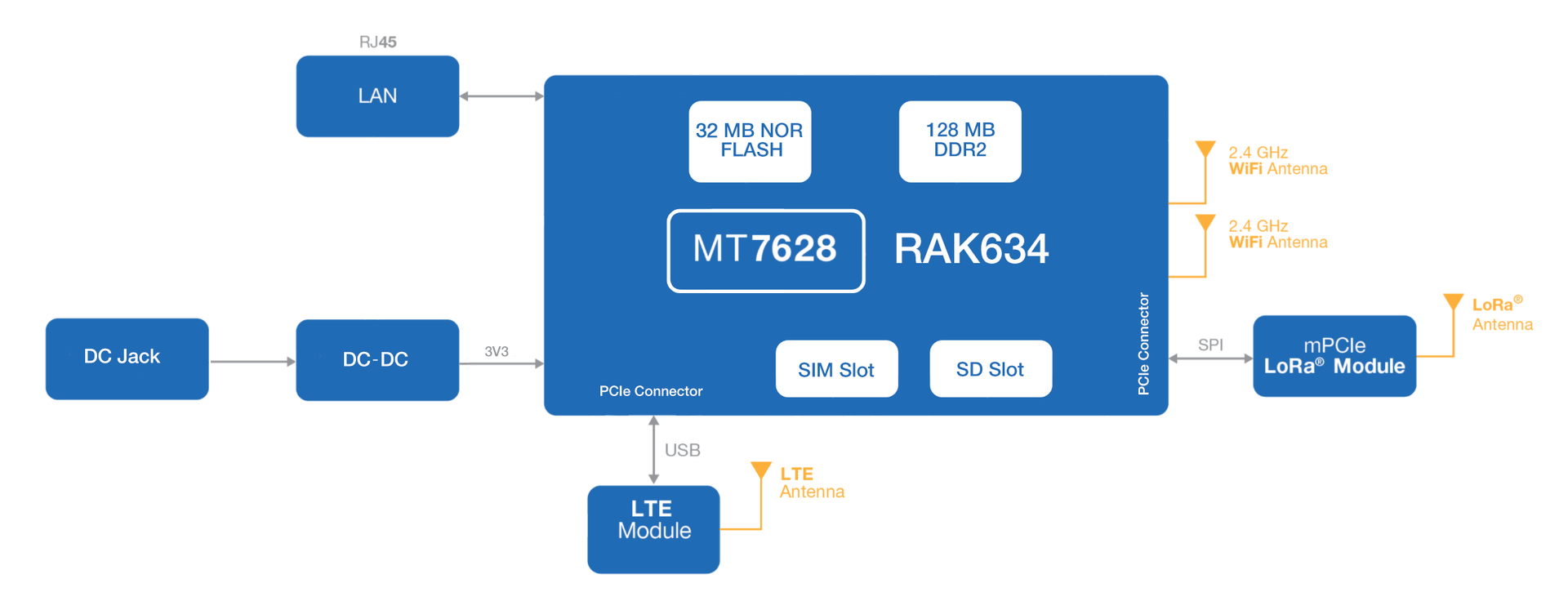 Figure 1: RAK7266 Block Diagram
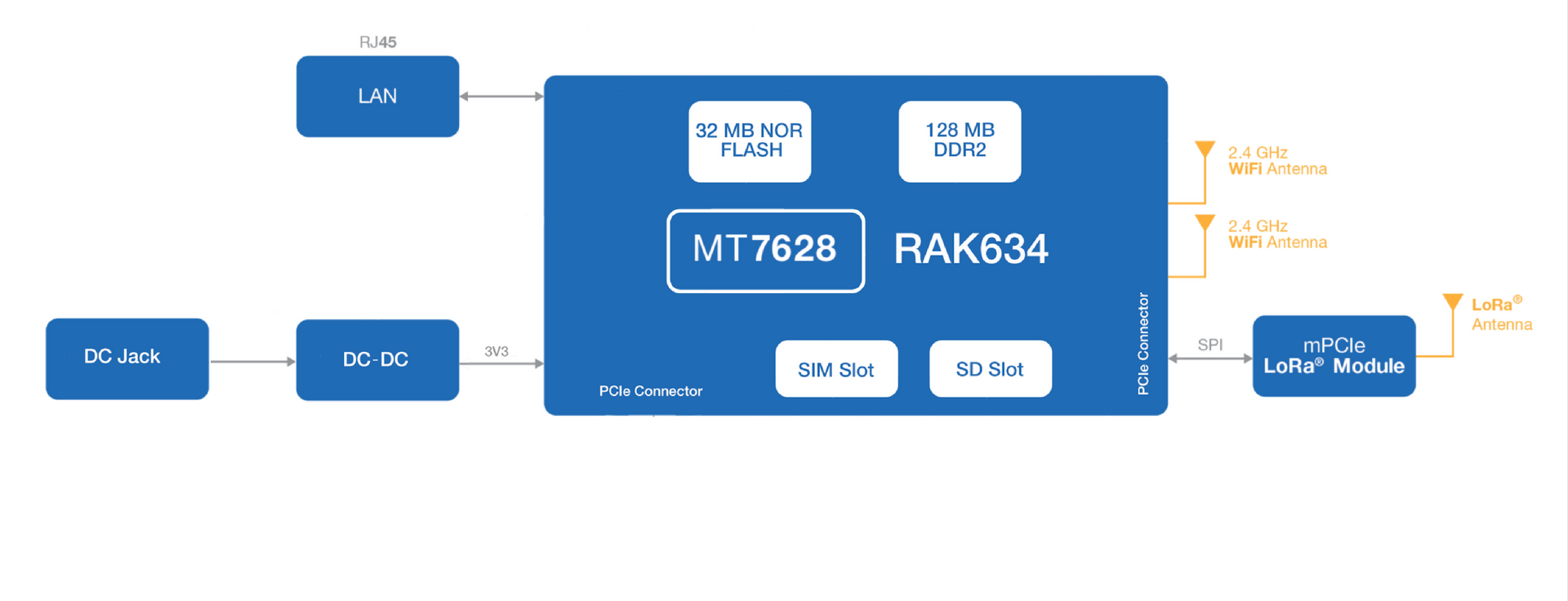 Figure 1: RAK7266S Block Diagram
For the cellular version (RAK7266), the internal hardware design and schematic remain unchanged between the internal-antenna and external-antenna variants. Both variants use the same built-in LTE Cat 1 module; only the antenna connection method differs.
Main Specifications
| Feature | Specifications |
|---|---|
| Computing | MT7628, 128 MB DDR2 RAM |
| LoRa Feature | SX1302 / SX1303 Mini PCIe card (The default configuration uses the SX1302 Mini PCIe card, with an SX1303 version available upon request.) |
| 8 Channels | |
| Frequency: EU868, IN865, RU864, US915, AU915, KR920, AS923-1/2/3/4, EU433,CN470 | |
| LoRa Radio: Refer to the LoRa Radio Specifications section for detailed information. | |
| Wi-Fi Feature | Frequency: 2.4 GHz (802.11b/g/n) |
| Channels: 1-13 | |
| Wi-Fi Radio: Refer to the Wi-Fi Radio Specifications section for detailed information. | |
| Cellular (Optional) | Nano SIM Card: 12 mm x 9 mm x 0.67 mm Supports Quectel EG915U-EU / EG915U-LA / EG915Q-NA (IoT / M2M - LTE Cat 1 module) LTE Radio: Refer to the LTE Radio Specifications section for detailed information. |
| Power Supply | 12 VDC |
| Antenna | LoRa: External antenna / RP-SMA connector |
| Wi-Fi: Integrated PCB antenna | |
| LTE: Internal antenna or External antenna / RP-SMA connector (depending on selected models) | |
| Ingress Protection | IP30 |
| Enclosure Material | Plastic (PC+ABS) |
| Weight | 0.3 kg |
| Dimensions | 166 mm x 127.5 mm x 36 mm Gateway only (no antenna, no bracket) |
| Operating Conditions | Operating Temperature: -10˚ C to ﹢55˚ C Storage Temperature: -10˚ C to ﹢65˚ C Operating Humidity: 0-95% RH non-condensing Storage Humidity: 0-95% RH non-condensing |
| Installation Method | Desktop, Wall-mount, 14 mm, 16 mm, 24 mm rails (brackets included) |
Hardware
This section provides an overview of the hardware specifications for the RAK7266 / RAK7266S gateway, including its interfaces, core functions, and key board parameters.
Interfaces
The RAK7266/RAK7266S gateway provides several hardware interfaces, enabling various connectivity options and functionalities. The following diagrams illustrate the gateway interfaces for each configuration:
-
Interfaces with external LTE antenna connectors
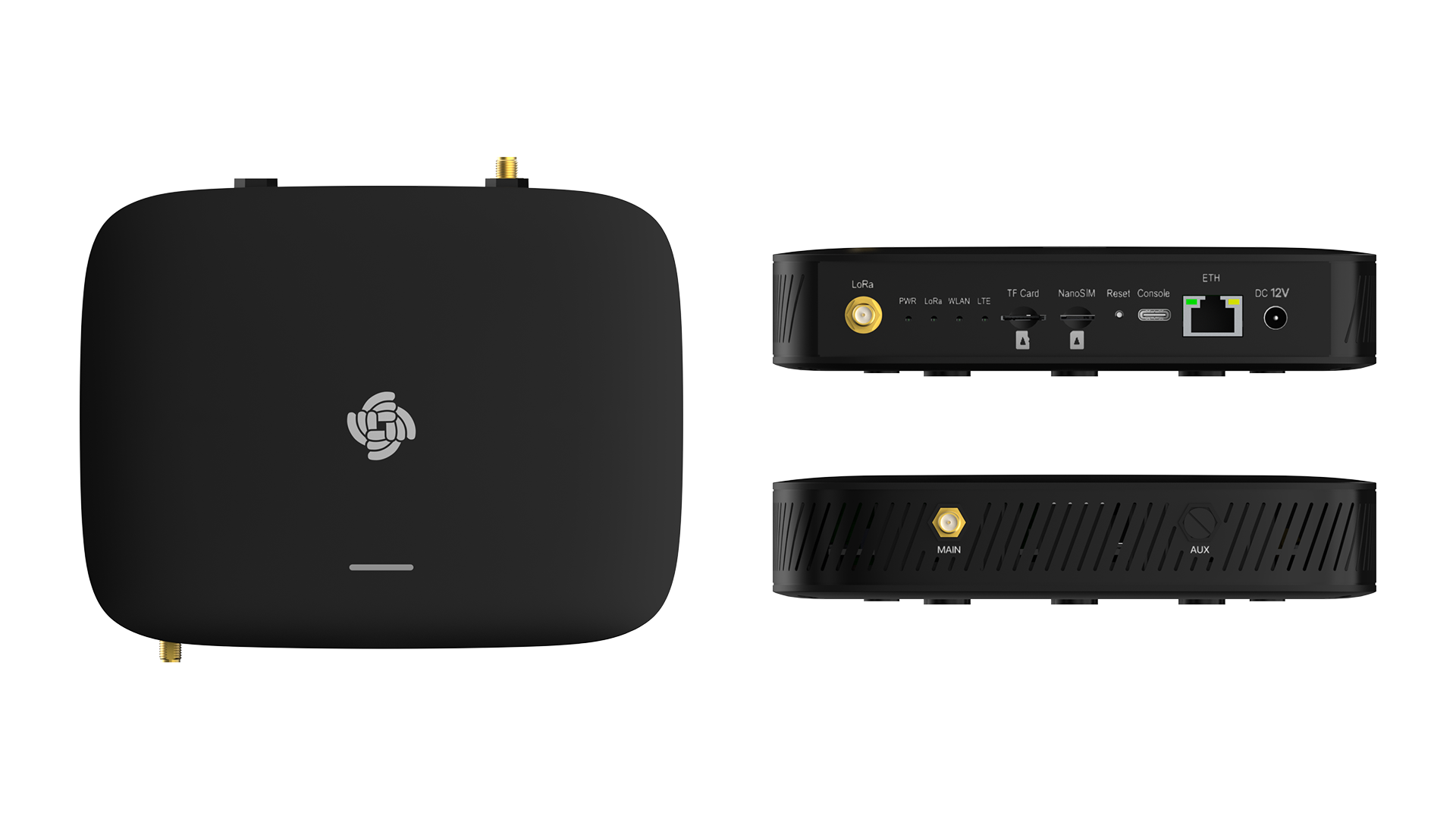 Figure 1: RAK7266 with external LTE antenna connectors
 -
Interfaces without external LTE antenna connectors
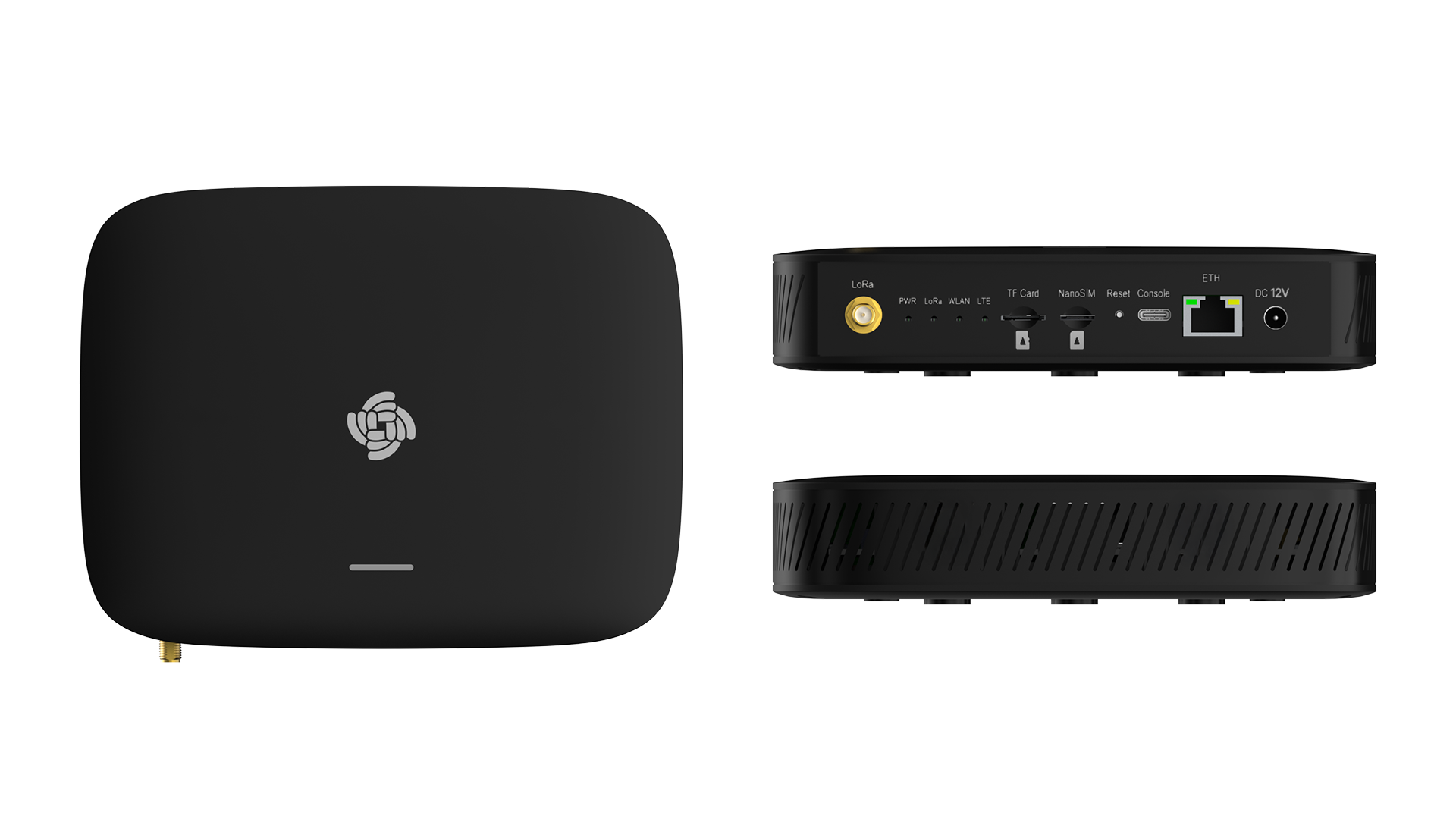 Figure 1: Interfaces of RAK7266S or RAK7266 with internal LTE antennas
Interface Description
| Interfaces | Description |
|---|---|
| DC 12V | Power Input |
| ETH | 10/100 Mbps Ethernet interface for wired network connectivity. |
| Console | USB Type-C port for debugging and maintenance |
| Reset | - Short press: Reboot the device. - Long press (≥5 sec): Factory reset. |
| NanoSIM | Slot for a NanoSIM card, enabling cellular connectivity. Available on all models, but only functional on LTE-enabled versions. |
| TF Card | Pre-installed 16 GB or 32 GB microSD card for log storage and uplink frame buffering. Capacity may vary by production batch. ⚠️ WARNING Do not eject the SD card located in the SD card slot during installation, as it stores logs and data essential for the device's performance. |
| LEDs |
|
| LoRa | LoRa® antenna connector |
| MAIN | LTE antenna Connector Available only on models that support external LTE antennas. |
| AUX | Reserve |
LED Indicators Details
| LEDs | Status Indication | Description |
|---|---|---|
| PWR | On | Gateway is powered on |
| Off | Gateway is powered off | |
| LoRa | On | LoRa module active |
| Off | LoRa module inactive | |
| Flashing | Transmitting or receiving LoRa packets | |
| WLAN | On | Wi-Fi is enabled; either AP mode or STA mode is active. |
| Off | Wi-Fi is disabled; both AP mode and STA mode are inactive. | |
| Flashing | Data transmitting or receiving | |
| LTE (functional only in RAK7266) | Slow Flash 1 (200 ms bright / 1800 ms dark) | Searching for network (unregistered) |
| Slow Flash 2 (1800 ms bright / 200 ms dark) | Idle (registered to network) | |
| Quick Flash (125 ms bright / 125 ms dark) | Data transmitting or receiving | |
| ETH | On | Linkup |
| Off | Linkdown | |
| Flashing | Data transmitting and receiving | |
| Breathing LED | Green (slow blinking) | Booting |
| Blue (slow blinking) | Normal (WAN online & gateway process running) | |
| Red (fast blinking) | Abnormal (WAN offline OR gateway process failed) | |
| You can customize the breathing light behavior by installing extensions. For detailed instructions, refer to the appropriate installation guide based on your firmware version: Compatible with WisGateOS 2 version 2.2.x or later Compatible with WisGateOS 2 versions 2.0.x and 2.1.x |
RF Specifications
LoRa Radio Specifications
| Parameter | Specifications |
|---|---|
| Operating Frequency | EU868/IN865/RU864/US915/AU915/KR920/AS923-1/2/3/4/EU433/CN470 |
| Transmit Power | 27 dBm (Max) |
| Receiver Sensitivity | -139 dBm (Min) |
Wi-Fi Radio Specifications
| Parameter | Specifications |
|---|---|
| Wireless Standard | IEEE 802.11b/g/n |
| Frequency | ISM band: 2.400-2.4835 GHz |
| Channels | 1-13 (2.4 GHz) |
| Transmit Power (The max power maybe different depending on local regulations): per chain | 802.11b 19 dBm @1 Mbps 19 dBm @11 Mbps |
| 802.11g 18 dBm @6 Mbps 16 dBm @54 Mbps | |
| 802.11n (2.4 GHz) 18 dBm @MCS0 (HT20) 16 dBm @MCS7 (HT20) 17 dBm @MCS0 (HT40) 15 dBm @MCS7 (HT40) | |
| Receiver Sensitivity (Typical) | 802.11b -95 dBm @1 Mbps -88 dBm @11 Mbps |
| 802.11g -90 dBm @6 Mbps -75 dBm @54 Mbps | |
| 802.11n (2.4 GHz) -89 dBm @MCS0 (HT20) -72 dBm @MCS7 (HT20) -86 dBm @MCS0 (HT40) -68 dBm @MCS7 (HT40) |
LTE Radio Specifications
| Module / Region | Supported Bands |
|---|---|
| EG915U-EU for EMEA/Brazil/Australia/New Zealand Region | LTE FDD: B1 / B3 / B5 / B7 / B8 / B20 / B28 GSM: B2 / B3 / B5 / B8 |
| EG915U-LA for Latin America Region | LTE FDD: B2 / B3 / B4 / B5 / B7 / B8 / B28 / B66 GSM: B2 / B3 / B5 / B8 |
| EG915Q-NA for North America Region | LTE FDD: B2 / B4 / B5 / B12 / B13 / B66 / B71 |
Software
The RAK7266/RAK7266S gateway runs on WisGateOS 2, a robust software platform designed for efficient network management and integration. Below are the key software features and capabilities:
For more detailed information on software configurations and usage, refer to the WisGateOS 2 User Guide.
| LoRa | Network | Management |
|---|---|---|
| Gateway OTA management | Wi-Fi AP mode | WisDM |
| LoRaWAN Packet Forwarding (Packet Forwarder, Basics Station) | Wi-Fi Client mode | SSH2 |
| Frequency Band Setup | LTE APN Setup (Optional) | Firmware update |
| Country Code Setup | VLAN (802.1Q) Support | Built-in Network Server |
| TX Power Setup | Uplink backup | MQTT Bridge |
| Data logger | Firewall | OpenVPN, Ping Watch Dog |
| Location Setup | DHCP Server/Client | Web UI |
| LoRa Statistics | NTP | |
| Supports Class A and C | ||
| Server Address and Port Setup |
Firmware
| Model | Source |
|---|---|
| RAK7266/RAK7266S WisGate Soho Lite | Download |
Certification

FCC Certification

ISED Certification

REACH Certification

WPC Certification


