RAK7268CV2-V WisGate Edge Lite 2 Verizon Datasheet
Overview
Description
The RAK7268CV2-V WisGate Edge Lite 2 Verizon is an 8-channel indoor gateway for LoRaWAN designed for deployments on the Verizon cellular network in the United States.
It supports Ethernet, 2.4 GHz Wi-Fi, and Verizon-certified LTE Cat 4 for flexible network backhaul. The gateway is equipped with external LTE antennas to improve cellular signal reception and connection reliability. Its onboard Wi-Fi also provides a default AP mode for convenient initial configuration.
The RAK7268CV2-V runs on WisGateOS 2, which provides secure gateway management, advanced networking features, and support for customizable extensions. It can also be remotely monitored and managed through WisDM, making it suitable for centralized management of distributed gateway deployments.
The gateway supports flexible power input options, including PoE and DC power, to accommodate different indoor installation environments.
Features
Hardware
- 8 LoRa® channels
- 2.4 GHz WiFi AP mode for convenient initial configuration
- 100BASE-T Ethernet with Power over Ethernet (PoE)
- RP-SMA connector for the LoRa antenna
- External LTE antennas for improved cellular signal reception and connection reliability
- Multiple backhaul options, including Ethernet, WiFi, and Verizon-certified LTE Cat 4
- Breathing status light for visual indication of the gateway operating status
- Industry certifications for safety, reliability, and regulatory compliance
Software
- WisGateOS 2 with enhanced UI and custom extension add-ons
- WisDM for remote management and monitoring
- Built-in Network Server
- Basics™ Station and Packet Forwarder modes
- LoRa Frame Filtering (node whitelisting in Packet Forwarder mode)
- MQTT v3.1 Bridging with TLS encryption (compatible with ChirpStack LNS)
- LoRa frame buffering in Packet Forwarder mode in case of NS outage, ensuring no data loss
- Supports popular LoRaWAN Network Servers, including TTI, AWS IoT, Actility, Loriot, ChirpStack, and others
Specifications
Overview
Block Diagram
The block diagram of RAK7268CV2-V shows the internal architecture of the hardware.
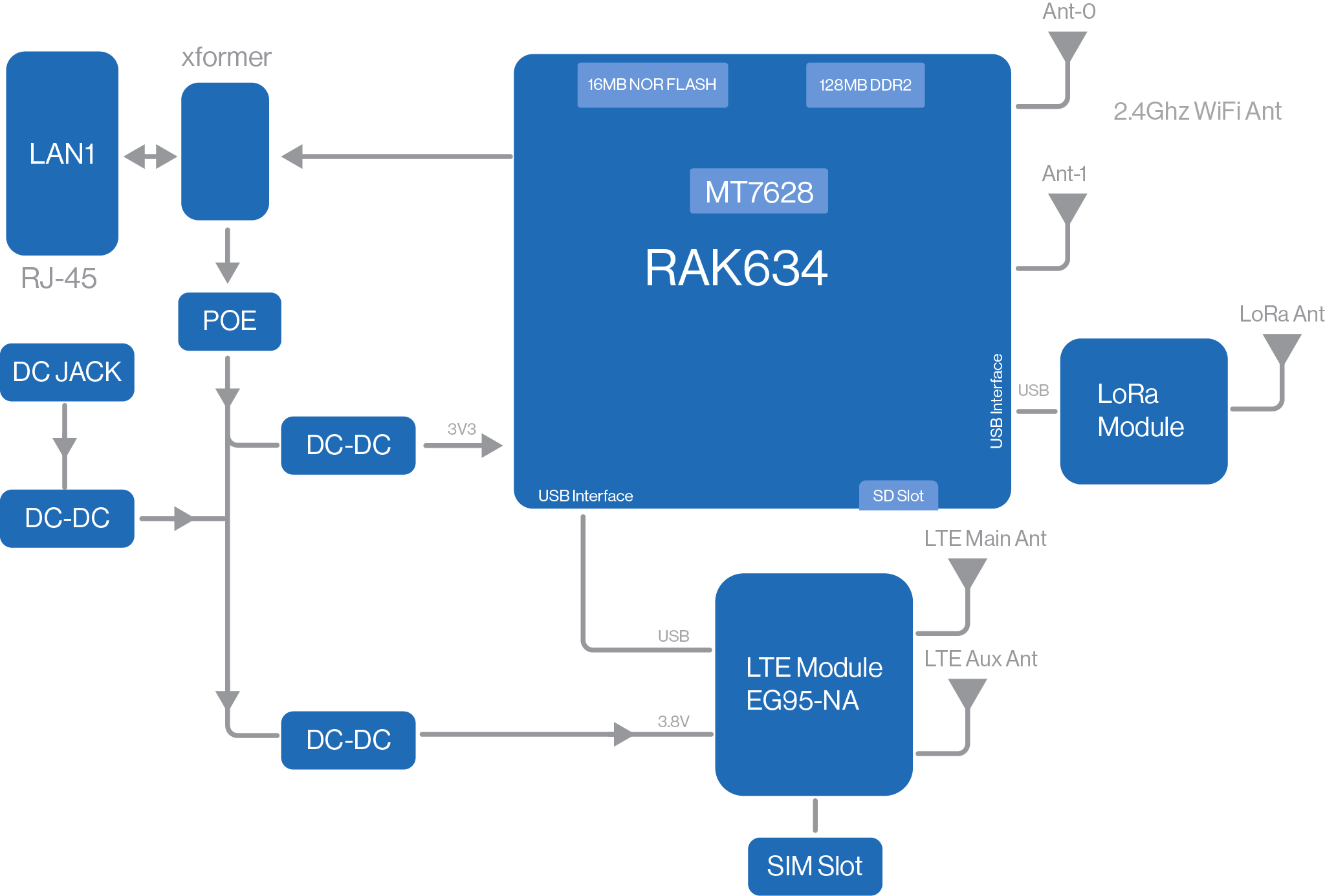 Figure 1: RAK7268CV2-V Block Diagram
Main Specifications
| Feature | Specifications |
|---|---|
| Computing | MT7628, 128 MB DDR2 RAM |
| LoRa Feature | SX1303 Mini PCIe card |
| 8 Channels | |
| Frequency: US915 | |
| LoRa Radio: Refer to the LoRa Radio Specifications section for detailed information. | |
| Wi-Fi Feature | Frequency: 2.4 GHz (802.11b/g/n) |
| Channels: 1-13 (2.4 GHz) | |
| Wi-Fi Radio: Refer to the Wi-Fi Radio Specifications section for detailed information. | |
| Cellular | Nano SIM Card: 12 mm x 9 mm x 0.67 mm |
| Quectel EG95-NA (IoT/M2M-optimized LTE Cat 4 Modules) | |
| LTE Radio: Refer to the LTE Radio Specifications section for detailed information. | |
| Power Supply | PoE (IEEE 802.3 af), 36-57 VDC |
| 9-36 VDC | |
| Power consumption: 3 W (typical) | |
| Antenna | LoRa: External antenna (RP-SMA) |
| Wi-Fi: Integrated PCB antenna | |
| LTE: External antenna (RP-SMA) | |
| Ingress Protection | IP30 |
| Enclosure Material | Plastic (PC+ABS) |
| Weight | 0.3 kg |
| Dimensions | 166 mm x 127.5 mm x 36 mm Gateway only (no antenna, no bracket) |
| Operating Conditions | Operating Temperature: -10˚ C to ﹢55˚ C Storage Temperature: -10˚ C to ﹢65˚ C Operating Humidity: 0-95% RH non-condensing Storage Humidity: 0-95% RH non-condensing |
| Installation Method | Desktop, Wall-mount, 14 mm, 16 mm, 24 mm rails (brackets included) |
Hardware
This section provides an overview of the hardware specifications for the RAK7268CV2-V gateway, including its interfaces, core functions, and key board parameters.
Interfaces
The RAK7268CV2-V gateway provides multiple hardware interfaces. Each model's interface layout is shown in Figure 2.
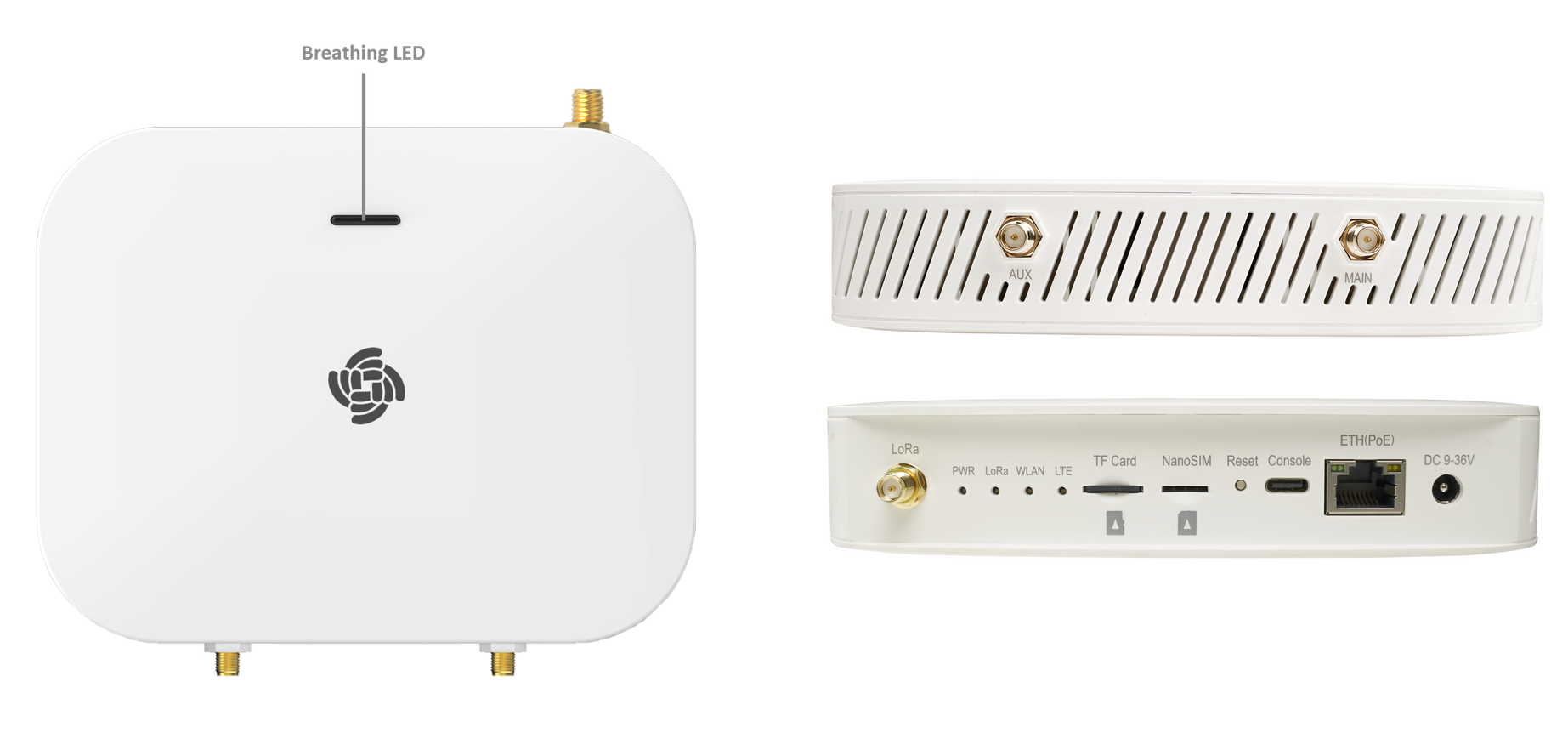 Figure 1: RAK7268CV2-V interfaces
Interface Description
| Interfaces | Description |
|---|---|
| DC 9-36 V | Power Input |
| ETH (PoE) | 10/100 Mbps Ethernet interface for wired network connectivity. PoE (Power over Ethernet) allows the gateway to receive both power and data through a single Ethernet cable. |
| Console | USB Type-C port for debugging and maintenance |
| Reset | - Short press: Reboot the device. - Long press (≥5 sec): Factory reset. |
| NanoSIM | Slot for a NanoSIM card, enabling cellular connectivity. |
| TF Card | Pre-installed 32 GB microSD card for log storage and uplink frame buffering ⚠️ WARNING Do not eject the SD card during installation, as it stores logs and data essential for device operation. |
| LEDs |
|
| LoRa | LoRa antenna connector |
| MAIN / AUX | LTE antenna connector |
LED Indicators Details
| LED | Status | Description |
|---|---|---|
| PWR | On | Gateway is powered on |
| Off | Gateway is powered off | |
| LoRa | On | LoRa module active |
| Off | LoRa module inactive | |
| Flashing | Transmitting or receiving LoRa packets | |
| WLAN | On | Wi-Fi is enabled; either AP mode or STA mode is active. |
| Off | Wi-Fi is disabled; both AP mode and STA mode are inactive. | |
| Flashing | Data transmitting or receiving | |
| LTE | Slow Flash 1 (200 ms bright / 1800 ms dark) | Searching for network (unregistered) |
| Slow Flash 2 (1800 ms bright / 200 ms dark) | Idle (registered to network) | |
| Quick Flash (125 ms bright / 125 ms dark) | Data transmitting or receiving | |
| ETH | On | Linkup |
| Off | Linkdown | |
| Flashing | Data transmitting and receiving | |
| Breathing LED | Green (slow blinking) | Booting |
| Blue (slow blinking) | Normal (WAN online & gateway process running) | |
| Red (fast blinking) | Abnormal (WAN offline OR gateway process failed) |
For the breathing LED, you can customize its light behavior using extensions. Refer to Extensions for WisGate Edge / Soho Gateways for detailed instructions.
RF Specifications
LoRa Radio Specifications
| Parameter | Specifications |
|---|---|
| Operating Frequency | US915 |
| Transmit Power | 27 dBm (Max) |
| Receiver Sensitivity | -139 dBm (Min) |
Wi-Fi Radio Specifications
| Parameter | Specifications |
|---|---|
| Wireless Standard | IEEE 802.11b/g/n |
| Frequency | ISM band: 2.400-2.4835 GHz |
| Channels | 1-13 (2.4 GHz) |
| Transmit Power (The max power maybe different depending on local regulations): per chain | 802.11b 19 dBm @1 Mbps 19 dBm @11 Mbps |
| 802.11g 18 dBm @6 Mbps 16 dBm @54 Mbps | |
| 802.11n (2.4 GHz) 18 dBm @MCS0 (HT20) 16 dBm @MCS7 (HT20) 17 dBm @MCS0 (HT40) 15 dBm @MCS7 (HT40) | |
| Receiver Sensitivity (Typical) | 802.11b -95 dBm @1 Mbps -88 dBm @11 Mbps |
| 802.11g -90 dBm @6 Mbps -75 dBm @54 Mbps | |
| 802.11n (2.4 GHz) -89 dBm @MCS0 (HT20) -72 dBm @MCS7 (HT20) -86 dBm @MCS0 (HT40) -68 dBm @MCS7 (HT40) |
LTE Radio Specifications
| Module / Region | Supported Bands |
|---|---|
| EG95-NA (North America) | LTE FDD: B2/B4/B5/B12/B13 |
| WCDMA: B2/B4/B5 |
Software
The RAK7268CV2-V gateway runs on WisGateOS 2, a robust software platform designed for efficient network management and integration.
For more detailed information on software configurations and usage, refer to the WisGateOS 2 User Guide.
| LoRa | Network | Management |
|---|---|---|
| Gateway OTA management | Wi-Fi AP mode | WisDM |
| LoRaWAN Packet Forwarding (Packet Forwarder, Basics Station) | Wi-Fi Client mode | SSH2 |
| Frequency Band Setup | LTE APN Setup | Firmware update |
| Country Code Setup | VLAN (802.1Q) Support | Built-in Network Server |
| TX Power Setup | Uplink backup | MQTT Bridge |
| Data logger | Firewall | OpenVPN, Ping Watch Dog |
| Location Setup | DHCP Server/Client | Web UI |
| LoRa Statistics | NTP | |
| Supports Class A and C | ||
| Server Address and Port Setup |
Firmware
| Model | Source |
|---|---|
| RAK7268CV2-V WisGate Edge Lite 2 Verizon |
Certification

FCC Certification

VERIZON Certification
FCC Caution
Any changes or modifications not expressly approved by the party responsible for compliance could void the user's authority to operate the equipment.
This device complies with part 15 of the FCC Rules. Operation is subject to the following two conditions:
- This device may not cause harmful interference.
- This device must accept any interference received, including interference that may cause undesired operation.
This equipment has been tested and found to comply with the limits for a Class B digital device, according to Part 15 of the FCC Rules. These limits are designed to provide reasonable protection against harmful interference in a residential installation. This equipment generates, uses, and can radiate radio frequency energy and, if not installed and used according to the instructions, may cause harmful interference to radio communications. However, there is no guarantee that interference will not occur in a particular installation. If this equipment does cause harmful interference to radio or television reception, which can be determined by turning the equipment off and on, the user is encouraged to try to correct the interference by one or more of the following measures:
- Reorient or relocate the receiving antenna.
- Increase the separation between the equipment and the receiver.
- Connect the equipment into an outlet on a circuit different from that to which the receiver is connected.
- Consult the dealer or an experienced radio/TV technician for help.
FCC Radiation Exposure Statement
This equipment complies with FCC radiation exposure limits set forth for an uncontrolled environment. This equipment should be installed and operated with a minimum distance of 20 cm between the radiator and your body.


