Metrics Templates help users set up gateway performance and health monitoring faster. RAK administrators can turn recommended monitoring configurations into reusable templates, while end users can create a ready-to-use dashboard from a template and adjust it to fit their own deployment.
Added template management under Settings > Templates for RAK Superadmin and RAK Admin users. Administrators can create templates from scratch or copy existing ones. The template list displays the template name, description, category, publication status, creator, and last updated information, with search and sorting by name, category, status, and update time.
2
Template Publication and Access Control
Added Draft and Published template states. Draft templates are visible only to administrators, while published templates are available to end users and can later be unpublished.
3
Template Preview
Added the ability to preview templates using organization data while editing. Preview data is not saved as part of the template configuration.
4
Create Dashboards from Templates
Added a Create from template option that allows users to select a template from the official template library based on their monitoring scenario. WisDM automatically copies the template's widgets and layout into a new, independent dashboard that users can customize by adding, removing, reconfiguring, or rearranging widgets.
Figure 1: Create from template
Figure 1: Template library
5
Project and Dashboard Ownership
Introduced Project Owner and Dashboard Owner mechanisms, allowing Location Admin users to create and manage the projects and Metrics dashboards they own.
WisDM automatically adjusts a template's time range to the maximum supported range when it exceeds the organization's data retention period and displays a notification.
Gateway Tags provide a flexible way to organize and operate gateway fleets beyond the existing Location structure. Users can group gateways by physical site, customer, priority, maintenance batch, project phase, or other operational criteria, and then use those tags for filtering and bulk operations.
Added the ability to create and edit Location Tags and Organization Tags when adding gateways, in Gateway Central, and on the Gateway Overview page. Tag names support 1–32 characters, including letters, numbers, underscores, and hyphens. Tag matching is case-insensitive. Users can create tags while typing or select existing tags using autocomplete.
Figure 1: Add or edit tags
2
Organization Tag Visibility Reminder
Added a reminder and shortcut to the visibility configuration page when Organization Tags are saved.
3
Bulk Tag Management
Added Manage location tags and Manage organization tags actions for multiple selected gateways. Users can add selected tags to all selected gateways, remove specific tags, or clear all tags within the selected scope.
4
Organization-Level Tag Management
Added Settings > Tags > Organization tags for Organization Admin users to view Organization Tags and their associated gateway counts. Administrators can rename or delete tags globally. Renaming a tag to an existing tag name automatically merges the two tags.
5
Location-Level Organization Tag Visibility
Added Settings > Tags > Location access for Organization Admin users to configure a global default visibility of Visible or Hidden, with overrides for individual Locations. When Organization Tags are hidden, regular users in the affected Location cannot see Organization Tag columns, filters, or tag blocks in gateway details. This supports MSP and reseller scenarios where internal operational tags must remain hidden from customer-side users.
Added separate Location Tags and Organization Tags columns and filters to Location-level and organization-wide gateway lists. Tag columns support A–Z sorting and four filter modes: Any of selected (OR), All of selected (AND), None of selected, and No tags.
Added Auto-Data Recovery settings to the UDP protocol configuration in Packet Forwarder mode. Includes a configurable automatic restart threshold and gateway firmware compatibility validation before applying the configuration.
2
Organization List Column Customization
Added the ability to show or hide columns in the organization list. Column display preferences are saved for future sessions.
3
Solar Battery Status Details
Added the Gateway Serial Number (SN) and Firmware Version to Solar Battery status details. Improved the timestamp presentation for fault and alarm events.
Fixed an issue where copying a single widget could incorrectly reset the width of existing widgets to full width.
2
Location Admin Network Configuration Status
Fixed a 403 error during asynchronous job-status polling after a Location Admin updated Basics Station network settings. The error could cause the configuration form to appear reset.
3
Location Deletion Refresh
Fixed an issue where a deleted Location remained visible in the Locations list until the page was refreshed.
4
Gateway Performance Traffic Chart Tooltip
Fixed tooltip clipping near chart boundaries in the Uplink and Downlink traffic charts.
5
China-Region CAPTCHA Compatibility
Improved CAPTCHA handling for users in China, where restricted access to Google reCAPTCHA could cause verification failures.
Can I customize a dashboard created from a Metrics Template?
Yes. WisDM copies the template's widgets and layout into your new dashboard, allowing you to customize it independently without changing the original template.
What is the difference between Location Tags and Organization Tags?
Location Tags are used to organize gateways within a specific Location, while Organization Tags can be applied across the organization. Organization administrators can also manage Organization Tags centrally and control whether they are visible in individual Locations.
Can I assign or remove tags from multiple gateways at once?
Yes. WisDM lets you select multiple gateways and add or remove tags in bulk. You can also filter gateway lists by tags using different matching options, such as gateways with any or all of the selected tags, gateways without the selected tags, or gateways with no tags.
LoRa® is a registered trademark or service mark of Semtech Corporation or its affiliates. LoRaWAN® is a licensed mark.

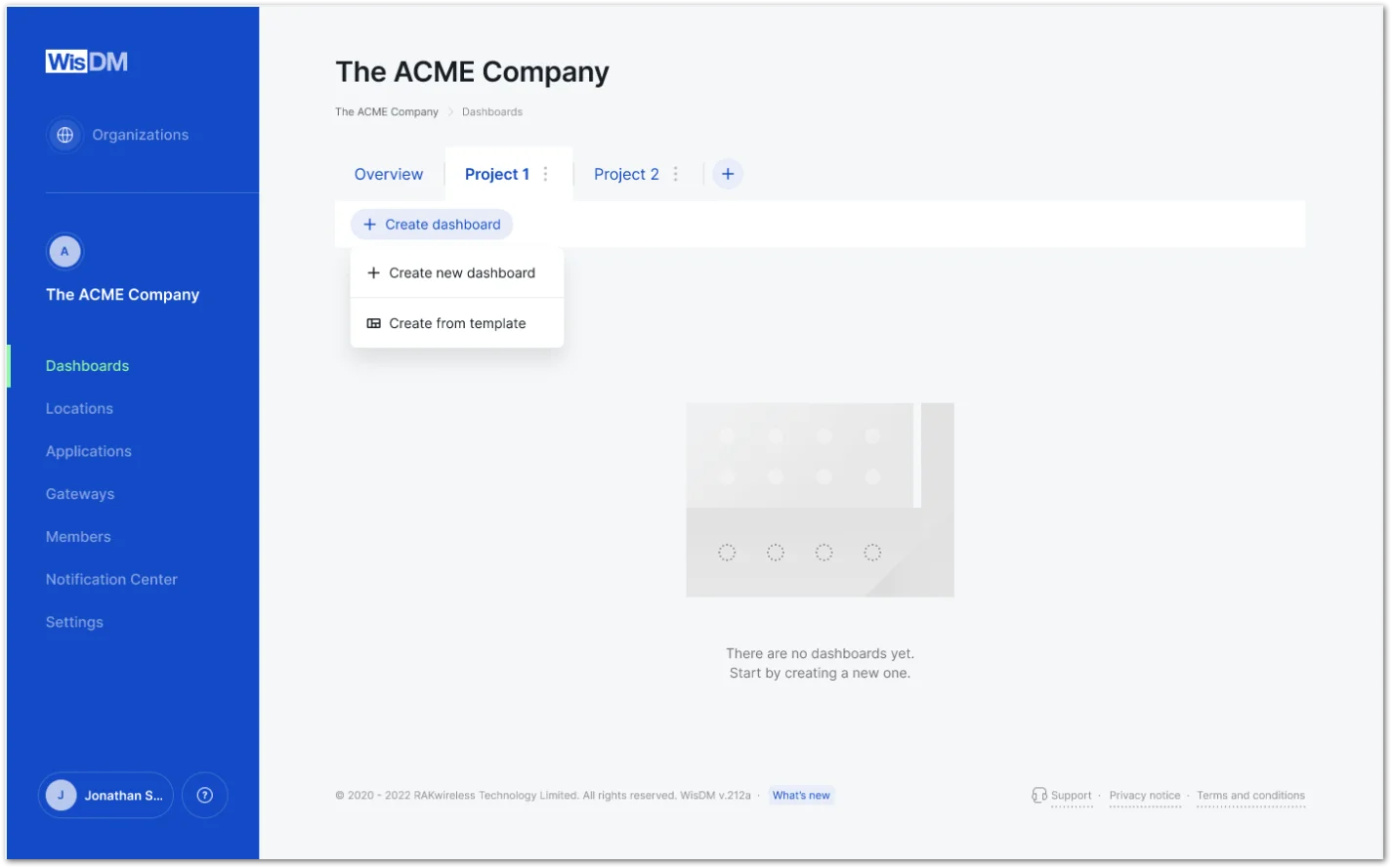 Figure 1: Create from template
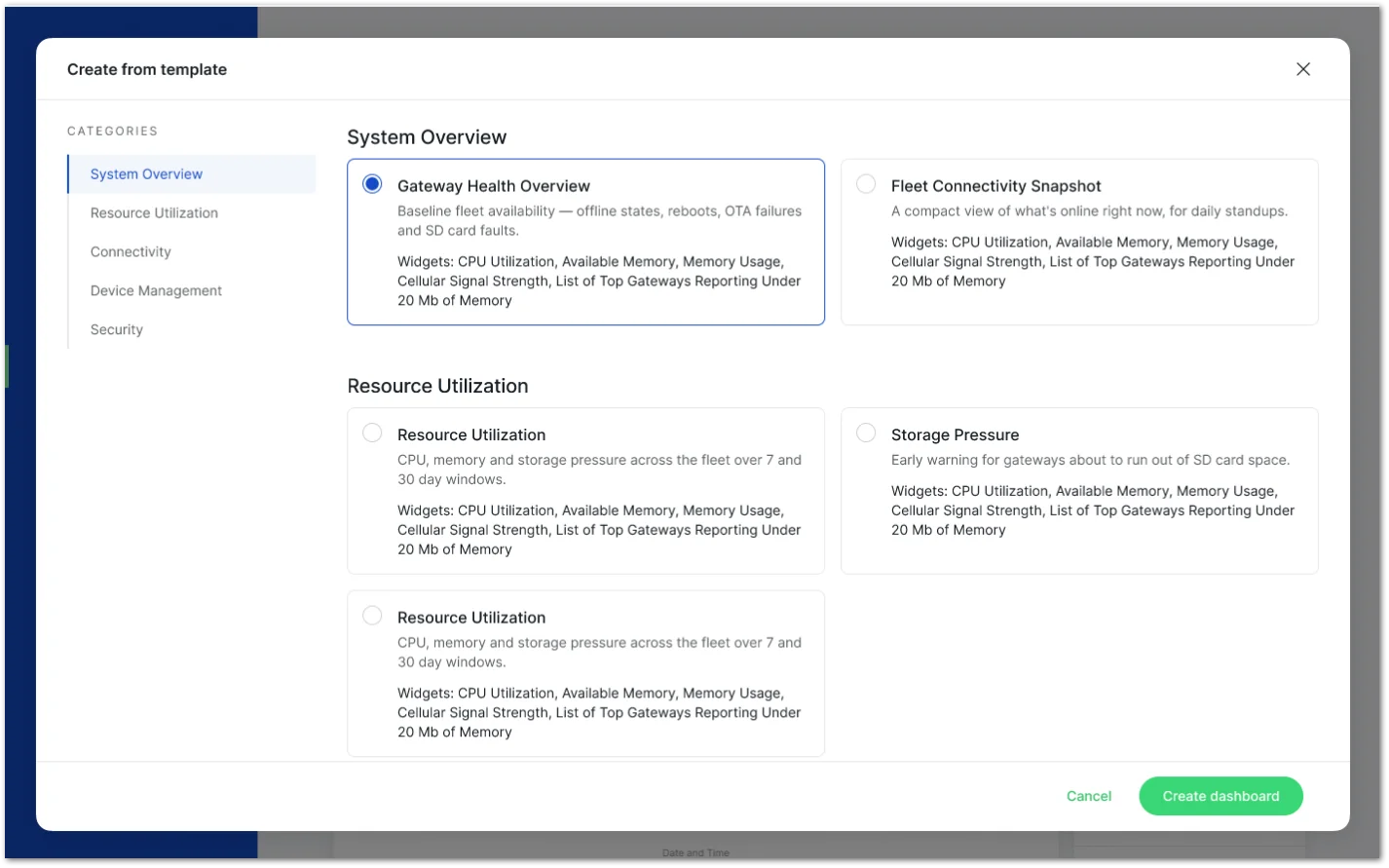 Figure 1: Template library
 Figure 1: Add or edit tags
 Figure 1: Location and organization tags


