RAK10730 WisMesh Pad Datasheet
Product Overview
The RAK10730 WisMesh Pad is a portable field terminal designed for Sensor Hub monitoring and deployment planning in Meshtastic-based applications.
It provides a local touchscreen interface for discovering and monitoring Sensor Hubs, viewing telemetry and alerts, and accessing Meshtastic messages, maps, nodes, and device settings. Before deployment, you can also evaluate local radio conditions with Spectrum Scan and plan node placement with Site Planner.
By combining sensor monitoring and pre-deployment tools in one portable device, WisMesh Pad helps you simplify field deployment, reduce repeated on-site adjustments, and gain clearer visibility into Sensor Hub data and deployment conditions.
Key Features
- Raspberry Pi CM4 platform with a 7-inch, 1024 × 600 touchscreen.
- Sensor Hub monitoring with discovery, telemetry, history, and alerts.
- Spectrum Scan with RSSI analysis, channel scoring, and scan history.
- Site Planner for coverage simulation and node placement.
- 20000 mAh (3.7 V) rechargeable battery with external power support.
- Built-in GPS, WiFi, Gigabit Ethernet, and USB.
- External LoRa® antenna for Meshtastic communication.
- Supports 863–870 MHz and 902–928 MHz frequency bands.
Specifications
Interfaces
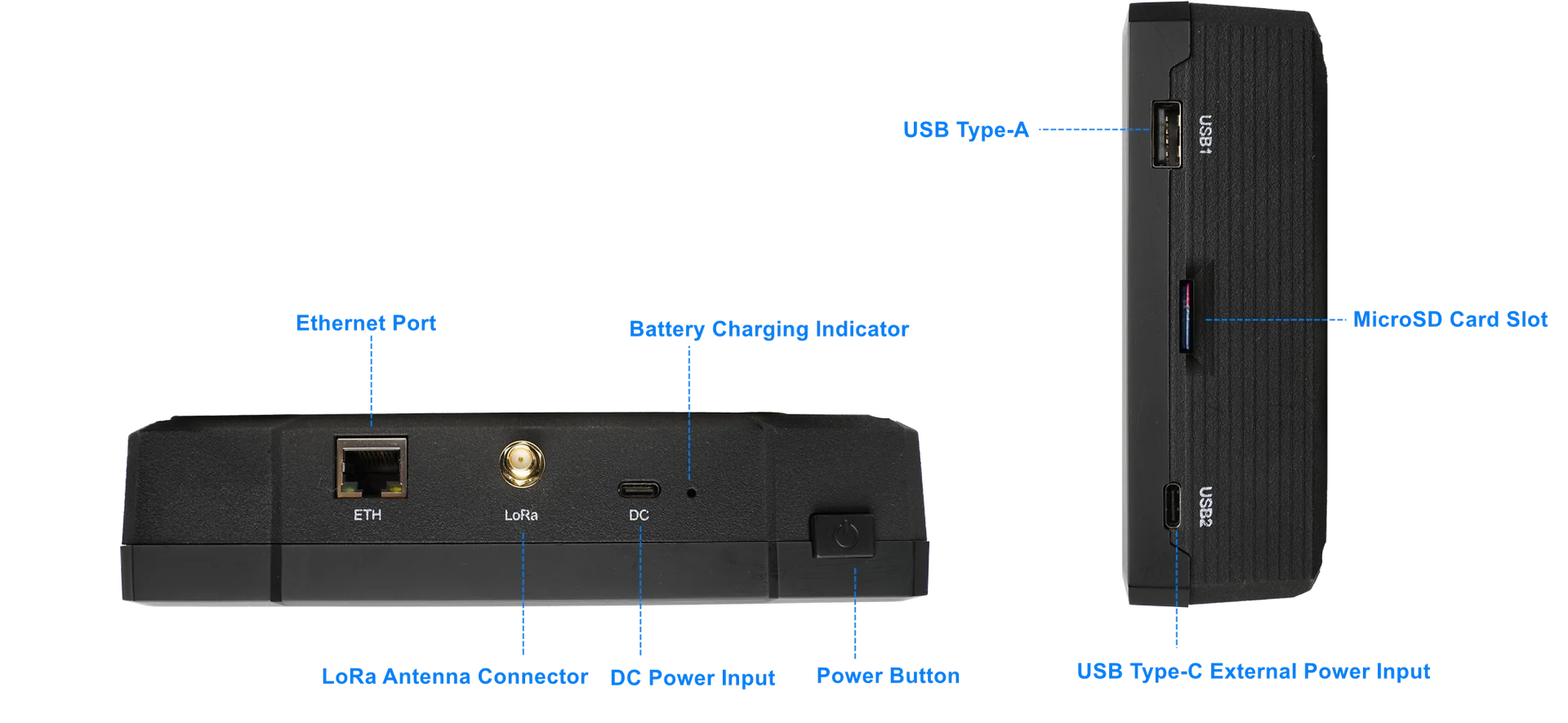 Figure 1: WisMesh Pad Physical Interface
| Interface | Description |
|---|---|
| Power Button | Switches battery power on or off. USB Type-C external power is not controlled by this switch. |
| Battery Charge Indicator | Indicates battery charging status. |
| DC Power Input | Supports 5 V/3 A power input. Provides power to charge the battery. |
| LoRa Antenna Connector | LoRa Antenna Connector: SMA connector for connecting the LoRa antenna, supporting LoRa communication for Meshtastic networking. |
| Ethernet Port (ETH) | 10/100/1000M Ethernet RJ45 port, used wired network connection for CM4 |
| USB 1 | USB Type-A port for connecting external USB devices ,such as USB flash drives or Keyboard |
| MicroSD Card Slot | Slot for inserting a MicroSD card that contains the device's firmware. This card is essential for the device's operation and must not be removed during normal use. |
| USB 2 | USB Type-C external power input (5 V, ≥2 A recommended) for powering the device. Does not charge the battery. |
Main Display
WisMesh Pad integrates a 7-inch touchscreen display for local configuration, monitoring, and Meshtastic network management.
| Item | Specification |
|---|---|
| Display Size | 7-inch |
| Resolution | 1024 × 600 |
| Input | Capacitive touchscreen |
Connect to Meshtastic device
WisMesh Pad supports connecting to Meshtastic devices through the HTTP interface. You can add and manage multiple device connections. Saved connections are stored locally in the browser for quick access.
Bluetooth and Serial connections are not currently supported.
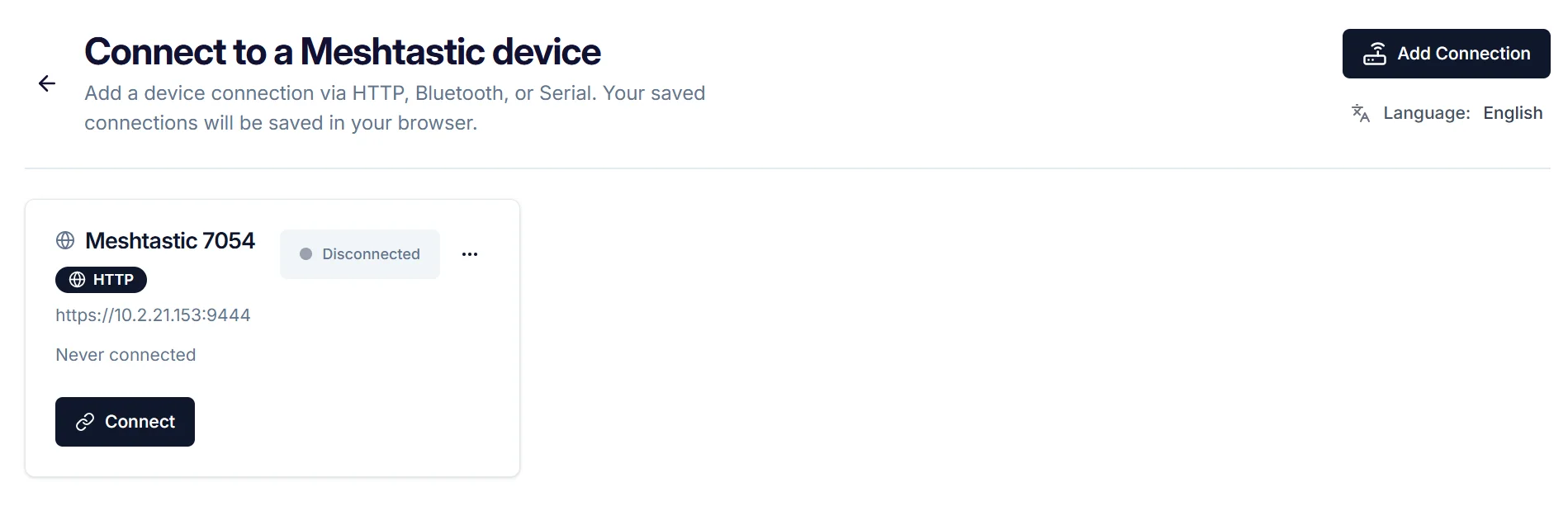 Figure 1: Mechanical dimensions
| Function | Description |
|---|---|
| Add Connection | Creates a new Meshtastic device connection using HTTP, Bluetooth, or Serial. |
| Connect Device | Opens the selected connection and establishes communication with the Meshtastic device. |
| Language | Changes the interface language. |
| Delete | Deletes a saved connection |
| Set as Default | Sets a frequently used connection as the default device. |
Mode Selection
WisMesh Pad provides two operation modes for different deployment scenarios:
- WisMesh Station Used after connecting to a Meshtastic device for monitoring and network management.
- Check Your Deployment Used before installation for radio environment evaluation and deployment planning.
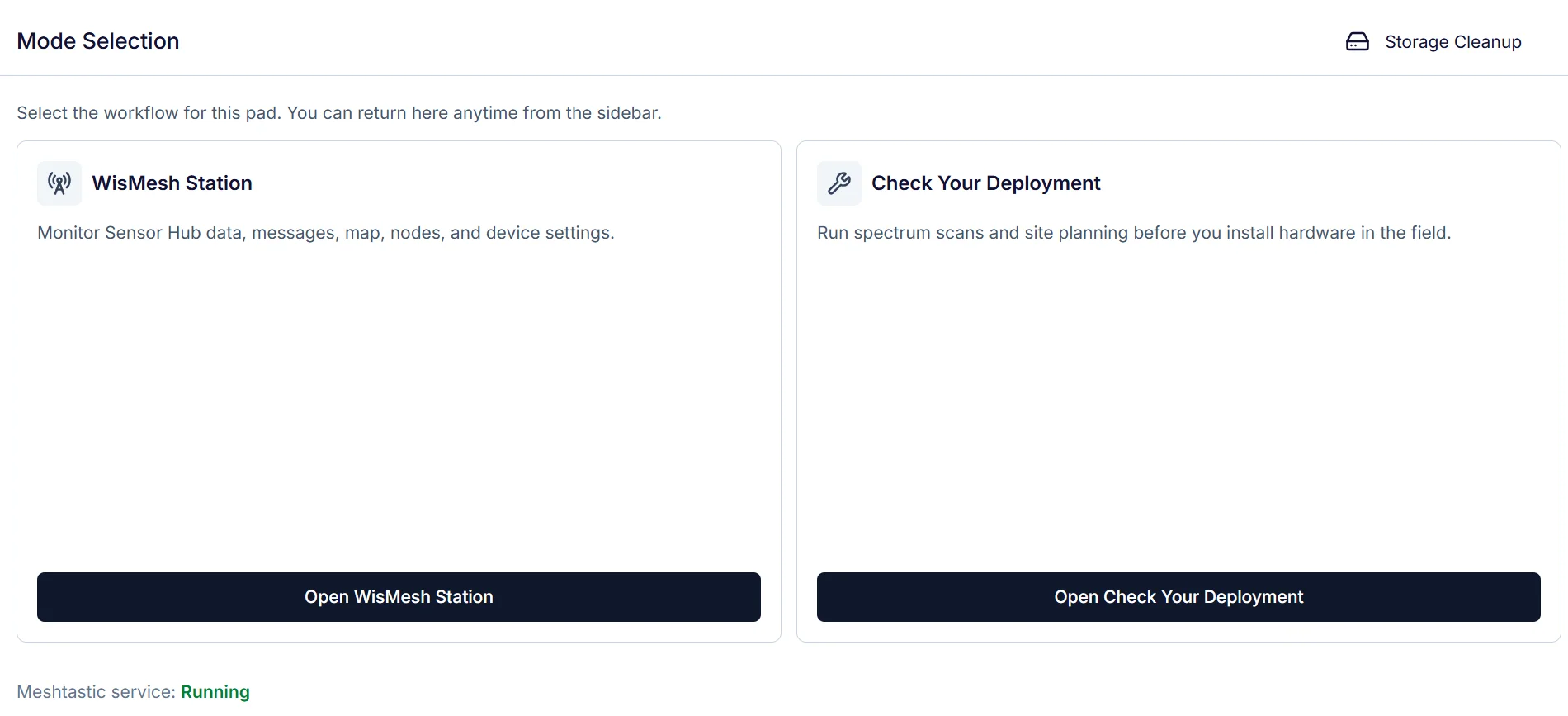 Figure 1: Mechanical dimensions
| Mode | Description |
|---|---|
| WisMesh Station | Monitor Sensor Hub data and access Meshtastic functions, including Messages, Map, Nodes, and Settings. |
| Check Your Deployment | Evaluate radio conditions with Spectrum Scan and plan node placement with Site Planner before deployment. |
| Meshtastic Service | Monitor Meshtastic service status and check whether the service is running or stopped. |
| Storage Cleanup | Review storage usage and remove Sensor Hub history and Scan history. |
RF Characteristics
Meshtastic Operating Frequencies
The WisMesh Pad supports multiple regional frequency bands for Meshtastic communication. When purchasing this device, select the correct frequency variant according to your region.
| Frequency Variant | Supported Frequency Range |
|---|---|
| 8xx MHz version | 863 – 870 MHz |
| 9xx MHz version | 902 – 928 MHz |
Antenna
| Antenna Type | Frequency Range | Antenna Gain | LNA Gain | Efficiency |
|---|---|---|---|---|
| GPS Antenna | 1575.42 – 1602 MHz | 0.6 dBi | 22 dB | 42% |
| WiFi Antenna | 2400 – 2500 MHz | 3.12 dBi | — | 79.95% |
Electrical Characteristics
Power Supply
| Item | Specification |
|---|---|
| DC Power Input | 5 V / 3 A (for normal and fast battery charging) |
| USB 2 (Type-C) | 5 V / 2 A (provides power to the device but does not charge the battery) |
| Power Usage Recommendation | - For indoor configuration or static use, you can turn off the battery and power the device directly via USB Port 2. - Use the built-in battery when external power is not accessible (outdoor/mobile). |
Power Consumption
| Item | Specification |
|---|---|
| Maximum Power Consumption | 7.3 W (continuous LoRa TX + GPS acquisition mode) |
| Power Consumption After Shutdown | Battery standby current: ~0.6 mA |
| Long-term Storage Time | Up to 3 years powered off after a full charge |
Battery & Charging
| Item | Specification |
|---|---|
| Battery Capacity | Built-in 20,000 mAh @ 3.7 V rechargeable lithium battery |
| Battery Runtime | Operates for over 11 hours on a full charge |
| Charging Time | ~10 hours from low battery to full charge (using recommended power adapter) |
| Charging Recommendation | For battery charging, always use the DC 5 V / 3 A input. |
Environmental Characteristics
| Parameter | Minimum | Typical | Maximum |
|---|---|---|---|
| Storage Temperature | -20° C | +25° C | +60° C |
| Operating Temperature | -20° C | +25° C | +40° C |
Mechanical Characteristics
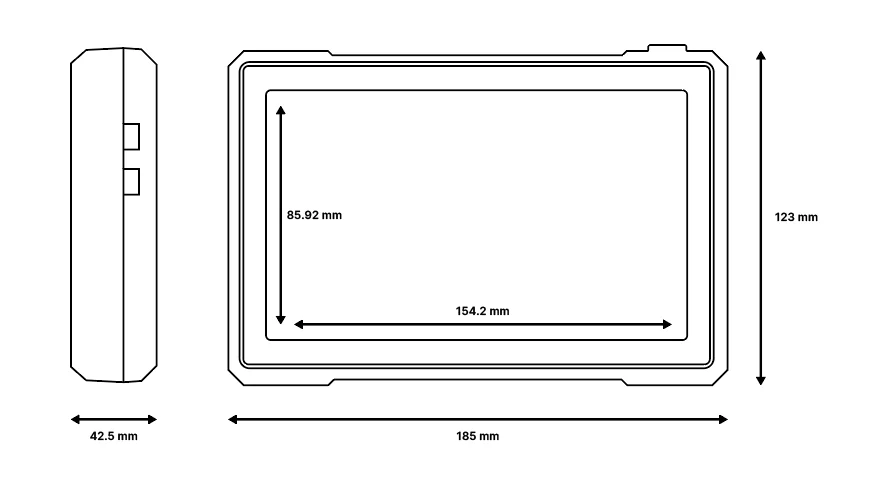 Figure 1: Mechanical characteristics
Firmware
Download the latest firmware version of WisMesh Pad via the RAKwireless Downloads.


