ConnectOS Concentratord
The ChirpStack Concentratord is the driver layer between the LoRa® concentrator hardware and everything else on the gateway. It owns the radio: it configures the chipset, reads the gateway EUI from it, and exposes a single API that the packet forwarders connect to.
Everything else in the LoRaWAN menu, the MQTT Forwarder, the UDP Forwarder, the BasicStation Forwarder and the Gateway Mesh is a client of the Concentratord. Configure it first; none of them can work until it runs.
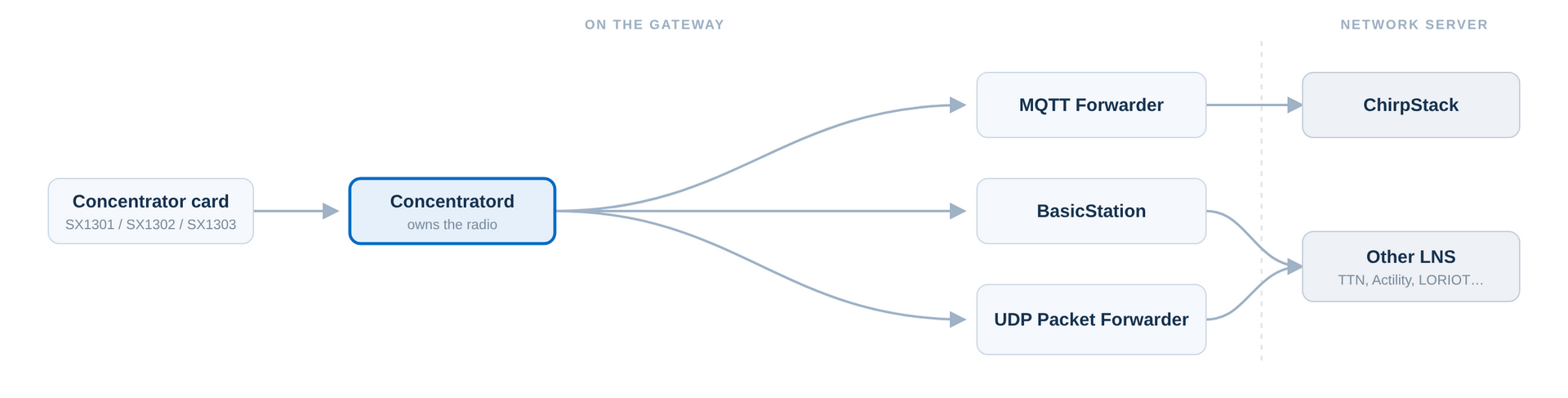 Figure 1: Concentratord in the ConnectOS LoRaWAN Architecture
One instance runs per slot, so a gateway with two concentrator cards runs two independent Concentratord instances, each with its own gateway EUI and its own set of forwarders.
Pick the Slot
Navigate to LoRaWAN → Concentratord. The tabs at the top Slot 1 and Slot 2 select which mini PCIe slot you are configuring. Configure the slot your card is physically fitted in.
Slot 1 and Slot 2 are configured, enabled and started completely independently. Leave the slot you are not using disabled.
Global Configuration
On the Global configuration tab, tick Enabled and set Enabled chipset to match the card you have.
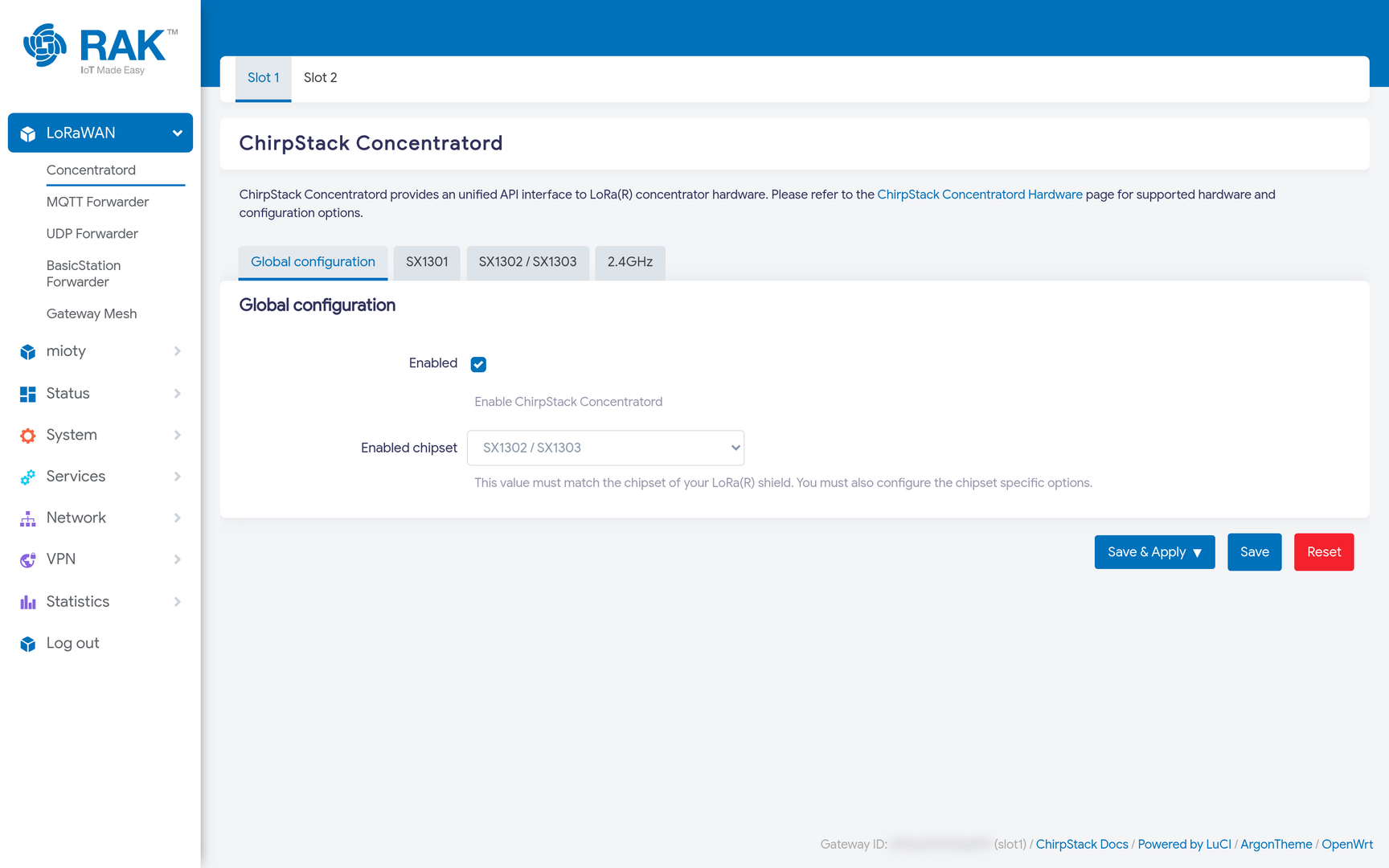 Figure 1: Concentratord Global Configuration
| Chipset | Typical cards |
|---|---|
| SX1301 | RAK2245, RAK2246, RAK2247 |
| SX1302 / SX1303 | RAK2287, RAK5146 |
| 2.4 GHz | RAK5148 |
The chipset choice decides which of the remaining tabs applies. Each chipset has its own tab, and only the one matching your selection is used, so filling in the SX1301 tab while the chipset is set to SX1302 has no effect.
Chipset Configuration
Open the tab for your chipset and describe the hardware. For a RAK5146 (SX1303) connected over USB:
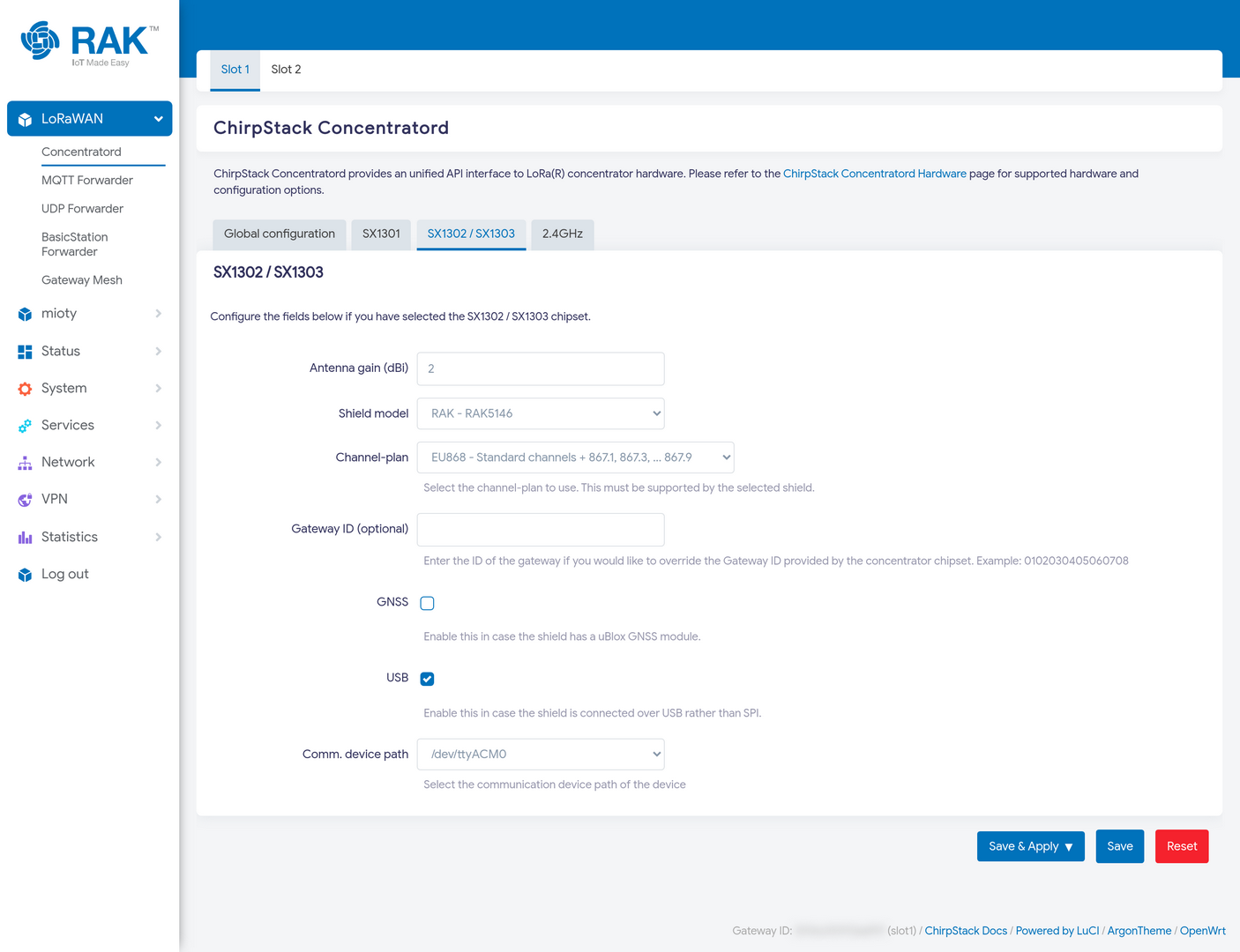 Figure 1: Concentratord SX1302/SX1303 Configuration
| Field | Meaning |
|---|---|
| Antenna gain | Gain of the attached antenna in dBi. Used in the duty-cycle and EIRP calculations, so set it honestly. |
| Shield model | The concentrator card model. This selects the reset and power-enable pins for that board. |
| Channel-plan | The plan for your region, for example EU868. It must be supported by the selected shield, and must match the plan of the network server you connect to. |
| Gateway ID | Leave empty to use the EUI reported by the concentrator chipset. Fill it in only to deliberately override that EUI. |
| GNSS | Enable only if the card carries a uBlox GNSS module. Enabling it without the hardware stops the Concentratord from starting cleanly. |
| USB | Enable when the card is connected over USB rather than SPI. |
| Comm. device path | The device node for the card. USB cards appear as /dev/ttyACM0; SPI cards use /dev/spidev0.0. |
Press Save & Apply.
Regional plans that cover several sub-bands are listed separately, for example US915 - Channels 0-7 + 64 through Channels 56-63 + 71. Pick the sub-band your network server expects; a gateway listening on the wrong sub-band looks connected but never hears a device.
Verify
Once the Concentratord starts, it reads the EUI out of the concentrator chipset and ConnectOS shows it in the footer of every page, with the slot it came from:
Gateway ID: 0015c001f19ad81d (slot1)
That EUI is the gateway's identity, it is what you register with your network server, and what the forwarders use unless you override it.
For more detail, open Status → System Log and look for chirpstack-concentratord messages. A healthy start looks like this:
chirpstack-concentratord-sx1302: Starting the concentrator
chirpstack-concentratord-sx1302: Gateway ID retrieved, gateway_id: "0015c001f19ad81d"
chirpstack-concentratord-sx1302: Initializing JIT queue, capacity: 32
chirpstack-concentratord-sx1302: Creating socket for publishing events, bind: ipc:///tmp/concentratord_slot1_event
chirpstack-concentratord-sx1302: Creating socket for receiving commands, bind: ipc:///tmp/concentratord_slot1_command
chirpstack-concentratord-sx1302: Publishing stats event, rx_received: 0, rx_received_ok: 0, ...
The last line repeats every 30 seconds. Those two ipc:// sockets are what the forwarders attach to, which is why each forwarder asks you which slot to use rather than which device.
Troubleshooting
| Symptom | Likely cause |
|---|---|
| Footer reads Could not read Gateway ID | The Concentratord did not start. Check the system log for the reason. |
No Gateway ID retrieved line in the log | Wrong shield model, wrong device path, or the USB flag does not match how the card is wired. |
| Starts, but a forwarder reports no backend | The forwarder is pointed at the other slot. Check its Backend or Slot setting. |
| Devices are never heard | Channel-plan or sub-band mismatch with the network server. |
Next Steps
With the Concentratord running, choose how the gateway reaches your network server:
- MQTT Forwarder The recommended path to a ChirpStack network server.
- UDP Forwarder The legacy Semtech protocol, for network servers that require it.
- BasicStation Forwarder For The Things Stack and other Basics Station platforms.
- Gateway Mesh To extend coverage with gateways that have no internet connection.


