ConnectOS Gateway Mesh
ChirpStack Gateway Mesh extends LoRaWAN® coverage into places you cannot get a backhaul to. Gateways with no internet connection, on a hilltop, down a valley, running off solar, repeat uplinks and downlinks over LoRa® until they reach a gateway that is connected.
The end devices are unchanged. They transmit ordinary LoRaWAN frames and know nothing about the mesh, which is the main practical difference from the LoRa Alliance Relay specification: no firmware change on the fleet.
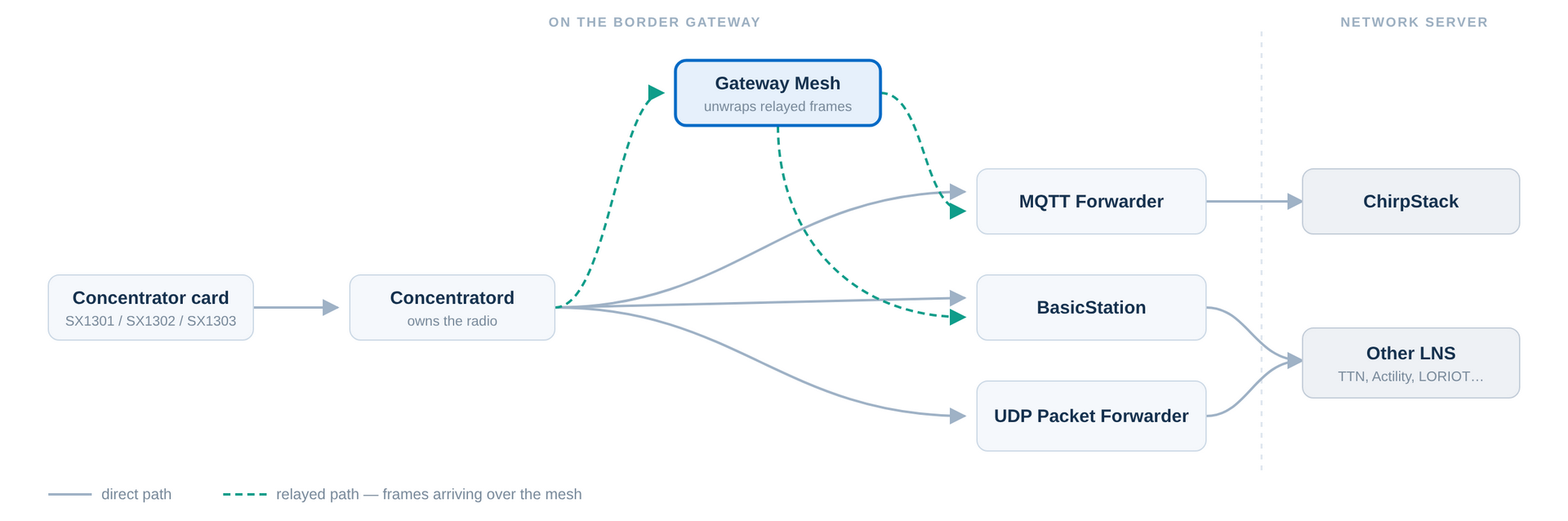 Figure 1: Border Gateway Packet Flow
How It Works
Gateways take one of two roles:
| Role | Internet | Job |
|---|---|---|
| Relay Gateway | No | Hears device frames, wraps them in a mesh packet, and hands them back to the Concentratord to re-transmit. |
| Border Gateway | Yes | Unwraps mesh packets and hands them to the network server as if the device had been heard directly. |
  device ))) Relay GW ))) Relay GW ))) Border GW ──── ChirpStack
              (no WAN)     (no WAN)      (WAN)
A Relay Gateway runs no packet forwarder at all, with no backhaul there is nothing for one to talk to. The Gateway Mesh never drives the radio itself: it wraps each frame and hands it straight back to the Concentratord, which re-transmits it over the air:
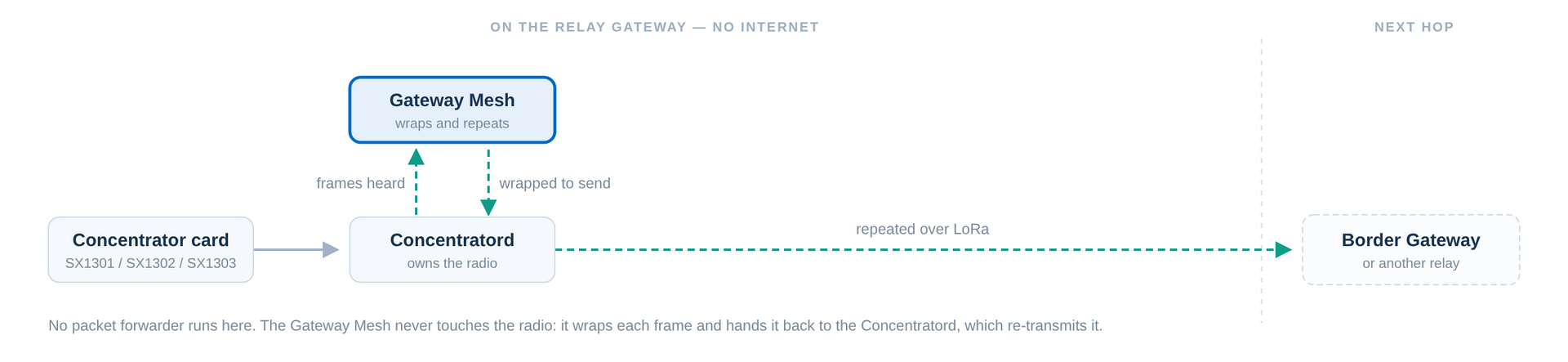 Figure 1: Relay Gateway Packet Flow
The Border Gateway is the diagram at the top of this page: there the mesh hands frames to a forwarder, which carries them to the network server.
An uplink is repeated hop by hop until a Border Gateway picks it up. The Border Gateway recovers the original reception parameters, data rate, frequency, RSSI, SNR, and forwards the frame with mesh context attached. The network server returns that context on the downlink, which is how the Border Gateway knows which path to send the reply back along.
Some consequences worth planning around:
- Class A only. The mesh relies on the device's normal receive windows.
- Every hop costs airtime. A frame is transmitted again at each hop, so the mesh consumes duty cycle on the mesh channel. Keep hop counts as low as the topology allows.
- Latency grows per hop, and the downlink must make the return trip inside the device's receive window.
Before You Start
- The Concentratord must be configured and running on every gateway in the mesh.
- Decide the root key in advance, it must be identical on every Border and Relay Gateway.
- On the Border Gateway, the MQTT Forwarder is what carries traffic on to ChirpStack, configured under its Mesh entry rather than a slot.
Global Configuration
Navigate to LoRaWAN → Gateway Mesh. On the Global configuration tab, tick Enabled and select the Region.
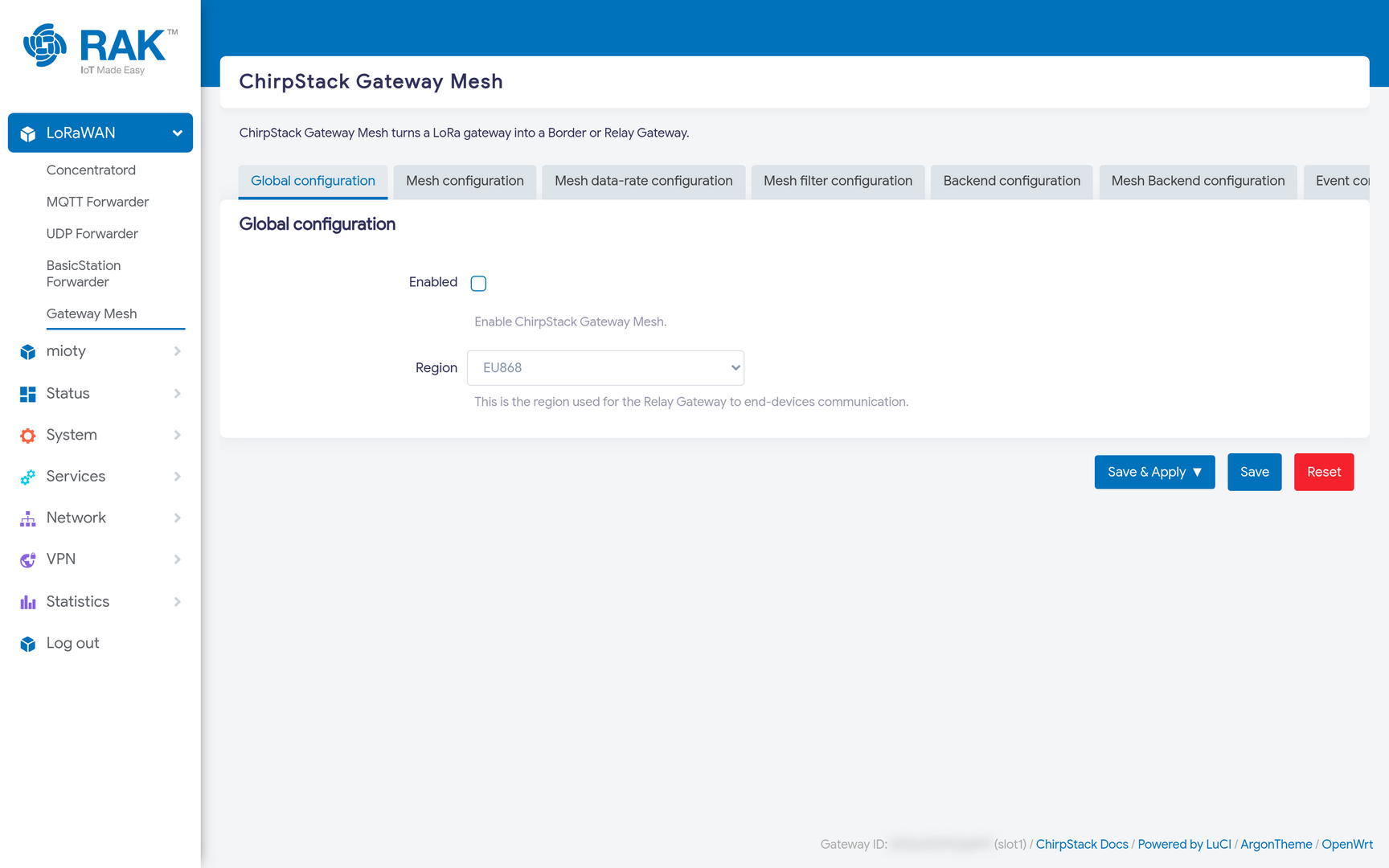 Figure 1: Gateway Mesh Global Configuration
Mesh Configuration
This tab defines the mesh itself. Every gateway in one mesh must agree on these settings.
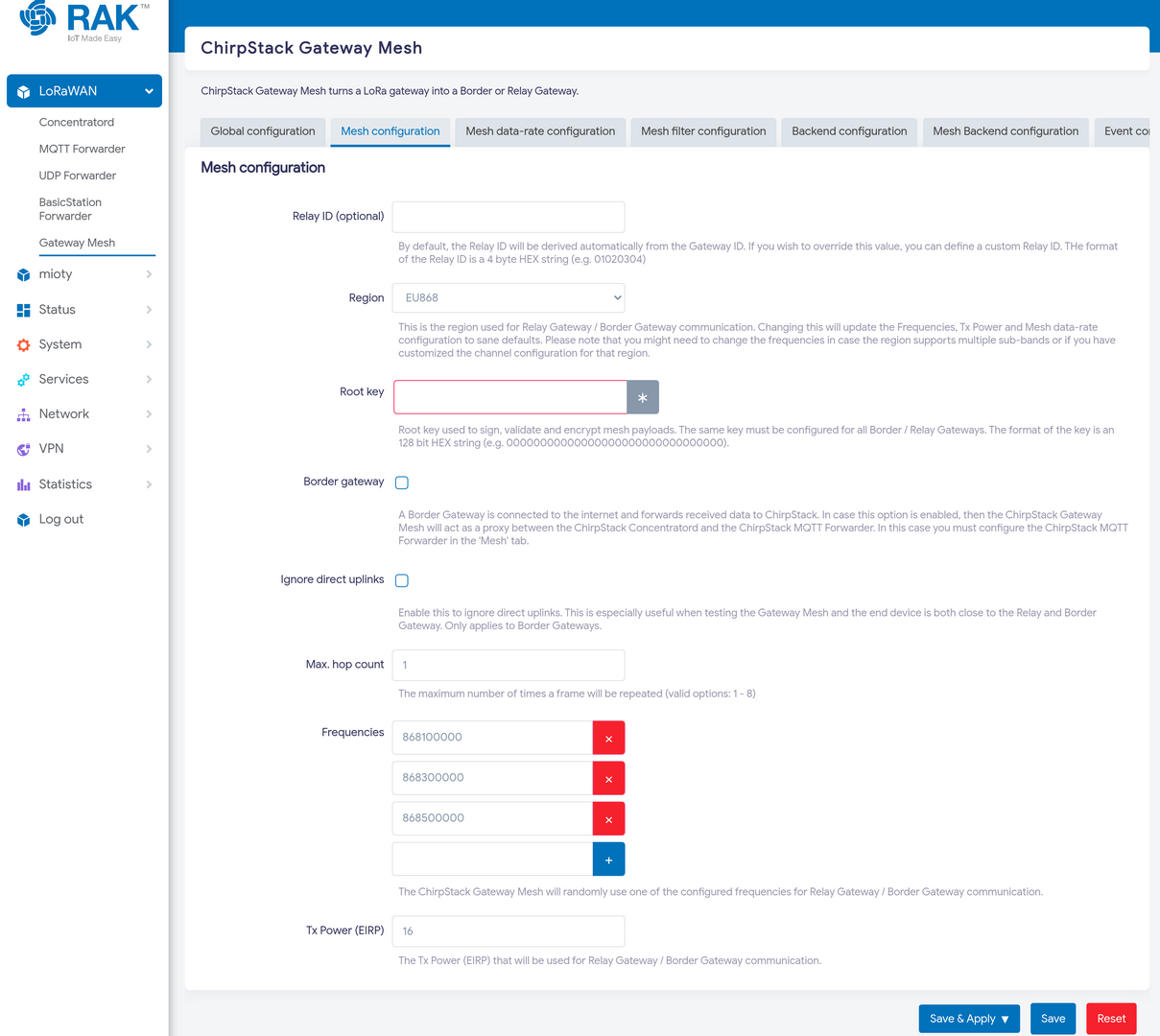 Figure 1: Gateway Mesh Configuration
| Field | Meaning |
|---|---|
| Relay ID (optional) | A 4-byte hex identifier for this gateway within the mesh. Derived from the Gateway ID unless you override it. |
| Region | The region used for gateway-to-gateway links. Changing it resets the frequencies, Tx power and data-rate below to sane defaults. |
| Root key | A 128-bit hex key used to sign, validate and encrypt mesh payloads. The same key must be set on every Border and Relay Gateway. |
| Border gateway | Marks this gateway as a Border Gateway. Leave unticked on relays. |
| Ignore direct uplinks | On a Border Gateway, ignore frames heard directly from devices, accepting only relayed ones. |
| Max. hop count | How many times a frame may be repeated, 1 to 8. |
| Frequencies | The channels used for mesh links. The mesh picks one at random per transmission. |
| Tx Power (EIRP) | Transmit power for mesh links. |
Three of these deserve more than a one-line description:
Root key is the mesh's only security boundary. It is what stops an outsider injecting frames or replaying yours. Generate a random 128-bit value rather than an obvious one, and treat it as a shared secret across the whole mesh, a gateway with the wrong key is simply not part of the mesh.
Max. hop count is a budget, not a target. Each hop re-transmits the frame, so airtime consumption grows with every additional hop, and so does the round-trip time the downlink must fit into. Start at the smallest number that reaches your Border Gateway.
Ignore direct uplinks is a testing aid. When a relay and a border gateway are on the same bench, the border gateway hears the device directly and the mesh path never gets exercised, everything looks fine while nothing is actually being relayed. Ticking this forces traffic through the mesh so you can prove the path works before deploying.
Mesh Data-rate Configuration
The modulation used between gateways, independent of what the end devices use.
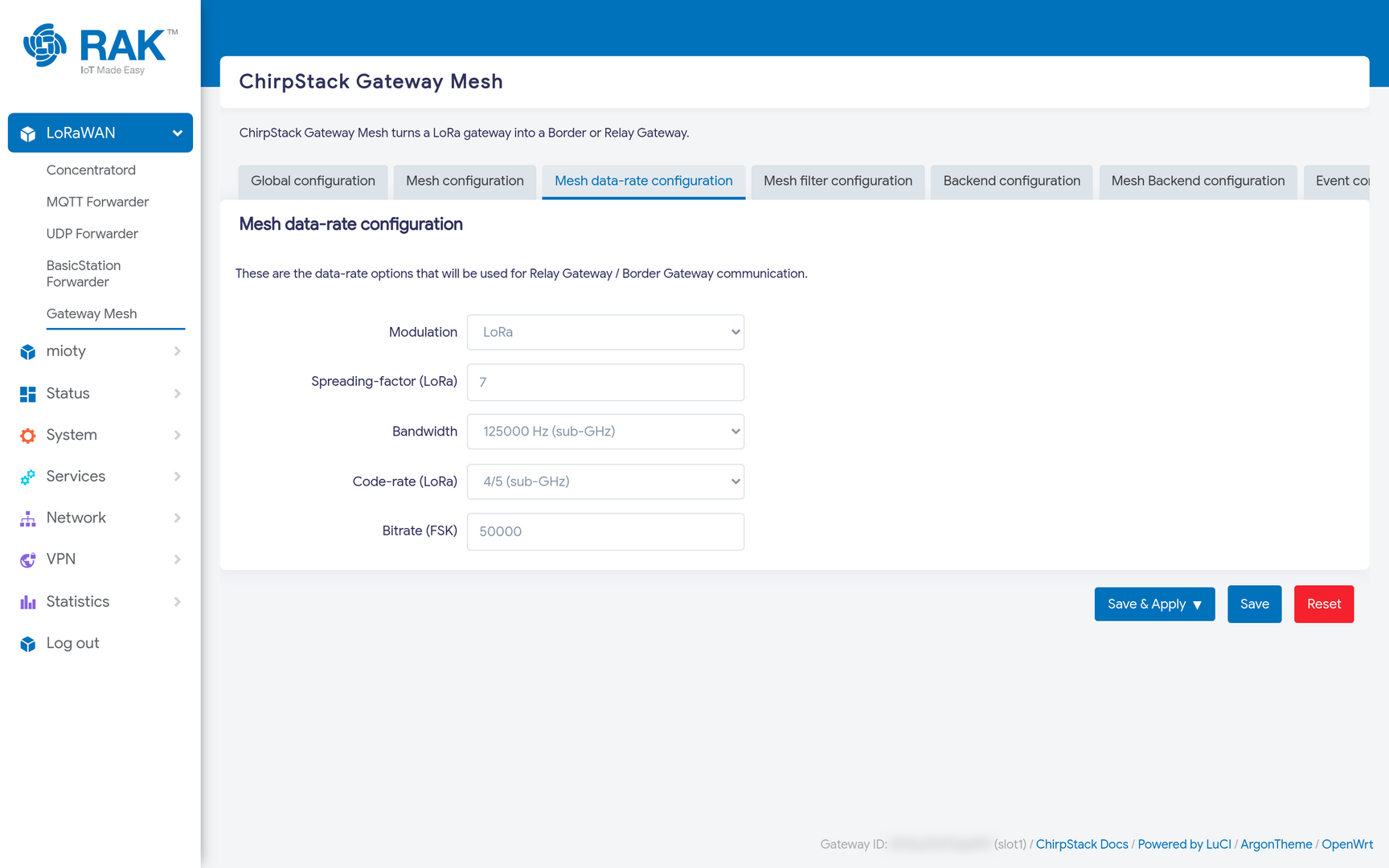 Figure 1: Gateway Mesh Data Rate Configuration
| Field | Meaning |
|---|---|
| Modulation | LORA or FSK. |
| Spreading-factor | LoRa spreading factor for mesh links. |
| Bandwidth | LoRa bandwidth in Hz. |
| Code-rate | LoRa coding rate. |
| Bitrate (FSK) | Bitrate when the modulation is FSK. |
Mesh links are typically gateway-to-gateway over a known, fixed path, often with better antennas and line of sight than any device enjoys. That usually justifies a faster, shorter-range setting than the device channels use: a lower spreading factor cuts airtime per hop, which is the resource the mesh spends most of.
Backends
Two backend tabs decide which concentrator each side of the gateway uses.
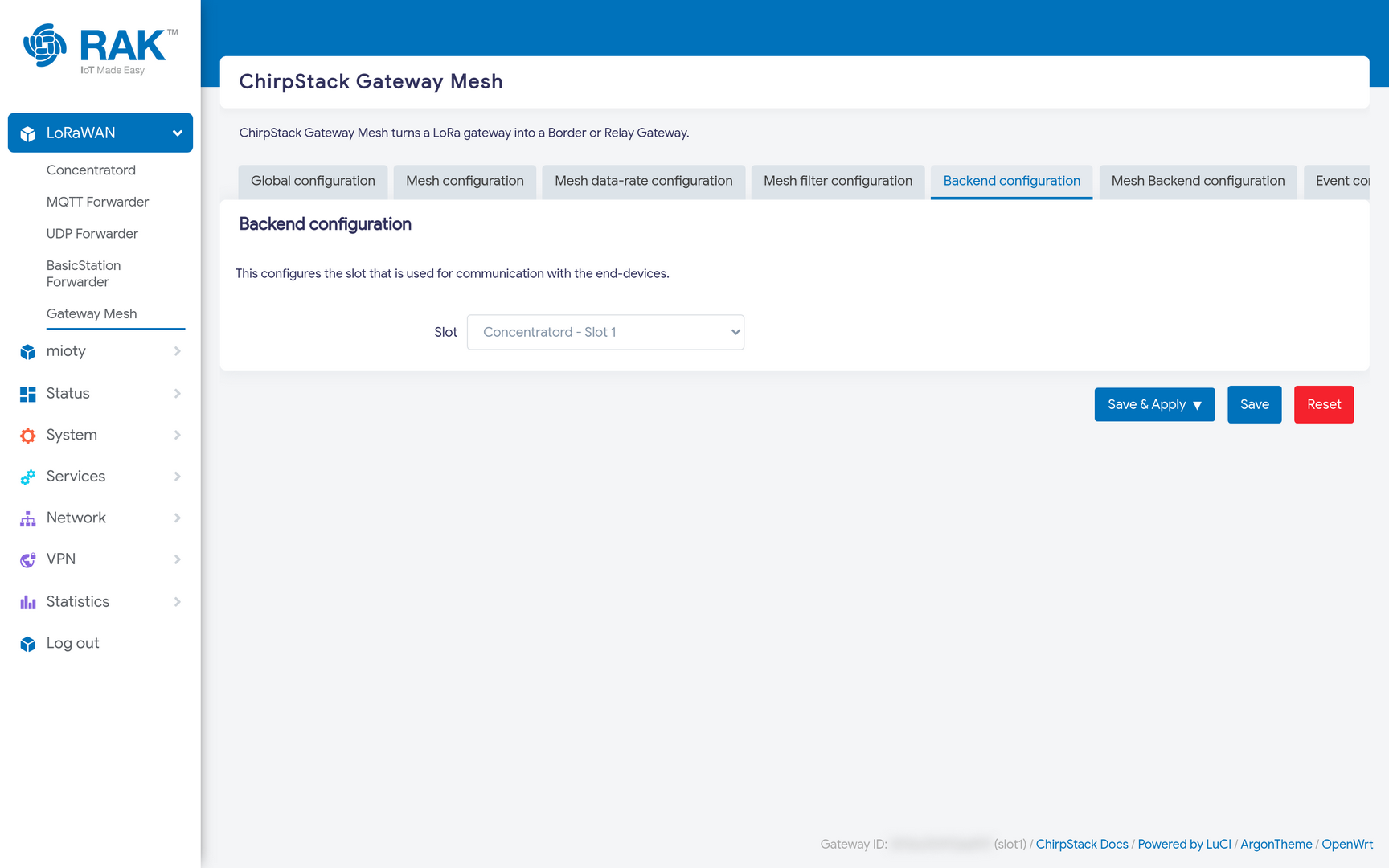 Figure 1: Gateway Mesh Backend Configuration
| Tab | Purpose |
|---|---|
| Backend configuration | The concentrator slot used to talk to end devices. |
| Mesh Backend configuration | The concentrator slot used for gateway-to-gateway links. |
They can be the same slot, in which case device traffic and mesh traffic share one radio and one duty-cycle budget. The reason they are separate settings is that a two-slot gateway can dedicate a radio to each, for example an ISM2400 (2.4 GHz) card for the mesh backhaul and an EU868 card for the devices. That removes the contention entirely, and is the arrangement to prefer if the hardware allows it.
Mesh Filters
The Mesh filter configuration tab takes DevAddr and JoinEUI prefixes, in CIDR notation, and drops everything else before it is relayed.
On a mesh this matters more than on a normal gateway. A relay spends its airtime, on a solar site, its power budget, repeating every frame it hears, including traffic belonging to networks that are nothing to do with you. Filtering to your own address space keeps the mesh carrying only what it exists to carry.
Configure the Border Gateway's Uplink
A Border Gateway still needs a route to the network server. With Border gateway enabled, the Gateway Mesh acts as a proxy between the Concentratord and the MQTT Forwarder, so the forwarder is configured under LoRaWAN → MQTT Forwarder → Mesh rather than under a slot.
Configure that entry exactly as you would a normal MQTT Forwarder: broker address, credentials, and topic prefix.
Verify
Check Status → System Log on both gateways for chirpstack-gateway-mesh entries. On a relay you should see frames being received and repeated; on the border gateway, mesh packets being unwrapped and passed on.
In ChirpStack, relayed uplinks arrive attributed to the Border Gateway, carrying the original device's reception parameters.
If nothing is relayed, check in this order:
- The root key matches on both gateways.
- Both use the same mesh region and frequencies.
- The max hop count is high enough for the path.


