ConnectOS
ConnectOS is an OpenWrt-based operating system designed for the RAK WisGate Connect family. Built on OpenWrt 24.10 and derived from the ChirpStack Gateway OS, it extends the latter with the packages and web pages necessary to run a multi-protocol gateway. This enables support for LoRaWAN®, mioty®, and container workloads on a single device.
Since ConnectOS retains the ChirpStack Gateway OS foundation, most of its interface will be familiar to users of ChirpStack-based gateways. The rest of this documentation covers each component in detail.
LoRaWAN
| Concentratord | The driver for the LoRa concentrator card. Configure this first; everything else depends on it. |
| MQTT Forwarder | Torward traffic to a ChirpStack network server over MQTT. |
| UDP Forwarder | The legacy Semtech UDP protocol, for maximum compatibility. |
| BasicStation Forwarder | Connect to The Things Stack and other Basics Station platforms. |
| Gateway Mesh | Extend coverage with gateways that have no internet connection. |
Other protocols and services
| mioty | Configure and manage the Miromico Miro EdgeCard mioty™. |
| Docker | Deploy and manage containers and Compose stacks from the web interface. |
Supported Devices
ConnectOS runs on the WisGate Connect gateways built around the Raspberry Pi Compute Module:
| Model | Compute Module |
|---|---|
| RAK7391 | CM4 and CM5 |
| RAK7392 | CM4 |
| RAK7393 | CM4 |
Getting Started
ConnectOS must be installed on the WisGate Connect gateway before use. Refer to the ConnectOS Installation Guide to download the correct ConnectOS image, perform the initial installation, and access the web interface for the first time.
What Is Included
| Component | Purpose |
|---|---|
| ChirpStack Concentratord | Driver layer for the LoRa concentrator cards, one instance per slot. |
| ChirpStack MQTT/UDP Forwarder | Forward LoRaWAN traffic to a local or remote network server. |
| ChirpStack LNS | A full LoRaWAN Network Server running on the gateway itself. |
| LoRa Basics Station | Connect the concentrator to an external LNS over the Basics Station protocol. |
| mioty | Management of the Miro EdgeCard mioty™, in Base Station or Service Center mode. |
| Docker and Docker Compose | Run containerized applications on the gateway. |
Where to Start
After completing the ConnectOS Installation Guide, set up the Concentratord first. It manages the LoRa concentrator hardware and reports the gateway's EUI, and every LoRaWAN feature in ConnectOS, all three forwarders, the built-in LNS and the Gateway Mesh, is a client of it. None of them can work until it runs.
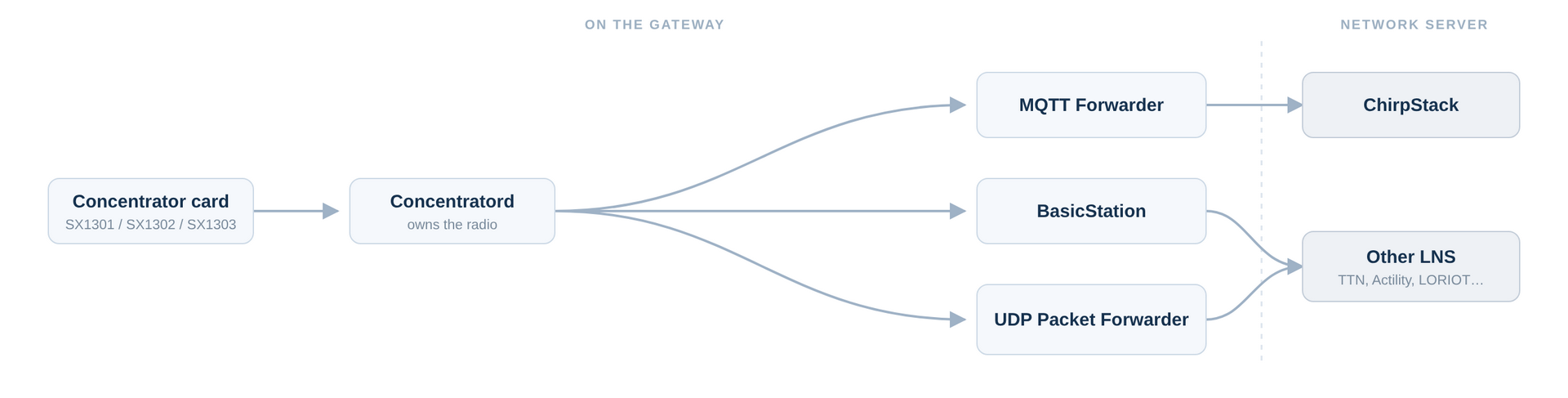 Figure 1: ConnectOS LoRaWAN Components
Once it does, the gateway EUI appears in the footer of every page:
Gateway ID: 0015c001f19ad81d (slot1)
That EUI is the identity you register with your network server. With it in hand, pick how the gateway should reach that server:
| If your network server is… | Use |
|---|---|
| ChirpStack | MQTT Forwarder |
| The Things Stack, or another Basics Station platform | BasicStation Forwarder |
| Anything else, or a legacy deployment | UDP Forwarder |
Only one forwarder should own a concentrator slot at a time. Enabling two against the same slot leaves them competing for the same radio.


