WisDM Organization-Level Notification Settings
The Notification Center at the Organization level defines how alerts and messages are managed across all Locations within the Organization.
It consists of two main categories:
- Location Notifications - System and device-related alerts that apply to all Locations (e.g., gateway status, firmware updates, and performance).
- Billing Notifications - Subscription and payment-related messages that are sent to designated finance contacts.
Locations Notification Settings
By default, all Locations inherit the Organization-level notification rules, unless a custom Location-level policy is configured.
Notification Recipients
For each notification type, you can define who receives the alerts:
- Organization Supervisor
- Organization Admin
- Location Supervisor
- Location Admin
Each role can be assigned a delivery frequency, depending on the event type:
- Immediately: Send notifications as soon as the event occurs.
- Hourly report: Group notifications and send once per hour.
- Daily report: Group notifications and send once per day.
- Never: Do not send notifications.
Gateway Status Change Notifications
This section allows administrators to configure email alerts when gateway status changes occur. Notifications help monitor gateway availability and detect issues early, reducing downtime and improving response time.
Status
Sends notifications when a gateway goes online or offline.
Gateway Sends Dying Gasp
Alerts when a gateway transmits a “dying gasp” signal before shutting down (e.g., due to power failure).
More than X% of Gateways are Offline Simultaneously
Triggers when the percentage of offline gateways exceeds the configured threshold.
 Figure 1: Set threshold value
- Percent of gateways offline (X%): Set the percentage threshold (10%-100%).
- Offline duration (N, mins): Minimum time a gateway must remain offline before it contributes to the threshold.
- Back to normal: Option to send notification when the condition is resolved.
Gateway is Offline for More than N Minutes
 Figure 1: Set threshold value
- Offline duration (N mins): Define the offline period that triggers the event (5-1440 minutes).
- Back to normal: Option to notify when the gateway comes back online.
Solar Battery Notifications
This section allows administrators to configure alerts related to solar battery health and safety. Notifications are sent when the battery reports a fault, enters protection mode, or raises a warning about abnormal conditions.
Fault
Triggers when the solar battery reports a critical fault condition. Immediate response is typically required to prevent system failure.
Protect
Triggers when the battery enters a protection state (e.g., cutoff due to unsafe voltage or current). This helps administrators act quickly to restore safe operating conditions.
Warning
Triggers when non-critical but abnormal conditions are detected (e.g., overheating, drop in charging efficiency). This provides early visibility of potential issues before they escalate to faults.
Firmware Notifications
Send alerts regarding the results of firmware upgrade tasks. This ensures that administrators are aware of successful and failed upgrades without the need to manually check the update logs.
Firmware upgrade result
Summarizes whether the firmware upgrade succeeded or failed after a gateway firmware update completes.
Gateway Configuration Notifications
Notifies administrators when critical configuration changes are automatically rolled back, aiding in the detection of misconfigurations.
Network interface setting rollback event
When gateway network interface settings fail and revert to the previous configuration. This ensures that administrators are aware of failed configuration attempts.
Gateway Performance Notifications
Monitor gateway resource usage to detect performance degradation before it impacts operations.
Gateway performance deteriorates
Helps administrators take proactive action to optimize resources or prevent overload.
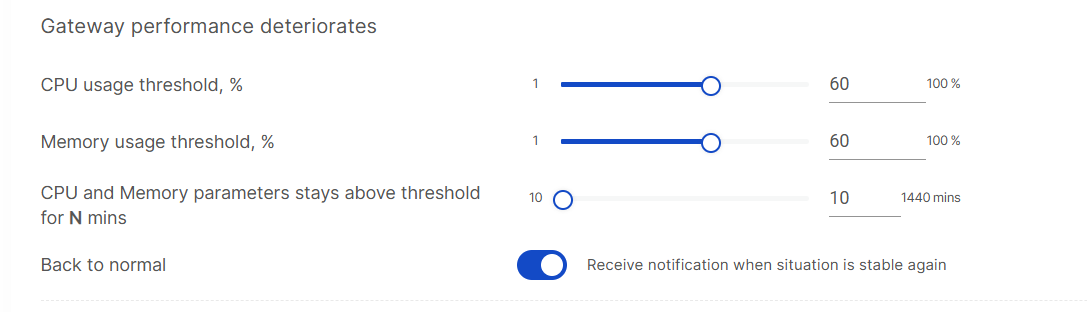 Figure 1: Set performance threshold
- CPU usage threshold (%): Define the percentage of CPU usage that triggers the alert.
- Memory usage threshold (%): Define the percentage of memory usage that triggers the alert.
- Duration (N, mins): Specify how long the CPU or memory usage must remain above the threshold before an alert is triggered.
- Back to normal: Option to receive a notification when the gateway returns to stable performance.
Billing Notifications
The Billing notifications tab allows eligible administrators to add specific email recipients for billing-related messages. This helps ensure that subscription and payment updates are also delivered to external finance, accounting, or procurement contacts.
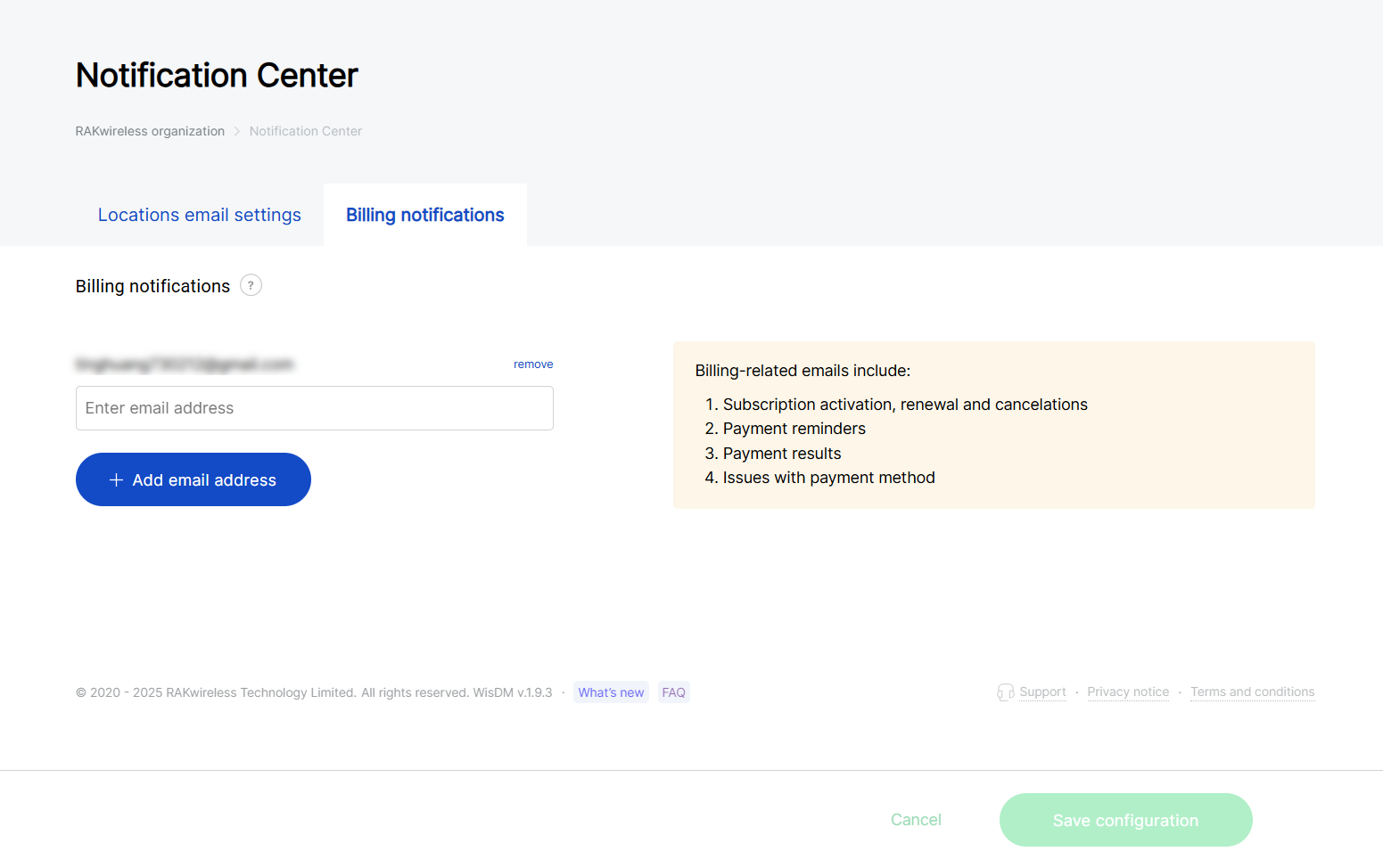 Figure 1: Billing notifications settings
Billing-related emails include:
- Subscription activation, renewal, and cancellation
- Payment reminders
- Payment results (success or failure)
- Issues with payment methods
- Billing notification recipients can be managed only by an Organization Admin with billing permissions.
- Billing notifications are independent of system alerts and Location-level policies. Only email recipients added here will receive subscription and payment-related updates.


